
# iOS Integration
Sample Integration Code
We provide a sample DEMO project that includes functionalities such as "WeChat Login, WeChat Pay, Amap, and Baidu Maps." Developers can obtain the sample integration code from Github (International) (opens new window) or Gitee (Domestic) (opens new window).
# 1. Obtain Credentials
Please Note
To integrate the SDK, you must first create an application in the FinClip platform and bind a Mini-Program, obtaining the exclusive SDK KEY and SDK SECRET for each application. These credentials will then be used during the SDK integration process. When opening a Mini-Program, the SDK will automatically initialize and verify the SDK KEY, SDK SECRET, and BundleID(Application ID).
You can click here to learn how to obtain the required SDK KEY and SDK SECRET. Ensure that the parameters filled in during SDK integration are correct; otherwise, the Mini-Program may fail to open.
# 2. Integrate the SDK
The FinClip Mini-Program SDK currently supports either pod integration or manual integration.
# 2.1 Pod Integration
# 2.1.1 Install Pod Environment
Cocoapods provides a very straightforward dependency management system, avoiding errors caused by manual imports. If you haven't installed Cocoapods before, you can refer to the official installation guide (English) (opens new window) or CocoaPods Installation Tutorial (Chinese) (opens new window).
sudo gem install cocoapods
pod setup
# 2.1.2 Create Podfile
Note
Starting from version 2.8.5, the FinClip Mini-Program SDK has been split into multiple SDKs: FinApplet (Core SDK), FinAppletExt, FinAppletBDMap, FinAppletGDMap, FinAppletBLE, FinAppletContact, FinAppletClipBoard, FinAppletWXExt, FinAppletShare, FinAppletLive, and FinAppletCalendar.
Among these, only FinApplet is mandatory, while other extension SDKs can be integrated based on actual needs.
If you do not need to use the extension SDKs, simply depend on FinApplet in your podfile. If you need to use APIs from the extension SDKs, you also need to depend on FinAppletExt.
- When using the functionality of the
Mapcomponent, if you want to implement it with third-party maps, you can referenceFinAppletBDMap (Baidu Map)orFinAppletGDMap (Amap). By default, it is implemented by the native map; - If you need to use Bluetooth functionality in the Mini-Program, you can add the
FinAppletBLEdependency in yourpodfile; - If you need to use
live-pusherandlive-playerfunctionality in the Mini-Program, you can add theFinAppletLivedependency in yourpodfile; - If you need to use
addPhoneContactto add phone contacts in the Mini-Program, you can add theFinAppletContactdependency in yourpodfile; - If you need to use clipboard functionality in the Mini-Program, you can add the
FinAppletClipBoarddependency in yourpodfile; - If you need to integrate WeChat login, payment, and user information retrieval capabilities in the Mini-Program, you can add the
FinAppletWXExtdependency in yourpodfile; - If you need to integrate sharing to WeChat friends, Moments, web links, and the ability to open corresponding Mini-Programs and pages when sharing, you can add the
FinAppletSharedependency in yourpodfile; - If you need to use calendar functionality in the Mini-Program, you can add the
FinAppletCalendardependency in yourpodfile;
Note
When using FinAppletWXExt and FinAppletShare, you need to follow the WeChat Access Guide - iOS Access Guide (opens new window) for configuration. Specifically, the following steps are involved:
- Configure the app's
Universal Links; - Enable the
Associated Domainsswitch and add theUniversal Linksdomain to the configuration; - In the project's Target -> 【Info】 -> 【URL Types】, add a new
URL Schemes(key as weixin, value as wx+the Appid applied for in WeChat); - Add the app access whitelist
LSApplicationQueriesSchemesin the project'sinfo.plist, with values beingwechat,weixin, andweixinULAPI. Remember to checkAssociated Domainsin the Apple Developer Center underApp ID Configuration. - If you encounter errors referencing WeChat headers, set Allow Non-modular Includes in Framework Modules to YES in the target's Build Settings.
In the root directory of your Xcode project, create a new Podfile file and add dependencies for the Mini-Program SDK in the Podfile:
pod 'FinApplet'
pod 'FinAppletExt'
pod 'FinAppletBDMap'
pod 'FinAppletGDMap'
pod 'FinAppletBLE'
pod 'FinAppletContact'
pod 'FinAppletClipBoard'
pod 'FinAppletWXExt'
pod 'FinAppletShare'
pod 'FinAppletLive'
pod 'FinAppletCalendar'
Podfile Example:
platform :ios, "9.0"

inhibit_all_warnings!

target "FinoAppletDemo" do
    pod 'FinApplet'
end


post_install do |installer|
    installer.pods_project.targets.each do |target|
        target.build_configurations.each do |config|
            config.build_settings['ENABLE_STRICT_OBJC_MSGSEND'] = 'NO'
            config.build_settings['APPLICATION_EXTENSION_API_ONLY'] = 'NO'
        end
    end
end
# 2.1.3 Install or Update Dependencies
Then, execute pod update or pod install.
# 2.1.4 Open the Project
After executing pod update or pod install, open the project directory, find the xxx.xcworkspace file, and double-click to open it.
# 2.2 Manual Integration
To facilitate quick developer experience and simulator-based development and debugging, our SDK includes the x86_64 architecture. Therefore, remember to remove the x86_64 architecture before uploading to the AppStore.
You can manually delete it, find scripts online to delete it, or configure the script according to section 3.2.4. Configuring the script allows development and debugging to still use the simulator, but the archive process will automatically remove the simulator architecture.
Of course, you can specify that only device architectures are needed, and we will deliver an SDK containing only device architectures.
SDK download addresses with and without x86_64 architecture are as follows. If you need to download other versions, replace 2.41.5 accordingly:
With x86 simulator:
https://app.finogeeks.com/finchat/sdk/FinApplet-2.41.5.zip https://app.finogeeks.com/finchat/sdk/FinAppletExt-2.41.5.zip
Without x86 simulator:
https://app.finogeeks.com/finchat/sdk/FinApplet-Min-2.41.5.zip https://app.finogeeks.com/finchat/sdk/FinAppletExt-Min-2.41.5.zip
Note
Since Baidu Map, Amap, Tencent Map, and WeChat SDKs are static libraries, FinAppletBDMap (Baidu Map), FinAppletGDMap (Amap), FinAppletTXMap (Tencent Map), FinAppletWXExt (WeChat Extension SDK), and FinAppletShare (Sharing SDK) are all static libraries.
# 2.2.1 Integration Steps
2.2.1.1 Add SDK to the Project
Drag FinApplet.framework into the project.
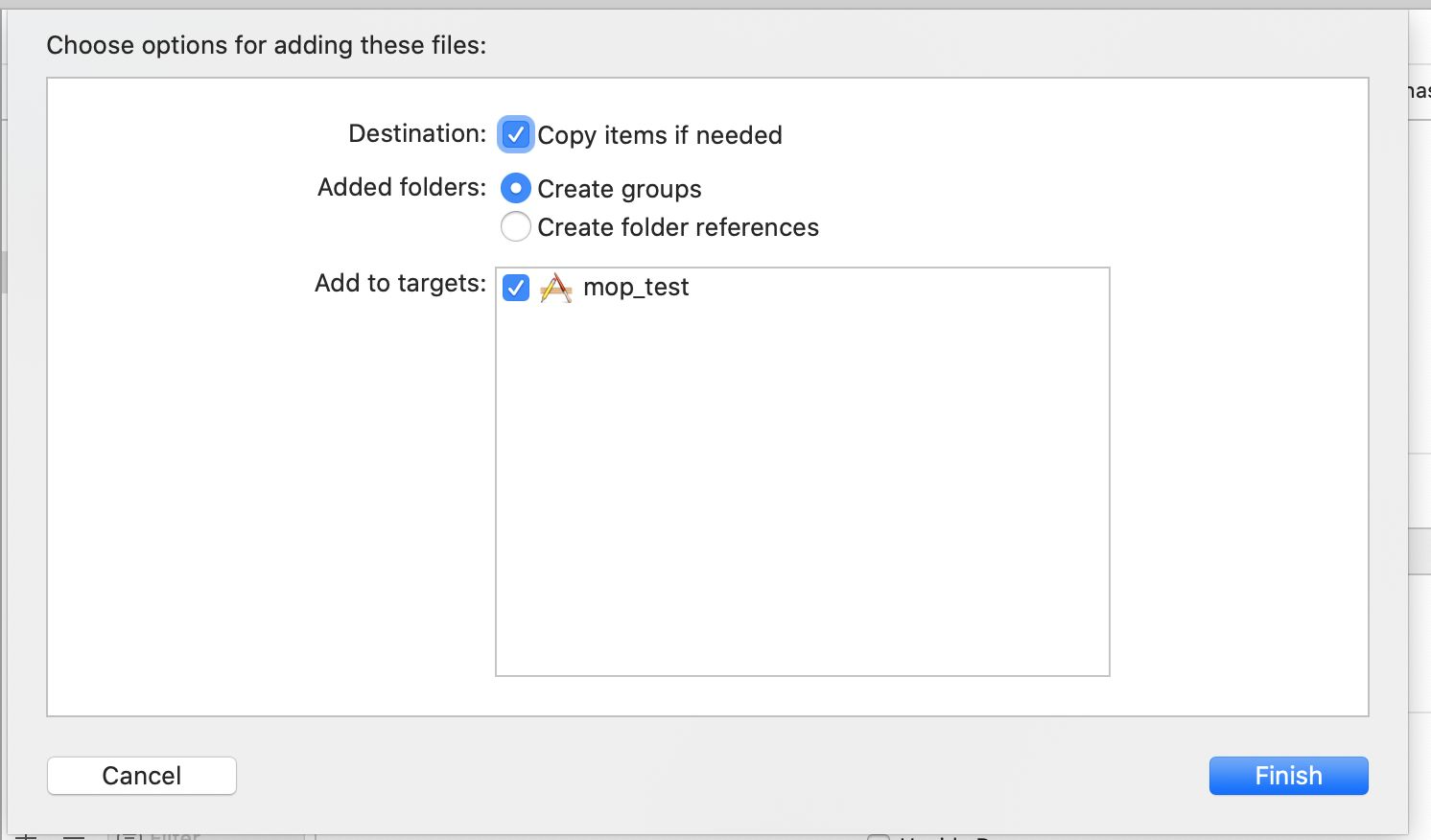
Of course, if you need to use APIs from FinAppletExt, FinAppletBLE, or FinAppletContact, you also need to drag FinAppletExt.framework, FinAppletBLE.framework, FinAppletContact.framework, FinAppletClipBoard.framework, and FinAppletCalendar.framework into the project.
If you need to use APIs from FinAppletLive, you also need to drag FinAppletLive.framework and our customized WebRTC.framework into the project.
2.2.1.2 Modify Project Configuration
Follow the configuration below:

If you need to use APIs from FinAppletExt, FinAppletBLE, FinAppletContact, FinAppletClipBoard, FinAppletGDMap, FinAppletBDMap, FinAppletLive, or FinAppletCalendar, you also need to add the corresponding framework to Copy Files.
Note
FinAppletGDMap.frameworkis a secondary encapsulation based on Amap SDK. Integration requires importing Amap’sAMap3DMap-NO-IDFA,AMapLocation-NO-IDFA, andAMapSearch-NO-IDFASDKs. Versions2.37.9and above can use the latest9.40version, while versions prior to2.37.9need to use Amap versions prior to9.4.0. You can download the relevant SDK from Amap's official website (opens new window);FinAppletBDMap.frameworkis a secondary encapsulation based on Baidu Map SDK. It requires integrating Baidu Map’sBMKLocationKit,BaiduMapKit/Map, andBaiduMapKit/SearchSDKs. You can download the relevant SDK from Baidu Map's official website (opens new window);FinAppletTXMap.frameworkis a secondary encapsulation based on Tencent Map SDK. It requires integrating Tencent Map’sTencent-MapSDKandFinAppletTencentLBSpSDKs. You can download the relevant SDK from Tencent Map's official website (opens new window);FinAppletWXExtandFinAppletShareare secondary encapsulations based on WeChat Terminal SDK. You can download the SDK package from WeChat Open Platform (opens new window) and import it into the project.FinAppletLivecurrently only supports thearm64architecture.
2.2.1.3 Open the Project
Double-click xxxx.xcodeproj to open the project.
2.2.1.4 Configure Archive Script
The Mini-Program SDK contains the x86_64 architecture, which facilitates development and debugging using the simulator. However, x86_64 architecture SDKs will cause errors when uploading to the app market. Configuring a script to automatically remove the simulator architecture during packaging allows us to both develop and debug using the simulator and normally submit to the app market.
Of course, you can request a version of the SDK that does not include the simulator.
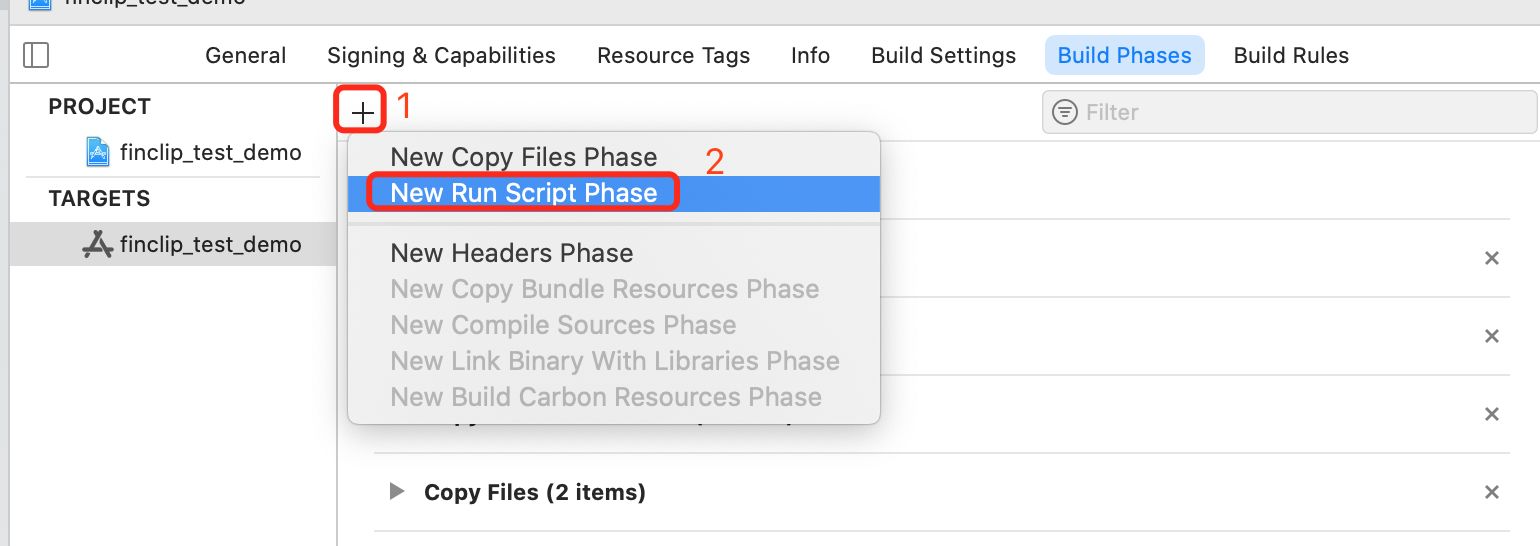

Script content as follows:
#!/bin/sh

# Strip invalid architectures

strip_invalid_archs() {
binary="$1"
echo "current binary ${binary}"
# Get architectures for current file
archs="$(lipo -info "$binary" | rev | cut -d ':' -f1 | rev)"
stripped=""
for arch in $archs; do
if ! [[ "${ARCHS}" == *"$arch"* ]]; then
if [ -f "$binary" ]; then
# Strip non-valid architectures in-place
lipo -remove "$arch" -output "$binary" "$binary" || exit 1
stripped="$stripped $arch"
fi
fi
done
if [[ "$stripped" ]]; then
echo "Stripped $binary of architectures:$stripped"
fi
}

APP_PATH="${TARGET_BUILD_DIR}/${WRAPPER_NAME}"

# This script loops through the frameworks embedded in the application and
# removes unused architectures.
find "$APP_PATH" -name '*.framework' -type d | while read -r FRAMEWORK
do
FRAMEWORK_EXECUTABLE_NAME=$(defaults read "$FRAMEWORK/Info.plist" CFBundleExecutable)
FRAMEWORK_EXECUTABLE_PATH="$FRAMEWORK/$FRAMEWORK_EXECUTABLE_NAME"
echo "Executable is $FRAMEWORK_EXECUTABLE_PATH"

strip_invalid_archs "$FRAMEWORK_EXECUTABLE_PATH"
done
Please note:
If after integration, running on the simulator reports the following error: Building for iOS Simulator, but the linked and embedded framework 'FinApplet.framework' was built for iOS + iOS Simulator. The solution is as follows.
Solution:
Modify Validate Workspace to Yes as shown in the image below, then recompile. Afterward, you can change it back to NO, and the error will no longer occur.

# 2.3 Swift Package Manager Integration
FinApplet:
https://git.finogeeks.com/spm/FinApplet.git

FinAppletExt:
https://git.finogeeks.com/spm/FinAppletExt.git

FinAppletBDMap:
https://git.finogeeks.com/spm/FinAppletBDMap.git

FinAppletGDMap:
https://git.finogeeks.com/spm/FinAppletGDMap.git

FinAppletBLE:
https://git.finogeeks.com/spm/FinAppletBLE.git

FinAppletContact:
https://git.finogeeks.com/spm/FinAppletContact.git

FinAppletClipBoard:
https://git.finogeeks.com/spm/FinAppletClipBoard.git

FinAppletWXExt:
https://git.finogeeks.com/spm/FinAppletWXExt.git

FinAppletShare:
https://git.finogeeks.com/spm/FinAppletShare.git

FinAppletLive:
https://git.finogeeks.com/spm/FinAppletLive.git

FinAppletCalendar:
https://git.finogeeks.com/spm/FinAppletCalendar.git

FinAppletTXMap
https://git.finogeeks.com/spm/FinAppletTXMap.git
For related dependencies, please refer to the manual integration section. If third-party SDKs are involved, and they support Swift Package Manager dependencies, directly add them via SPM. If the third-party SDK does not support SPM, manually add the third-party SDK to the project. For specifics, please refer to the manual integration section.
# 2.4 Swift Project Integration with OC Third-Party Libraries
If your project is written in Swift, integrating OC third-party libraries requires additional configuration.
If your project has never added any OC files before, when you create a new OC file, you will be prompted to automatically generate a bridging file. Click
Create Bridge Headerto generate the header file.
If your project has added OC files but no bridging file was generated, you need to manually create a Header file, named
"{target name-Bridging-Header.h}", such as"SwiftDemo-Bridging-Header.h". Additionally, in the Build Settings option of your project's targets, find the Objective-C Bridging Header option and set it to the newly created .h file, such as"SwiftDemo/SwiftDemo-Bridging-Header.h"(where SwiftDemo is the target name).
Add the following line of code to that file:
#include <FinApplet/FinApplet.h>
Then the Swift project can use the FinApplet OC third-party library.
# 3. Add Permission Descriptions
Based on your actual needs, integrate the corresponding SDKs and add permission configurations in the project's info.plist file.
If you integrate all the SDKs, the permissions that need to be configured include: Photo Album, Camera, Microphone, Location, Bluetooth, Contacts, and Calendar. These permissions are only triggered when calling the corresponding APIs and components.
| Permission Name | Permission Key |
|---|---|
| Photo Album Read | NSPhotoLibraryUsageDescription |
| Photo Album Write | NSPhotoLibraryAddUsageDescription |
| Camera | NSCameraUsageDescription |
| Microphone | NSMicrophoneUsageDescription |
| Location | NSLocationAlwaysAndWhenInUseUsageDescription, NSLocationAlwaysUsageDescription, NSLocationWhenInUseUsageDescription |
| Bluetooth | NSBluetoothAlwaysUsageDescription, NSBluetoothPeripheralUsageDescription |
| Contacts | NSContactsUsageDescription |
| Calendar | NSCalendarsUsageDescription |
The permissions involved in each SDK are as follows (you can choose to integrate based on actual needs):
Permissions involved in the Core SDK (FinApplet):
| Permission Name | Permission Key | Involved API |
|---|---|---|
| Photo Album Read | NSPhotoLibraryUsageDescription | chooseImage, chooseVideo, chooseMedia |
| Photo Album Write | NSPhotoLibraryAddUsageDescription | saveImageToPhotosAlbum, saveVideoToPhotosAlbum |
| Camera | NSCameraUsageDescription | scanCode, chooseImage, chooseVideo, chooseMedia, CameraContext (Camera Component) |
| Microphone | NSMicrophoneUsageDescription | chooseVideo, chooseMedia, CameraContext (Camera Component) |
Note
When recording video, the system will access the camera and microphone permissions sequentially.
Permissions involved in the Extension SDK (FinAppletExt):
| Permission Name | Permission Key | Involved API |
|---|---|---|
| Microphone | NSMicrophoneUsageDescription | startRecord, RecorderManager |
| Location | NSLocationAlwaysAndWhenInUseUsageDescription, NSLocationAlwaysUsageDescription, NSLocationWhenInUseUsageDescription | chooseLocation, getLocation, openLocation, choosePoi |
Permissions involved in the Extension SDK-BDMap (FinAppletBDMap):
| Permission Name | Permission Key | Involved API |
|---|---|---|
| Location | NSLocationAlwaysAndWhenInUseUsageDescription, NSLocationAlwaysUsageDescription, NSLocationWhenInUseUsageDescription | Map Component |
Permissions involved in the Extension SDK-GDMap (FinAppletGDMap):
| Permission Name | Permission Key | Involved API |
|---|---|---|
| Location | NSLocationAlwaysAndWhenInUseUsageDescription, NSLocationAlwaysUsageDescription, NSLocationWhenInUseUsageDescription | Map Component |
Permissions involved in the Extension SDK-BLE (FinAppletBLE):
| Permission Name | Permission Key | Involved API |
|---|---|---|
| Bluetooth | NSBluetoothAlwaysUsageDescription, NSBluetoothPeripheralUsageDescription | openBluetoothAdapter |
Permissions involved in the Extension SDK-Contact (FinAppletContact):
| Permission Name | Permission Key | Involved API |
|---|---|---|
| Contacts | NSContactsUsageDescription | addPhoneContact |
Permissions involved in the Share SDK-shareSDK (FinAppletShare):
| Permission Name | Permission Key | Involved API |
|---|---|---|
| Photo Album Write | NSPhotoLibraryAddUsageDescription | Save Button |
Permissions involved in the Extension SDK-Live (FinAppletLive):
| Permission Name | Permission Key | Involved API |
|---|---|---|
| Camera | NSCameraUsageDescription | live-pusher Component |
| Microphone | NSMicrophoneUsageDescription | live-pusher Component |
Permissions involved in the Extension SDK-Calendar (FinAppletCalendar):
| Permission Name | Permission Key | Involved API |
|---|---|---|
| Calendar | NSCalendarsUsageDescription | addPhoneRepeatCalendar, addPhoneCalendarapi |
Note
If these permissions have already been configured in your project, there is no need to add them again.
Additionally, if your Mini-Program or web pages make requests using the http protocol, you also need to configure the following parameters in the project:
<key>NSAppTransportSecurity</key>
	<dict>
		<key>NSAllowsArbitraryLoads</key>
		<true/>
	</dict>
This means setting 【App Transport Security Settings】 -> 【Allow Arbitrary Loads】 to YES.
# 4. Add URL Type
Note
Sections 4 and 8 are not mandatory. Only configure these sections if your App needs to support opening Mini-Programs via scheme.
Select Target -> 【Info】 -> 【URL Types】, and add a new URL Schemes (the format of URL Schemes is fat+md5 of sdkKey).
First, generate a 16-character lowercase MD5 from the SDK KEY, then add the prefix fat.

For more information on how to use this, refer to Open Mini-Programs Using Routing.
# 5. Set Supported Orientations for the Project

Note
- Since the public UI of Mini-Programs, such as loading pages, about, settings, complaints, etc., are fixed in portrait mode, the App must select Portrait.
- The app.json and page.json inside the Mini-Program can set pageOrientation to portrait, landscape, or auto, so the App needs to support both landscape and portrait modes.
For detailed scenarios regarding landscape and portrait handling in the SDK, see Detailed Explanation of Landscape and Portrait Modes in the SDK.
# 6. Add SDK Header Files
In places where you need to use the FinClip Mini-Program SDK, add the following code:
#import <FinApplet/FinApplet.h>
If you have also integrated the Extension SDK, to call APIs in the Extension SDK, you need to add the following code:
#import <FinAppletExt/FinAppletExt.h>
If you want to use the encapsulated Baidu Map SDK, you need to add the following code:
#import <FinAppletBDMap/FinAppletBDMap.h>
If you want to use the encapsulated AMap SDK, you need to add the following code:
#import <FinAppletGDMap/FinAppletGDMap.h>
If you want to use the encapsulated Tencent Map SDK, you need to add the following code:
#import <FinAppletTXMap/FinAppletTXMap.h>
If you need to use the Bluetooth library, you need to add the following code:
#import <FinAppletBLE/FinAppletBLE.h>
If you need to use the encapsulated Contacts SDK, you need to add the following code:
#import <FinAppletContact/FinAppletContact.h>
If you need to use the encapsulated Clipboard SDK, you need to add the following code:
#import <FinAppletClipBoard/FinAppletClipBoard.h>
If you need to use the encapsulated WeChat Extension SDK, you need to add the following code:
#import <FinAppletWXExt/FinAppletWXExt.h>
If you need to use the encapsulated Share SDK, you need to add the following code:
#import <FinAppletShare/FinAppletShare.h>
If you need to use the encapsulated Live SDK, you need to add the following code:
#import <FinAppletLive/FinAppletLive.h>
If you need to use the encapsulated Calendar SDK, you need to add the following code:
#import <FinAppletCalendar/FinAppletCalendar.h>
Of course, the most convenient way is to add the above code in the pch file, so you don't need to reference it wherever you use it.
# 7. Initialize the SDK
In the following method of the project's AppDelegate, call the SDK initialization method.
Note
Starting from version 2.13.109, the FinClip Mini-Program SDK supports configuring multiple server information, allowing you to open Mini-Programs from multiple different servers simultaneously, so the initialization method has changed. You can write the server configuration information into the plist file and initialize it as shown in the example below.
NSString *plistPath = [[NSBundle mainBundle] pathForResource:@"servers" ofType:@"plist"];
NSArray *array = [NSArray arrayWithContentsOfFile:plistPath];
NSMutableArray *storeArrayM = [NSMutableArray array];
for (NSDictionary *dict in array) {
    FATStoreConfig *storeConfig = [[FATStoreConfig alloc] init];
    storeConfig.sdkKey = dict[@"sdkKey"];
    storeConfig.sdkSecret = dict[@"sdkSecret"];
    storeConfig.apiServer = dict[@"apiServer"];
    storeConfig.apmServer = dict[@"apmServer"];
    if ([@"SM" isEqualToString:dict[@"cryptType"]]) {
        storeConfig.cryptType = FATApiCryptTypeSM;
    } else {
        storeConfig.cryptType = FATApiCryptTypeMD5;
    }

    [storeArrayM addObject:storeConfig];
}
FATConfig *config = [FATConfig configWithStoreConfigs:storeArrayM];
[[FATClient sharedClient] initWithConfig:config error:nil];
Alternatively, you can initialize it like this:
NSMutableArray *storeArrayM = [NSMutableArray array];
FATStoreConfig *storeConfig = [[FATStoreConfig alloc] init];
storeConfig.sdkKey = @"Your sdkKey information";
storeConfig.sdkSecret = @"Your sdkSecret information";
storeConfig.apiServer = @"Server domain";
storeConfig.apmServer = @"APM statistical event domain";
[storeArrayM addObject:storeConfig];

FATStoreConfig *storeConfig2 = [[FATStoreConfig alloc] init];
storeConfig2.sdkKey = @"Your sdkKey information";
storeConfig2.sdkSecret = @"Your sdkSecret information";
storeConfig2.apiServer = @"Server domain";
storeConfig2.apmServer = @"APM statistical event domain";
storeConfig2.cryptType = FATApiCryptTypeSM;
[storeArrayM addObject:storeConfig2];

FATConfig *config = [FATConfig configWithStoreConfigs:storeArrayM];
[[FATClient sharedClient] initWithConfig:config error:nil];
When it is necessary to use Baidu Map/AMap to implement the functionality of the MAP component, you need to apply for a KEY from the corresponding platform and perform initialization.
// Prepare map SDK initialization
[FATBDMapComponent setAgreePrivacy:YES];
[FATBDMapComponent setBDMapAppKey:@"Applied key"]

[FATGDMapComponent setGDMapPrivacyShow:AMapPrivacyShowStatusDidShow privacyInfo:AMapPrivacyInfoStatusDidContain PrivacyAgreement:AMapPrivacyAgreeStatusDidAgree];
[FATGDMapComponent setGDMapAppKey:@"Applied key"]

[FATTXMapComponent setPrivacyAgreement:YES];
[FATTXMapComponent setTXMapAppKey:@"Applied key"]
When live streaming capabilities are required, initialize and register the component.
// Live streaming component initialization
#ifdef __arm64__
    [FATLiveComponent registerComponent];
#endif
When using the addPhoneContact API, initialize and register the component.
// ContactSDK initialization
[FATContactComponent registerComponent]
When using the getClipboardData, setClipboardData APIs, initialize and register the component.
// ClipBoard initialization
[FATClipBoardComponent registerComponent];
When using WeChat's payment, login, or user information retrieval capabilities, initialize and register the component.
// WeChat extension SDL initialization
[FATWXExtComponent registerComponent:@"WeChat appid" universalLink:@"universalLink"];
Add the following code in AppDelegate.m.
- (BOOL)application:(UIApplication *)app openURL:(NSURL *)url options:(NSDictionary<UIApplicationOpenURLOptionsKey,id> *)options {
    /*  WeChat login and sharing    */
    if ([WXApi handleOpenURL:url delegate:[FATWXApiManager sharedManager]]) {
        return YES;
    }
    return YES;
}

// Before iOS 9.0
- (BOOL)application:(UIApplication *)application openURL:(NSURL *)url sourceApplication:(NSString *)sourceApplication annotation:(id)annotation{
    /*  WeChat login and sharing    */
    // `WeChatHandleURLDelegate ` is the `WXApiDelegate` proxy file
    if ([WXApi handleOpenURL:url delegate:[FATWXApiManager sharedManager]]) {
        return YES;
    }
    return YES;
}

- (BOOL)application:(UIApplication *)application handleOpenURL:(NSURL *)url{
    /*  WeChat login and sharing    */
    if ([WXApi handleOpenURL:url delegate:[FATWXApiManager sharedManager]]) {
        return YES;
    }
    return YES;
}

- (BOOL)application:(UIApplication *)application continueUserActivity:(NSUserActivity *)userActivity restorationHandler:(void (^)(NSArray<id<UIUserActivityRestoring>> * _Nullable))restorationHandler {
  return [WXApi handleOpenUniversalLink:userActivity delegate:[FATWXApiManager sharedManager]];
}
When sharing capabilities are needed, initialize and register the component.
// ShareSDK initialization
[FATShareComponent registerComponent:@"WeChat appid" universalLink:@"universalLink" scheme:@"Configured scheme"];
Starting from version 2.40.11, ShareSDK supports customizing the landing page link for shares and the download address of the ipa file in the share link. If customization is needed, use the following method:
/// ShareSDK initialization method since:2.40.11
/// - Parameters:
///   - wxappld: The appId registered on the WeChat Open Platform
///   - customUrl: Customized share landing page, optional
///   - universalLink: universalLink
///   - scheme: Scheme to open the App; if generated using fat+${16-bit lowercase md5 of SDKKey}, it can open the corresponding Mini-Program. Otherwise, it can only open the App.
///   - appDownloadLink: App download link, optional
+ (BOOL)registerComponent:(NSString *)wxappld customUrl:(NSString *)customUrl universalLink:(NSString *)universalLink scheme:(NSString *)scheme appDownloadLink:(NSString *)appDownloadLink;
Add the following code in AppDelegate.m.
- (BOOL)application:(UIApplication *)app openURL:(NSURL *)url options:(NSDictionary<UIApplicationOpenURLOptionsKey,id> *)options {
    if ([WXApi handleOpenURL:url delegate:[FATShareApiManager sharedManager]]) {
        return YES;
    }
    return YES;
}

// Before iOS 9.0
- (BOOL)application:(UIApplication *)application openURL:(NSURL *)url sourceApplication:(NSString *)sourceApplication annotation:(id)annotation{
    if ([WXApi handleOpenURL:url delegate:[FATShareApiManager sharedManager]]) {
        return YES;
    }
    return YES;
}

- (BOOL)application:(UIApplication *)application handleOpenURL:(NSURL *)url{
    if ([WXApi handleOpenURL:url delegate:[FATShareApiManager sharedManager]]) {
        return YES;
    }
    return YES;
}

- (BOOL)application:(UIApplication *)application continueUserActivity:(NSUserActivity *)userActivity restorationHandler:(void (^)(NSArray<id<UIUserActivityRestoring>> * _Nullable))restorationHandler {
  return [WXApi handleOpenUniversalLink:userActivity delegate:[FATShareApiManager sharedManager]];
}
Note
If both WeChat SDK and ShareSDK are used, the implementation class for the delegate methods can be set to [FATWXApiManager sharedManager].
If your project already implements the WeChat delegate methods, you need to handle WeChat's request - (void)onReq:(BaseReq*)req method, and process requests of type LaunchFromWXReq. After obtaining the corresponding JSON string, parse the parameters and use the core SDK’s method to open the Mini-Program to ensure that clicking on the shared link opens the corresponding shared Mini-Program. Otherwise, the process cannot be completed.
Below is an example code:
- (void)onReq:(BaseReq *)req {
    if ([req isKindOfClass:[LaunchFromWXReq class]]) {
        LaunchFromWXReq *launchReq = (LaunchFromWXReq *) req;
        [self managerDidRecvLaunchFromWXReq:launchReq];
    }
}

- (void)managerDidRecvLaunchFromWXReq:(LaunchFromWXReq *)launchReq {
    NSString *ext = launchReq.message.messageExt;
    NSDictionary *dic = [self dictionaryWithJsonString:ext];
    NSString *appId = dic[@"appId"];
    [[FATClient sharedClient] closeAllAppletsWithCompletion:^{
        [[FATClient sharedClient] startRemoteApplet:appId startParams:@{@"path":dic[@"path"] ? dic[@"path"] : @"", @"query":dic[@"query"] ? dic[@"query"] : @""} InParentViewController:[FATShareTools topViewController] completion:nil];
    }];
}

- (NSDictionary *)dictionaryWithJsonString:(NSString *)jsonString {
    if (jsonString == nil) {
        return nil;
    }
    NSData *jsonData = [jsonString dataUsingEncoding:NSUTF8StringEncoding];
    NSError *err;
    NSDictionary *dic = [NSJSONSerialization JSONObjectWithData:jsonData options:NSJSONReadingMutableContainers error:&err];
    if(err) {
        NSLog(@"JSON parsing failed: %@",err);
        return nil;
    }
    return dic;
}
Note
Using the WeChat extension SDK requires that the core SDK version be 2.37.13 or higher. Using the ShareSDK requires that the core SDK version be 2.39.11 or higher.
Note
Since FinAppletWXExt needs to override the buttonOpenTypeDelegate (in versions prior to 2.37.13, this was FATAppletDelegate) related methods, specifically chooseAvatar, contact, feedback, getPhoneNumber, launchApp, and shareAppMessage. Therefore, if you have implemented buttonOpenTypeDelegate and the six aforementioned methods, FinAppletWXExt will take over getPhoneNumber, and the remaining five methods should be migrated as follows. If you haven't implemented buttonOpenTypeDelegate or haven't used these six methods, you can ignore this. If you need to integrate FinAppletWXExt and also implement open-type related methods, refer to the instructions below.
- After successfully initializing the core SDK and WeChat extension SDK, set your delegate method implementation class
[FATDelegateClientHelper sharedHelper].buttonOpenTypeDelegate = [FINWXButtonDelegate sharedHelper];
- Implement the buttonOpenTypeDelegate's delegate methods
- (BOOL)forwardAppletWithInfo:(NSDictionary *)contentInfo completion:(void (^)(FATExtensionCode code, NSDictionary *result))completion {
    return YES;
}

- (BOOL)getUserInfoWithAppletInfo:(FATAppletInfo *)appletInfo bindGetUserInfo:(void (^)(NSDictionary *result))bindGetUserInfo {
    return YES;
}

- (BOOL)contactWithAppletInfo:(FATAppletInfo *)appletInfo sessionFrom:(NSString *)sessionFrom sendMessageTitle:(NSString *)sendMessageTitle sendMessagePath:(NSString *)sendMessagePath sendMessageImg:(NSString *)sendMessageImg showMessageCard:(BOOL)showMessageCard {
    return YES;
}

- (BOOL)getPhoneNumberWithAppletInfo:(FATAppletInfo *)appletInfo bindGetPhoneNumber:(void (^)(NSDictionary *result))bindGetPhoneNumber {
    NSLog(@"Mini-Program Info:%@", appletInfo);
    return YES;
}

- (BOOL)launchAppWithAppletInfo:(FATAppletInfo *)appletInfo appParameter:(NSString *)appParameter bindError:(void (^)(NSDictionary *result))bindError bindLaunchApp:(void (^)(NSDictionary *result))bindLaunchApp {
    return YES;
}

- (BOOL)feedbackWithAppletInfo:(FATAppletInfo *)appletInfo {
    return YES;
}

- (BOOL)chooseAvatarWithAppletInfo:(FATAppletInfo *)appletInfo bindChooseAvatar:(void (^)(NSDictionary *result))bindChooseAvatar {
    return YES;
}
The Bluetooth library does not require initialization; simply include the header file in your project.
Note
For versions 2.21.1 and later, there is no need to call the configuration for the extension SDK. The SDK internally automatically determines whether the extension SDK is integrated and triggers its configuration automatically.
Of course, if you need to use APIs from the extension SDK, after initializing the SDK, configure the extension APIs. Call the following code once:
// Prepare extension APIs
[[FATExtClient sharedClient] fat_prepareExtensionApis];
Note
If currentUserId is not set, cached data will be stored in the default directory. When retrieving the list of recently opened Mini-Programs, the Mini-Programs retrieved will be those in the default directory. To use different cache directories for different users, set different currentUserId for each user.
# 8. handleOpenURL Processing
Mini-Programs support being opened via external links, requiring the following processing.
- (BOOL)application:(UIApplication *)application openURL:(NSURL *)url sourceApplication:(NSString *)sourceApplication annotation:(id)annotation
{
    if ([[FATClient sharedClient] handleOpenURL:url]) {
        return YES;
    }
    return YES;
}

- (BOOL)application:(UIApplication *)app openURL:(NSURL *)url options:(NSDictionary<UIApplicationOpenURLOptionsKey,id> *)options
{
    if ([[FATClient sharedClient] handleOpenURL:url]) {
        return YES;
    }
    return YES;
}
# 9. Opening a Mini-Program
FATAppletRequest *request = [[FATAppletRequest alloc] init];
request.appletId = @"Mini-Program ID";
request.apiServer = @"Server address";
request.transitionStyle = FATTranstionStyleUp;
request.startParams = startParams;

[[FATClient sharedClient] startAppletWithRequest:request InParentViewController:self completion:^(BOOL result, FATError *error) {
    NSLog(@"Open Mini-Program:%@", error);
} closeCompletion:^{
    NSLog(@"Close Mini-Program");
}];
For more information about the FinClip Mini-Program SDK APIs, please refer to the API Documentation.
# 10. Extension SDK
A quick integration guide for using the Extension SDK. For detailed usage, refer to the Integrate SDK section above.
# 10.1 WeChat Extension SDK
Quick integration of the WeChat SDK provides the ability to invoke WeChat Mini-Programs for login, user information, phone number, and payment functionalities. Quick integration method:
pod 'FinAppletWXExt'
Note
When using FinAppletWXExt, you need to follow the configuration steps in the WeChat Integration Guide - iOS Integration Guide (opens new window). The specific steps are as follows:
- Configure the app's
Universal Links; - Enable the
Associated Domainsswitch and add theUniversal Linksdomain to the configuration; - In the project's Target -> 【Info】 -> 【URL Types】, add a new
URL Schemes(key as weixin, value as wx + the Appid applied for in WeChat); - Add the application access whitelist
LSApplicationQueriesSchemesin the project'sinfo.plist, with values to be filled aswechat,weixin,weixinULAPI. Remember to checkAssociated Domainsin the Apple Developer Center underApp ID Configuration.
Register the component for initialization:
// WeChat Extension SDL Initialization
[FATWXExtComponent registerComponent:@"WeChat appid" universalLink:@"universalLink"];
Add the following code in AppDelegate.m.
- (BOOL)application:(UIApplication *)app openURL:(NSURL *)url options:(NSDictionary<UIApplicationOpenURLOptionsKey,id> *)options {
    /*  WeChat Login and Sharing    */
    if ([WXApi handleOpenURL:url delegate:[FATWXApiManager sharedManager]]) {
        return YES;
    }
    return YES;
}

// Before iOS 9.0
- (BOOL)application:(UIApplication *)application openURL:(NSURL *)url sourceApplication:(NSString *)sourceApplication annotation:(id)annotation{
    /*  WeChat Login and Sharing    */
    // `WeChatHandleURLDelegate ` is the `WXApiDelegate` proxy file
    if ([WXApi handleOpenURL:url delegate:[FATWXApiManager sharedManager]]) {
        return YES;
    }
    return YES;
}

- (BOOL)application:(UIApplication *)application handleOpenURL:(NSURL *)url{
    /*  WeChat Login and Sharing    */
    if ([WXApi handleOpenURL:url delegate:[FATWXApiManager sharedManager]]) {
        return YES;
    }
    return YES;
}

- (BOOL)application:(UIApplication *)application continueUserActivity:(NSUserActivity *)userActivity restorationHandler:(void (^)(NSArray<id<UIUserActivityRestoring>> * _Nullable))restorationHandler {
  return [WXApi handleOpenUniversalLink:userActivity delegate:[FATWXApiManager sharedManager]];
}
Note
Using the WeChat Extension SDK requires that the core SDK version is 2.37.13 or higher.
Note
Since FinAppletWXExt needs to override buttonOpenTypeDelegate (in versions prior to 2.37.13, it was FATAppletDelegate) methods related to open-type, specifically chooseAvatar, contact, feedback, getPhoneNumber, launchApp, shareAppMessage six methods.
Therefore, if you have implemented buttonOpenTypeDelegate and the above six methods, FinAppletWXExt will take over getPhoneNumber. The remaining five methods should be migrated as follows. If you haven't implemented buttonOpenTypeDelegate or haven't used the above six methods, you can ignore this. If you need to integrate FinAppletWXExt and also implement open-type related methods, refer to the instructions below.
- After successfully initializing the core SDK and WeChat extension SDK, set your delegate method implementation class
[FATDelegateClientHelper sharedHelper].buttonOpenTypeDelegate = [FINWXButtonDelegate sharedHelper];
- Implement the buttonOpenTypeDelegate proxy methods
- (BOOL)forwardAppletWithInfo:(NSDictionary *)contentInfo completion:(void (^)(FATExtensionCode code, NSDictionary *result))completion {
    return YES;
}

- (BOOL)getUserInfoWithAppletInfo:(FATAppletInfo *)appletInfo bindGetUserInfo:(void (^)(NSDictionary *result))bindGetUserInfo {
    return YES;
}

- (BOOL)contactWithAppletInfo:(FATAppletInfo *)appletInfo sessionFrom:(NSString *)sessionFrom sendMessageTitle:(NSString *)sendMessageTitle sendMessagePath:(NSString *)sendMessagePath sendMessageImg:(NSString *)sendMessageImg showMessageCard:(BOOL)showMessageCard {
    return YES;
}

- (BOOL)getPhoneNumberWithAppletInfo:(FATAppletInfo *)appletInfo bindGetPhoneNumber:(void (^)(NSDictionary *result))bindGetPhoneNumber {
    NSLog(@"Mini-Program Info:%@", appletInfo);
    return YES;
}

- (BOOL)launchAppWithAppletInfo:(FATAppletInfo *)appletInfo appParameter:(NSString *)appParameter bindError:(void (^)(NSDictionary *result))bindError bindLaunchApp:(void (^)(NSDictionary *result))bindLaunchApp {
    return YES;
}

- (BOOL)feedbackWithAppletInfo:(FATAppletInfo *)appletInfo {
    return YES;
}

- (BOOL)chooseAvatarWithAppletInfo:(FATAppletInfo *)appletInfo bindChooseAvatar:(void (^)(NSDictionary *result))bindChooseAvatar {
    return YES;
}
# 10.2 Map Extension SDK
When using the Map component functionality, if you want to use third-party maps, you can reference FinAppletBDMap (Baidu Map), FinAppletGDMap (Gaode Map), FinAppletTXMap (Tencent Map). By default, it is implemented by FinAppletExt (Native Map).
Gaode Map SDK allows up to 10 map view objects simultaneously in an app
When exceeding 10 map view objects, new map content will display as a black screen. Therefore, when using Gaode Map to implement the map component (i.e., depending on the Gaode Map Extension SDK), the Mini-Program needs to remove and destroy the map in the onHide() of the page, then create the map and add map content in onShow().
Quick integration method:
#pod 'FinAppletBDMap'
#pod 'FinAppletTXMap'
#pod 'FinAppletGDMap'  // Choose one to release
pod 'FinAppletExt'
Initialize and register components:
When needing to use Baidu Map, Gaode Map, Tencent Map to implement the MAP component functionality, you need to apply for a KEY from the corresponding platform and initialize it.
#import  <FinAppletExt/FinAppletExt.h>
// According to your actual situation, import the corresponding header files
#import  <FinAppletBDMap/FinAppletBDMap.h>
#import  <FinAppletGDMap/FinAppletGDMap.h>
#import  <FinAppletTXMap/FinAppletTXMap.h>
// Prepare map sdk initialization
[FATBDMapComponent setAgreePrivacy:YES];
[FATBDMapComponent setBDMapAppKey:@"applied key"]

[FATGDMapComponent setGDMapPrivacyShow:AMapPrivacyShowStatusDidShow privacyInfo:AMapPrivacyInfoStatusDidContain PrivacyAgreement:AMapPrivacyAgreeStatusDidAgree];
[FATGDMapComponent setGDMapAppKey:@"applied key"]

[FATTXMapComponent setPrivacyAgreement:YES];
[FATTXMapComponent setTXMapAppKey:@"applied key"]
# 10.3 Bluetooth Extension SDK
If you need to use Bluetooth functionality in the Mini-Program, you can introduce the Bluetooth Extension SDK. Quick integration method:
pod 'FinAppletBLE'
The Bluetooth SDK does not require initialization; just include the header file.
#import <FinAppletBLE/FinAppletBLE.h>
# 10.4 Contact Extension SDK
If you need to use addPhoneContact to add mobile contacts in the Mini-Program, you can introduce the Contact SDK.
Quick integration method:
pod 'FinAppletContact'
Initialize and register components:
#import <FinAppletContact/FinAppletContact.h>
// ContactSDK Initialization
[FATContactComponent registerComponent]
# 10.5 Clipboard Extension SDK
If you need to use clipboard functionality in the Mini-Program, you can introduce the Clipboard SDK. Quick integration method:
pod 'FinAppletClipBoard'
Initialize and register components:
#import <FinAppletClipBoard/FinAppletClipBoard.h>
// ClipBoard Initialization
[FATClipBoardComponent registerComponent];
# 10.6 Share SDK
If you need to use sharing functionality in the Mini-Program, you can introduce the Share SDK. Quick integration method:
pod 'FinAppletShare'
Initialize and register components:
#import <FinAppletShare/FinAppletShare.h>
// share Initialization
[FATShareComponent registerComponent:@"WeChat appid" universalLink:@"universalLink" scheme:@"configured scheme"];
Starting from version 2.40.11, ShareSDK supports customizing the landing page link for shares and the download address of the ipa file in the share link. If you need to customize the configuration, you can use the following method:
// ShareSDK Initialization Method since:2.40.11
/// - Parameters:
///   - appld: Mini-Program id
///   - customUrl: Custom short link for sharing, optional
///   - universalLink: universalLink
///   - scheme: Scheme to open the App. If generated using fat+${SDKKey's 16-digit lowercase md5}, it can open the corresponding Mini-Program. Otherwise, it can only open the App.
///   - appDownloadLink: App download link, optional
+ (BOOL)registerComponent:(NSString *)appld customUrl:(NSString *)customUrl universalLink:(NSString *)universalLink scheme:(NSString *)scheme appDownloadLink:(NSString *)appDownloadLink;
Add the following code in AppDelegate.m.
- (BOOL)application:(UIApplication *)app openURL:(NSURL *)url options:(NSDictionary<UIApplicationOpenURLOptionsKey,id> *)options {
    if ([WXApi handleOpenURL:url delegate:[FATShareApiManager sharedManager]]) {
        return YES;
    }
    return YES;
}

// Before iOS 9.0
- (BOOL)application:(UIApplication *)application openURL:(NSURL *)url sourceApplication:(NSString *)sourceApplication annotation:(id)annotation{
    if ([WXApi handleOpenURL:url delegate:[FATShareApiManager sharedManager]]) {
        return YES;
    }
    return YES;
}

- (BOOL)application:(UIApplication *)application handleOpenURL:(NSURL *)url{
    if ([WXApi handleOpenURL:url delegate:[FATShareApiManager sharedManager]]) {
        return YES;
    }
    return YES;
}

- (BOOL)application:(UIApplication *)application continueUserActivity:(NSUserActivity *)userActivity restorationHandler:(void (^)(NSArray<id<UIUserActivityRestoring>> * _Nullable))restorationHandler {
  return [WXApi handleOpenUniversalLink:userActivity delegate:[FATShareApiManager sharedManager]];
}
# 10.7 Live SDK (live SDK)
If you need to use live streaming functionality in the Mini-Program, you can introduce the Live SDK. Quick integration method:
pod 'FinAppletLive'
Initialize and register components:
#import <FinAppletLive/FinAppletLive.h>
// Default value is NO. When set to YES, it indicates using the built-in live component
FATUIConfig *uiConfig = [[FATUIConfig alloc] init];
uiConfig.useNativeLiveComponent = YES;
// Live Initialization
#ifdef __arm64__
[FATLiveComponent registerComponent];
#endif
# 10.8 Calendar Extension SDK
If you need to use calendar functionality in the Mini-Program, you can introduce the Calendar Extension SDK. Quick integration method:
pod 'FinAppletCalendar'
The Calendar SDK does not require initialization; just include the header file.
#import <FinAppletCalendar/FinAppletCalendar.h>