
# Mini-Program Management
Mini-Program management mainly introduces the APIs for operating Mini-Programs, including: opening Mini-Programs, closing Mini-Programs, searching Mini-Programs, etc.
# 1. Open Mini-Program
Supported app types
Mini-Program✅ Mini-Game✅ H5 Application✅
From the user's perspective, Mini-Program launch can be divided into two cases: cold start and hot start. Cold start: The first time a Mini-Program is opened, or when a Mini-Program is opened again by the user after being destroyed. At this point, the Mini-Program needs to be reloaded and started, which is a cold start. Hot start: If the user has already opened a certain Mini-Program and then opens it again within a certain period of time, the Mini-Program has not been destroyed at this point, but has merely transitioned from the background state to the foreground state. This process is a hot start.
Different scenarios use different APIs for opening Mini-Programs. Therefore, we provide multiple different APIs for opening Mini-Programs.
- Open an online Mini-Program. Here, generally only the Mini-Program ID and server address are needed. This API can only open the official version and the reviewed version of the Mini-Program.
- Open a Mini-Program via QR code. This scenario involves scanning the QR code on the FinClip Mini-Program Open Platform, obtaining the content within the QR code, and then using that content to open the Mini-Program. QR codes for the official version, trial version, reviewed version, real-device debugging version, and preview version of Mini-Programs can all be opened using this API.
- Open a Mini-Program via URL Scheme. This scenario involves embedding the URI of a URL Scheme in an H5 webpage, triggering the opening of the Mini-Program within the App. Only the published official version of the Mini-Program is supported.
# 1.1 Open Mini-Program Normally
When opening a Mini-Program, it first checks whether there is a cached Mini-Program locally. If not, it automatically downloads the Mini-Program from the remote server and then opens it; if there is a cached Mini-Program, it first opens the local Mini-Program and then verifies whether there is a new version on the server side.
If there is a new version, the new version of the Mini-Program is downloaded, and the next time it is opened, the new version of the Mini-Program will be used; if there is no new version, nothing is done.
/// Start Mini-Program
/// @param request The request to start
/// @param parentVC Parent view controller
/// @param completion Completion callback
/// @param closeCompletion Callback when the Mini-Program is closed
- (void)startAppletWithRequest:(FATAppletRequest *)request
        InParentViewController:(UIViewController *)parentVC
                    completion:(void (^)(BOOL result, FATError *error))completion
               closeCompletion:(dispatch_block_t)closeCompletion;
FATAppletRequest
| Property Name | Type | Description |
|---|---|---|
| appletId | NSString | Mini-Program/Mini-Game/H5 Application ID, required |
| apiServer | NSString | The server to which the Mini-Program belongs, required |
| appName | NSString | Mini-Program name, optional |
| appletLogo | NSString | Network address of the Mini-Program icon, optional |
| startParams | NSDictionary | Mini-Program launch parameters. For supported keys, please refer to FATStartParamKey. Optional |
| reLaunchMode | FATReLaunchMode | The reLaunch mode when the Mini-Program is hot-started. Please refer to the FATReLaunchMode description. Optional |
| transitionStyle | FATTranstionStyle | The transition animation style when opening the Mini-Program. Optional. The default value is FATTranstionStyleUp |
| animated | BOOL | Whether to use animation. Optional. The default value is YES |
| sequence | NSNumber | Mini-Program index. Optional |
| offlineMiniprogramZipPath | NSString | Offline Mini-Program zip package path. A local Mini-Program package path can be passed in to speed up the first launch. Optional |
| offlineFrameworkZipPath | NSString | Offline Base Library zip package path. A Base Library path can be passed in to speed up the first launch. Optional |
| hideMiniProgramCloseButton | BOOL | Whether to hide the close button in the Mini-Program page capsule. The default is NO |
| hideMiniProgramMoreButton | BOOL | Whether to hide the more button in the Mini-Program page capsule. The default is NO |
| from | NSNumber | Source. Recorded in the apm event during data reporting |
| appletPageOrientation | FATInterfaceOrientation | The orientation of the Mini-Program page. Highest priority |
| commonUIOrientation | FATInterfaceOrientation | The orientation of non-Mini-Program pages. Highest priority |
| appletThemeStyle | FATAppletThemeStyle | The theme mode of the Mini-Program |
| forceUpdate | BOOL | Whether to force opening the latest version. The default is NO |
| appletAutoAuthorize | FATAppletAutoAuthorize | Whether to automatically request permissions. When set to FATAppletAutoAuthorizeYes, the Mini-Program permission request dialog will not pop up |
Note: If you want to launch offline for the first time, both offlineMiniprogramZipPath and offlineFrameworkZipPath must be passed.
# 1.1.1 Open Mini-Program (Basic Parameters)
Normally, opening a Mini-Program only requires passing the Mini-Program ID and server address.
Example code:
FATAppletRequest *request = [[FATAppletRequest alloc] init];
request.appletId = @"Mini-Program ID"; // Required
request.apiServer = @"Server address"; // Required

[[FATClient sharedClient] startAppletWithRequest:request InParentViewController:self completion:^(BOOL result, FATError *error) {
    NSLog(@"Open Mini-Program: %@", error);
} closeCompletion:^{
    NSLog(@"Close Mini-Program");
}];
# 1.1.2 Open Mini-Program (with Launch Parameters)
Opening a Mini-Program can also pass launch parameters, supporting path (the path to launch the Mini-Program, code package path), query (the query parameters to launch the Mini-Program), and scene (the scene value to launch the Mini-Program).
Example code:
FATAppletRequest *request = [[FATAppletRequest alloc] init];
request.appletId = @"Mini-Program ID"; // Required
request.apiServer = @"Server address"; // Required
request.startParams =  @{
	@"path":@"/pages/index/index",
 	@"query":@"key1=value1&key2=value2",
 	@"scene" : @"1001"
}; // Mini-Program launch parameters

[[FATClient sharedClient] startAppletWithRequest:request InParentViewController:self completion:^(BOOL result, FATError *error) {
    NSLog(@"Open Mini-Program: %@", error);
} closeCompletion:^{
    NSLog(@"Close Mini-Program");
}];
# 1.1.3 Open Mini-Program (Using Offline Package)
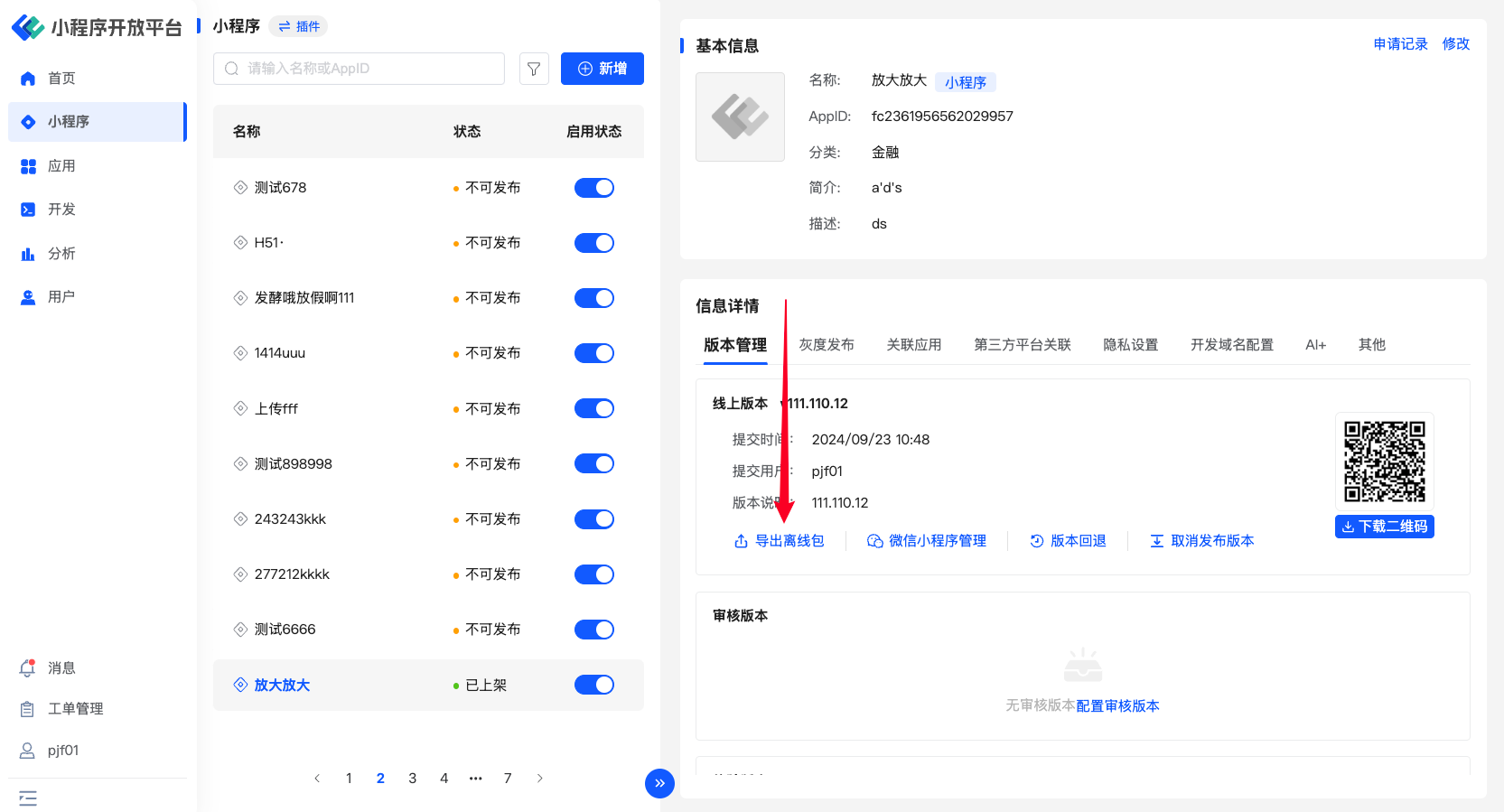
Since the Mini-Program package and Base Library package need to be downloaded when opening a Mini-Program for the first time, the first launch is relatively slow. To address this situation, we can download the Mini-Program package and Base Library package in advance, place them in the project, and package them; or we can download the Mini-Program and Base Library packages at an appropriate time after the app is opened.
FATAppletRequest *request = [[FATAppletRequest alloc] init];
request.appletId = @"Mini-Program ID";
request.apiServer = @"Server address";
// Mini-Program offline package address (see the image above). It can be a bundle path or a sandbox path
request.offlineMiniprogramZipPath = [[NSBundle mainBundle] pathForResource:@"api_demo" ofType:@"zip"];
// Base Library offline package address (see the image above). It can be a bundle path or a sandbox path
request.offlineFrameworkZipPath = [[NSBundle mainBundle] pathForResource:@"framework-3.0.49" ofType:@"zip"];

[[FATClient sharedClient] startAppletWithRequest:request InParentViewController:self.window.rootViewController completion:^(BOOL result, FATError *error) {
    NSLog(@"Open Mini-Program 11: %@", error);
} closeCompletion:^{
    NSLog(@"Close Mini-Program 11");
}];
# 1.1.4 Open Mini-Program in Different Window Modes on iPad
On iPad, Mini-Programs can be displayed by setting different window modes, better implementing certain business scenarios and providing a better user experience. The following modes are currently supported:
fullScreen mode Default mode. The Mini-Program is displayed in full screen after being opened. Example code:
FATAppletRequest *request = [[FATAppletRequest alloc] init];
request.appletId = @"Mini-Program ID"; // Required
request.apiServer = @"Server address"; // Required
request.presentationConfig = [FATAppletPresentationConfig fullScreenPresentationConfig];
[[FATClient sharedClient] startAppletWithRequest:request InParentViewController:self completion:^(BOOL result, FATError *error) {
 NSLog(@"Open Mini-Program: %@", error);
} closeCompletion:^{
 NSLog(@"Close Mini-Program");
}];
Demo effect:
currentContext mode Starting from the ParentViewController that opens the Mini-Program, search upward through the view controller hierarchy, and display using the first ViewController whose definesPresentationContext property is true as the Context. After the display is complete, all views belonging to the PresentingViewController will be temporarily removed from the view stack. The window display size depends on the display mode of the found context. It can be used in an iPad UISplitViewController to specify a controller that individually covers one side of the screen. Example code:
FATAppletRequest *request = [[FATAppletRequest alloc] init];
request.appletId = @"Mini-Program ID"; // Required
request.apiServer = @"Server address"; // Required
request.presentationConfig = [FATAppletPresentationConfig currentContextPresentationConfig];
[[FATClient sharedClient] startAppletWithRequest:request InParentViewController:self completion:^(BOOL result, FATError *error) {
 NSLog(ompletion:^{
 NSLog(@@"Open Mini-Program: %@", error);
} closeC"Close Mini-Program");
}];
Demo effect:
overCurrentContext mode The display effect is the same as the currentContext mode above. The difference is that after the display is complete, the views belonging to the PresentingViewController will not be removed from the view stack. Example code:
FATAppletRequest *request = [[FATAppletRequest alloc] init];
request.appletId = @"Mini-Program ID"; // Required
request.apiServer = @"Server address"; // Required
request.presentationConfig = [FATAppletPresentationConfig overCurrentContextPresentationConfig];
[[FATClient sharedClient] startAppletWithRequest:request InParentViewController:self completion:^(BOOL result, FATError *error) {
NSLog(ompletion:^{
NSLog(@@"Open Mini-Program: %@", error);
} closeC"Close Mini-Program");
}];
Demo effect:
pageSheet mode Open the Mini-Program in non-full-screen mode. The Mini-Program window size cannot be set. The Mini-Program window width is the width of the device in portrait orientation, and the height changes between portrait and landscape orientations. There is a mask over the area outside the Mini-Program window. Example code:
FATAppletRequest *request = [[FATAppletRequest alloc] init];
request.appletId = @"Mini-Program ID"; // Required
request.apiServer = @"Server address"; // Required
request.presentationConfig = [FATAppletPresentationConfig pageSheetPresentationConfig];
[[FATClient sharedClient] startAppletWithRequest:request InParentViewController:self completion:^(BOOL result, FATError *error) {
NSLog(ompletion:^{
NSLog(@@"Open Mini-Program: %@", error);
} closeC"Close Mini-Program");
}];
Demo effect:
formSheet mode Similar to pageSheet mode. The Mini-Program is opened in non-full-screen mode. The Mini-Program window size cannot be set. The window size is determined by the system and is always displayed in the center. Example code:
FATAppletRequest *request = [[FATAppletRequest alloc] init];
request.appletId = @"Mini-Program ID"; // Required
request.apiServer = @"Server address"; // Required
request.presentationConfig = [FATAppletPresentationConfig formSheetPresentationConfig];
[[FATClient sharedClient] startAppletWithRequest:request InParentViewController:self completion:^(BOOL result, FATError *error) {
NSLog(ompletion:^{
NSLog(@@"Open Mini-Program: %@", error);
} closeC"Close Mini-Program");
}];
Demo effect:
popover mode Display the Mini-Program window in a popover manner, with a small arrow pointing to the button or other UI element that triggered the modal view. The window size can be set. There are 2 configuration methods. Example code: Method 1: Configure via the sourceView and sourceRect parameters. sourceView specifies the view element that triggers the Mini-Program, and sourceRect defines the specific area on this view. It will usually try to place its arrow pointing to the center of sourceRect.
FATAppletRequest *request = [[FATAppletRequest alloc] init];
request.appletId = @"Mini-Program ID"; // Required
request.apiServer = @"Server address"; // Required
request.presentationConfig = [FATAppletPresentationConfig popoverPresentationSourceViewConfig:self.view sourceRect:CGRectMake(20, 20, 500, 500)];
[[FATClient sharedClient] startAppletWithRequest:request InParentViewController:self completion:^(BOOL result, FATError *error) {
NSLog(ompletion:^{
NSLog(@@"Open Mini-Program: %@", error);
} closeC"Close Mini-Program");
}];
Demo effect:
Method 2: The Mini-Program can pop up after an item (such as a navigation bar button UIBarButtonItem or UITabBarItem), and its arrow will be automatically placed according to the position of the barButtonItem.
FATAppletRequest *request = [[FATAppletRequest alloc] init];
request.appletId = @"Mini-Program ID"; // Required
request.apiServer = @"Server address"; // Required
request.presentationConfig =[FATAppletPresentationConfig popoverPresentationSourceItemConfig:CGSizeMake(300, 500) barButtonItem:item];
[[FATClient sharedClient] startAppletWithRequest:request InParentViewController:self completion:^(BOOL result, FATError *error) {
NSLog(ompletion:^{
NSLog(@@"Open Mini-Program: %@", error);
} closeC"Close Mini-Program");
}];
Demo effect:
custom mode The Mini-Program window is displayed in a custom manner. The window area can be customized. Custom display animations are not supported. Example code:
FATAppletRequest *request = [[FATAppletRequest alloc] init];
request.appletId = @"Mini-Program ID"; // Required
request.apiServer = @"Server address"; // Required
request.presentationConfig = [FATAppletPresentationConfig customPresentationConfig:CGPointMake(self.view.bounds.size.width / 3.0 / 2.0, 64) preferredContentSize:CGSizeMake(self.view.bounds.size.width / 3.0 * 2.0, self.view.bounds.size.height / 3 * 2)];
[[FATClient sharedClient] startAppletWithRequest:request InParentViewController:self completion:^(BOOL result, FATError *error) {
NSLog(ompletion:^{
NSLog(@@"Open Mini-Program: %@", error);
} closeC"Close Mini-Program");
}];
Demo effect:
# 1.2 Open Mini-Program via QR Code
This process is generally more complex. You need to first scan the QR code on the FinClip Mini-Program Open Platform, obtain the content within the QR code, and then use the QR code content to call this interface to open the Mini-Program.
/// Start Mini-Program with QR code information
/// @param request Request object
/// @param parentVC Parent view controller
/// @param requestBlock Callback when the QR code verification request is completed
/// @param completion Completion callback
/// @param closeCompletion Callback when the Mini-Program is closed
- (void)startAppletWithQrCodeRequest:(FATAppletQrCodeRequest *)request
              inParentViewController:(UIViewController *)parentVC
                        requestBlock:(void (^)(BOOL result, FATError *error))requestBlock
                          completion:(void (^)(BOOL result, FATError *error))completion
                     closeCompletion:(dispatch_block_t)closeCompletion;
Note: When opening a trial version QR code, the corresponding trial member userId needs to be added when initializing the SDK. FATAppletQrCodeRequest
| Property Name | Type | Description |
|---|---|---|
| qrCode | NSString | QR code content, required |
| transitionStyle | FATTranstionStyle | The transition animation style when opening the Mini-Program. Optional. The default value is FATTranstionStyleUp |
| animated | BOOL | Whether to use animation. Optional. The default value is YES |
| from | NSNumber | Source. Recorded in the apm event during data reporting |
| reLaunchMode | FATReLaunchMode | The reLaunch mode when the Mini-Program is hot-started. Please refer to the FATReLaunchMode description. Optional |
| forceUpdate | BOOL | Whether to force opening the latest version. The default is NO |
Example code:
FATAppletQrCodeRequest *qrcodeRequest = [[FATAppletQrCodeRequest alloc] init];
qrcodeRequest.qrCode = qrCode;

[[FATClient sharedClient] startAppletWithQrCodeRequest:qrcodeRequest inParentViewController:self requestBlock:^(BOOL result, FATError *error) {
    NSLog(@"Request completed: %@", error);
} completion:^(BOOL result, FATError *error) {
    NSLog(@"Open completed: %@", error);
} closeCompletion:^{
    NSLog(@"Closed");
}];
# 1.3 Open Mini-Program Using URL Scheme
Sometimes, we hope to be able to open the Mini-Program in our own app from a webpage loaded in Safari or from a third-party app. In this case, URL Scheme can be used to open the Mini-Program through our own App.
First, you need to add a URL Type. Select Target -> [Info] -> [URL Types], and add a URL Schemes. The format of URL Schemes is fat + the md5 of sdkKey. See the example in the image below. The format of URL Schemes is fat + the md5 of sdkKey. See the example in the image below. The format of URL Schemes is fat + the md5 of sdkKey. See the example in the image below.

Then, implement the OpenURL delegate method in AppDelegate. Example code is as follows:
- (BOOL)application:(UIApplication *)application openURL:(NSURL *)url sourceApplication:(NSString *)sourceApplication annotation:(id)annotation
{
    if ([[FATClient sharedClient] handleOpenURL:url]) {
        return YES;
    }
    return YES;
}

- (BOOL)application:(UIApplication *)app openURL:(NSURL *)url options:(NSDictionary<UIApplicationOpenURLOptionsKey,id> *)options
{
    if ([[FATClient sharedClient] handleOpenURL:url]) {
        return YES;
    }
    return YES;
}
Finally, add the Scheme link in the H5 webpage.
The complete format of the Scheme URI: ${scheme}://applet/appid/${appId}?path=${path}&query=${encoded query}&apiServer=${encoded apiServer}
| Configuration Name | Type | Required | Configuration Description |
|---|---|---|---|
| scheme | String | Yes | fat{16-character lowercase md5 of sdkKey}, example: fat705b46f78820c7a8 |
| appId | String | Yes | Mini-Program id |
| path | String | No | Mini-Program page path, example: pages/index/index |
| query | String | No | Mini-Program parameters, URLEncode(key1=value1&key2=value2) |
| apiServer | String | No | The server to which the Mini-Program belongs. Defaults to the first server initialized. Required when multiple servers are initialized. |
Example as follows:
<a href='fatd919cec7395563d7://applet/appid/617bb42f530fb30001509b27?path=pages/index/index&query=key%3Dvalue%26name%3Dtable&apiServer=https%3A%2F%2Fwww.finclip.com'>Open Mini-Program</a>
Of course, you can also enter the complete URL in the Safari browser's address bar (for example: fat705b46f78820c7a8://applet/appid/5e017a61c21ecf0001343e31), then press Enter to open your App and launch the Mini-Program.
# 1.4 Cold Start Scenario
When a Mini-Program cold starts, if the launch parameters include a path, it will launch into the page corresponding to that path; if no path parameter is included, it will enter the Mini-Program home page.
# 1.5 Hot Start Scenario
* Triggering cold start: If the Mini-Program has a new version or the environment has changed since the last launch, the Mini-Program will be restarted (cold start).
* In hot start scenarios, you can set the reLaunch mode to determine whether a relaunch is needed.
  1. FATReLaunchModeParamsExist: If the launch parameters contain path, query, or referrerInfo, and any of these parameters is not empty, a reLaunch will be triggered. If a path parameter is present, it will enter the page corresponding to that path.
  2. FATReLaunchModeOnlyParamsDiff: If there are launch parameters and they differ from the previous launch parameters, a reLaunch will be executed.
  3. FATReLaunchModeAlways: Ignore launch parameters; execute reLaunch on every hot start.
  4. FATReLaunchModeNever: Never execute reLaunch on hot start, i.e., hot start always reuses the page stack.
# 2. Close Mini-Program
Supported app types
Mini-Program ✅ Mini-Game ✅ H5 Application ✅
Closing a Mini-Program is equivalent to tapping the Mini-Program in the Capsule Button in the upper right corner. At this point, the Mini-Program is sent to the background and is not destroyed.
# 2.1 Close a Specified Mini-Program
/**
Close the specified opened Mini-Program
@param animated Whether to show animation
@param completion Callback when closing is complete
*/
- (void)closeApplet:(NSString *)appletId animated:(BOOL)animated completion:(dispatch_block_t)completion;
# 2.2 Close All Mini-Programs
In some scenarios, Mini-Program A may open Mini-Program B, and Mini-Program B may open Mini-Program C. To close all opened Mini-Programs in this case, you can use this method.
/**
Close all currently opened Mini-Programs
@param completion Callback when closing is complete
*/
- (void)closeAllAppletsWithCompletion:(dispatch_block_t)completion;
# 2.3 Close the Current Mini-Program
/**
Close the current Mini-Program
@param animated Whether to show animation
@param completion Callback when closing is complete
*/
- (void)closeCurrentApplet:(BOOL)animated completion:(dispatch_block_t)completion;
# 3. Terminate Mini-Program
Supported app types
Mini-Program ✅ Mini-Game ✅ H5 Application ✅
After a Mini-Program is closed, it is not actually terminated but suspended in the background. The next time the Mini-Program is opened, it will immediately be switched to the foreground and run. Therefore, if you want the Mini-Program to be truly terminated after closing, you can use the following APIs based on your actual needs to terminate a specified Mini-Program or all Mini-Programs.
Note: If a Mini-Program is currently being displayed, calling the following two APIs will not destroy the Mini-Program. You need to call the close function first, then call one of the following two methods to destroy the Mini-Program.
# 3.1 Terminate a Specified Mini-Program
After the Mini-Program is closed, calling this API will delete the cache and destroy the Mini-Program.
/**
Delete the specified Mini-Program from memory
*/
- (void)clearMemeryApplet:(NSString *)appletId;
# 3.2 Terminate All Mini-Programs
When you have opened and closed multiple Mini-Programs and want to terminate all Mini-Programs suspended in the background at once, you can use this API.
/**
 Clear all Mini-Programs cached in memory
 */
- (void)clearMemoryCache;
# 4. Delete Mini-Program
Supported app types
Mini-Program ✅ Mini-Game ✅ H5 Application ✅
When a Mini-Program runs, the Mini-Program package and Mini-Program information are cached locally, so the cache will be used first the next time it is opened, making the opening speed faster. Therefore, if you want to delete all information of a Mini-Program, you can use the following APIs to delete a specific Mini-Program or delete all Mini-Programs.
# 4.1 Delete a Specified Mini-Program
/**
 Delete the specified Mini-Program from local storage

 @param appletId Mini-Program id
 @return BOOL Result
 */
- (BOOL)removeAppletFromLocalCache:(NSString *)appletId;
# 4.2 Delete All Mini-Programs
///  Delete locally cached Mini-Programs
- (void)clearLocalApplets;
# 5 Batch Download Mini-Programs
Supported app types
Mini-Program ✅ Mini-Game ✅ H5 Application ✅
Downloading Mini-Programs to the local device in advance can reduce the time required for the first launch of the Mini-Program.
/**
 @brief Batch update Mini-Programs
 @param appIds Array of Mini-Program ids
 @param apiServer Server address
 @param complete Callback for batch updating Mini-Programs
 */
- (void)downloadApplets:(NSArray *)appIds apiServer:(NSString *)apiServer complete:(void (^)(NSArray *results, FATError *error))complete;

/**
 @brief Batch update Mini-Programs
 @param appIds Array of Mini-Program ids
 @param apiServer Server address
 @param isBatchDownloadApplets Whether to download Mini-Programs
 @param complete Callback for batch updating Mini-Programs
 */
- (void)downloadApplets:(NSArray *)appIds apiServer:(NSString *)apiServer isBatchDownloadApplets:(BOOL)isBatchDownloadApplets complete:(void (^)(NSArray *results, FATError *error))complete;
Example code
// Default download
[[FATClient sharedClient] downloadApplets:##appIds## apiServer:##apiServer## complete:^(NSArray *results, FATError *error) {
    // Callback for batch updating Mini-Programs
    // results  Batch update Mini-Program results, which is an array object
    //          where each element is: @{@"appId": ##Mini-Program id##, @"success": ##whether the update succeeded##, @"needUpdate": ##whether an update is needed##}
    //          For each Mini-Program id passed in, the latest version may already be cached locally, so an update may not be needed. In this case, the needUpdate field is false.
    // error    Error, nil on success
}];
// Whether to download Mini-Programs is determined by the isBatchDownloadApplets parameter
[[FATClient sharedClient] downloadApplets:##appIds## apiServer:##apiServer## isBatchDownloadApplets:##isBatchDownloadApplets## complete:^(NSArray *results, FATError *error) {
    // Callback for batch updating Mini-Programs
    // results  Batch update Mini-Program results, which is an array object
    //          where each element is: @{@"appId": ##Mini-Program id##, @"success": ##whether the update succeeded##, @"needUpdate": ##whether an update is needed##}
    //          For each Mini-Program id passed in, the latest version may already be cached locally, so an update may not be needed. In this case, the needUpdate field is false.
    // error    Error, nil on success
}];
# 6 Pre-download Base Library
Configuring Base Library pre-download can reduce the time required for the first launch of a Mini-Program.
The FATStoreConfig class has a new enablePreloadFramework property. Set enablePreloadFramework to YES during initialization to enable Base Library pre-download for that server. During initialization, servers with Base Library pre-download enabled will download the Base Library, making Mini-Program opening faster.
Example code:
FATStoreConfig *storeConfig = [[FATStoreConfig alloc] init];
storeConfig.sdkKey = @"##sdkKey##";
storeConfig.sdkSecret = @"##sdkSecret##";
storeConfig.apiServer = @"##apiServer##";
storeConfig.cryptType = FATApiCryptTypeSM;
// Enable Base Library pre-download
storeConfig.enablePreloadFramework = YES;
FATConfig *config = [FATConfig configWithStoreConfigs:@[storeConfig]];
[[FATClient sharedClient] initWithConfig:config error:nil];