# Introduction to Fdep SDK
You can view the relevant introduction to the Industry Compliance App Market (Fdep Platform) here (opens new window).
# 1. What is Fdep SDK
Fdep SDK is developed according to the security SDK standards required by the Industry Compliance App Market (opens new window). Most of its SDK standard requirements are consistent with the FinClip Mini-Program SDK, but in terms of certain security logic and data, the FinClip Mini-Program SDK has been aligned with the requirements of the Industry Compliance App Market.
# 2. Differences between FinClip Mini-Program SDK and Fdep SDK
| FinClip Mini-Program SDK | Fdep SDK | |
|---|---|---|
| Environment Address | Supports privatization, Online version address is https://super-apps.ai | https://open.fdep.cn |
| SDK Initialization | No SDK fingerprint | Includes SDK fingerprint |
| SDK Encryption Method | Online environment requires MD5 algorithm, Privatized customers can freely choose MD5/SM algorithm | SM algorithm (SM3) |
# 3. Data Collection and Usage Instructions for Fdep SDK
Regarding data collection and usage, the FinClip Mini-Program SDK involves the following scenarios:
- To achieve business functions, the Mini-Program needs to obtain permissions from the user. These permissions include: photo album, camera, geographic location, etc. Permission acquisition is typically done through pop-up dialogs;
- To fulfill financial regulatory requirements, the SDK provides the
getSuperviseInfointerface. This interface primarily collects user information and device information, is actively called by the Mini-Program, and the data flow is: App→SDK→Mini-Program→Mini-Program Business Backend. The SDK does not retain data traces; - To meet the trace retention requirements of the Industry Compliance App Market, the SDK must collect certain business data and report it to the Industry Compliance App Market. This type of data does not involve sensitive user information and is primarily Mini-Program information and APP information. The data flow is: App→SDK→Industry Compliance App Market;
Please Note
Due to different scenarios, the three modes are explained as follows:
# 3.1 Authorization Pop-up Initiated to Fulfill Business Requirements
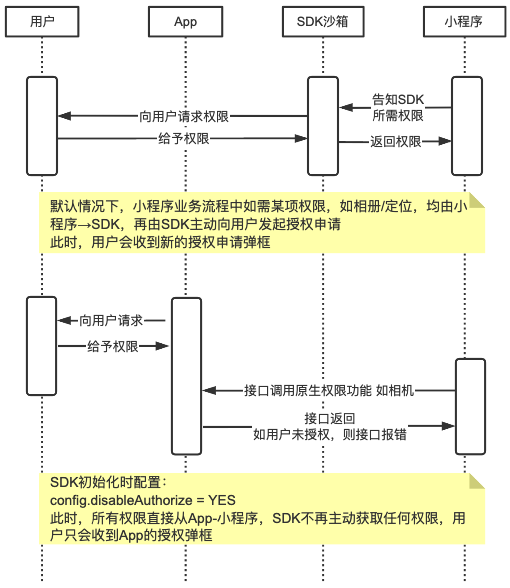
To meet APP's permission management needs, the FinClip Mini-Program SDK is actively split into the Core SDK and the Extension SDK. Functions other than photo album and camera require developers to actively integrate the Extension SDK before calling them. If you have no requirement for these permissions, you do not need to integrate the Extension SDK.
In addition to splitting the Mini-Program SDK based on permission content, to meet the flexible configuration needs of different APPs, we also provide a setting option for "Prohibit the SDK from actively initiating permission requests". After developers enable this setting, the SDK will be unable to actively request any permissions from the user; all permissions must come from the APP's unified authorization.
For detailed setup methods, please refer to:
Combining the Extension SDK and the prohibition function, you can refer to the following diagram to understand the permission request flow:
# 3.2 The getSuperviseInfo Interface Provided for Business Supervision
During most financial industry business operations, it is necessary to report data to regulatory authorities. This information involves some user data (such as phone number, user device information), etc. Some of this data cannot be directly obtained by the SDK in higher Android/iOS systems. The APP needs to obtain authorization from the user first.
Please Note
You can view the Industry Compliance App Market - getSuperviseInfo Interface Documentation (opens new window) for interface details.
Please refer to the following table for the reported information:
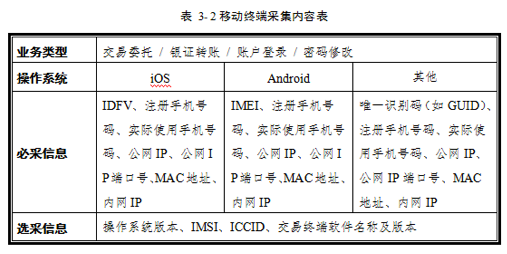
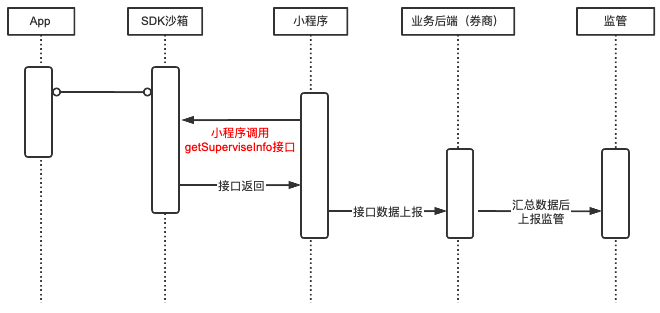
Given this requirement, this interface is actively called by the Mini-Program. After the SDK obtains the existing authorizations within the App, it will supplement the data fields and report them to the Mini-Program. The Mini-Program then sends this data content to its business backend and completes the supplementation of the remaining fields within its own system.
During this process, the SDK only provides the interface and does not retain any data.
The sequence diagram for this process is as follows:
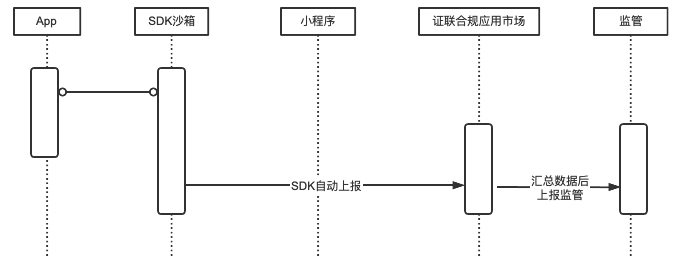
# 3.3 Active Reporting by the SDK to Fulfill Trace Retention for the Industry Compliance App Market
To achieve real-time monitoring of third-party引流 business, the Industry Compliance App Market needs to monitor the behavior of the SDK and the APP in real-time.
This monitoring content is actively reported by the SDK to the Industry Compliance App Market. It is then aggregated and filtered by the operations personnel of the Industry Compliance App Market before being reported to the regulators as required.
The Industry Compliance App Market primarily focuses on引流 business, so the data collected and reported includes the following:
- Basic SDK information, including: current SDK version number;
- Application information where the SDK resides, including: application name, application version number;
- Basic Host-App information, including: mobile operating system, mobile phone model;
- Basic Mini-Program information, including: Mini-Program ID, Mini-Program and SDK exceptions (including description information when the exception occurred);
The sequence diagram for this process is as follows: