
# Frequently Asked Questions About App Cross-Server Support for Mini-Programs
After integrating the FinClip Mini-Program SDK, you might have the following questions:
- How can I open multiple Mini-Programs listed in the
FinClip SaaS environmentwithin a single App? - How can I open multiple Mini-Programs listed in
different environments (such as a private environment and a certificate-linked environment)within a single App?
You can find answers and solutions to the above questions in this article.
# 1. Mini-Program Initialization and Launch
The process of initializing the FinClip Mini-Program SDK and launching a Mini-Program within an App is illustrated in the following diagram:
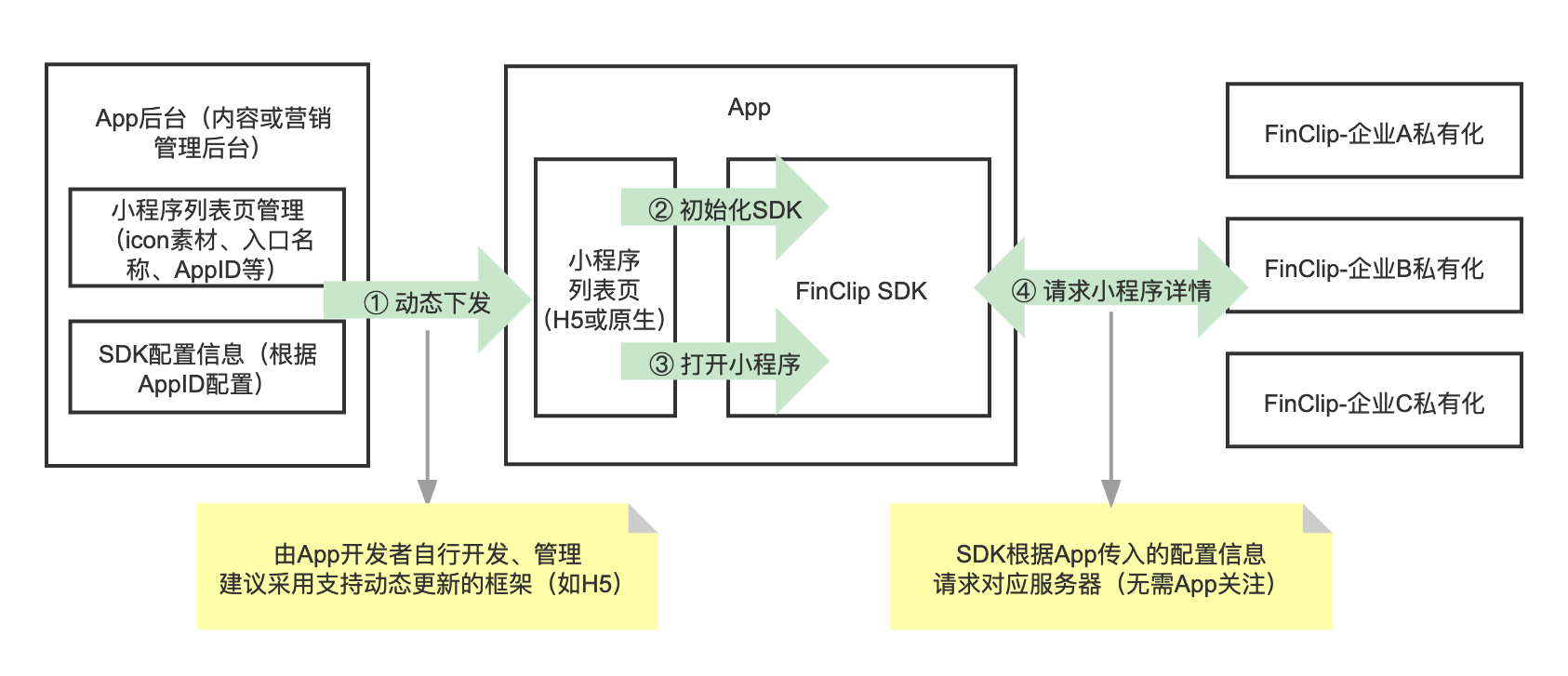
As shown in steps ② and ③ of the diagram above, initializing the Mini-Program SDK is a prerequisite step for launching a Mini-Program. If you need to configure Mini-Programs from multiple environments, you must complete the corresponding operations before initializing the Mini-Program SDK.
You can also click here to learn how to design the entry point for Mini-Programs within an App.
# 2. How to Configure Multi-Environment Server Information During SDK Initialization?
FinClip supports configuring server information for Mini-Programs from multiple environments during the Mini-Program initialization process. The operations are as follows:
# 2.1 iOS Configuration Method
Note
Starting from version 2.13.109, the FinClip Mini-Program SDK supports configuring multiple server information entries, allowing simultaneous access to Mini-Programs from different servers. Therefore, the initialization method has changed. You can initialize it as shown in the following example.
NSMutableArray *storeArrayM = [NSMutableArray array];
FATStoreConfig *storeConfig = [[FATStoreConfig alloc] init];
storeConfig.sdkKey = @"Your SDK Key information";
storeConfig.sdkSecret = @"Your SDK Secret information";
storeConfig.apiServer = @"Server domain";
storeConfig.apmServer = @"Domain for APM event statistics";
[storeArrayM addObject:storeConfig];

FATStoreConfig *storeConfig2 = [[FATStoreConfig alloc] init];
storeConfig2.sdkKey = @"Your SDK Key information";
storeConfig2.sdkSecret = @"Your SDK Secret information";
storeConfig2.apiServer = @"Server domain";
storeConfig2.apmServer = @"Domain for APM event statistics";
storeConfig2.cryptType = FATApiCryptTypeSM;
[storeArrayM addObject:storeConfig2];

FATConfig *config = [FATConfig configWithStoreConfigs:storeArrayM];
[[FATClient sharedClient] initWithConfig:config error:nil];
To view the detailed iOS initialization guide, please click here.
# 2.2 Android Configuration Method
// Collection of server information
List<FinStoreConfig> storeConfigs = new ArrayList<>();

// Information for Server 1
FinStoreConfig storeConfig1 = new FinStoreConfig(
        "SDK Key information",   // SDK Key
        "SDK Secret information",   // SDK Secret
        "Address of Server 1",   // Server address
        "Data reporting server address for Server 1",   // Data reporting server address
        "/api/v1/mop/",   // Server interface request route prefix
        "",
        "Encryption method"   // Encryption method, SM for National Secret, MD5 for MD5 (recommended)
);
storeConfigs.add(storeConfig1);

// Information for Server 2
FinStoreConfig storeConfig2 = new FinStoreConfig(
        "SDK Key information",   // SDK Key
        "SDK Secret information",   // SDK Secret
        "Address of Server 2",   // Server address
        "Data reporting server address for Server 2",   // Data reporting server address
        "/api/v1/mop/",   // Server interface request route prefix
        "",
        "Encryption method"   // Encryption method, SM for National Secret, MD5 for MD5 (recommended)
);
storeConfigs.add(storeConfig2);

FinAppConfig config = new FinAppConfig.Builder()
        .setFinStoreConfigs(storeConfigs) // Collection of server information
        .build();
To view the detailed Android initialization guide, please click here.
# 3. How to Dynamically Support Mini-Programs on Multiple Servers? What Do I Need to Do?
Q: I have completed the initialization of the SDK's server configuration information, but additional servers have been added later. Can I open Mini-Programs on the new servers without republishing the App?
A: Yes. The backend needs to provide an interface to retrieve the initialization configuration information for multiple servers. Then, at an appropriate time, call this interface to obtain the initialization configuration information for all servers. After that, initialize the SDK and launch the Mini-Program.
You can reinitialize the server information in the Mini-Program SDK using the following methods.
# 3.1 iOS Implementation
# 3.1.1 Obtain Initialization Configuration Information for All Servers
This requires the backend to maintain the initialization configuration information for multiple servers and provide an interface for the App to call at an appropriate time.
# 3.1.2 Initialize the SDK
// Assume this array contains the initialization configuration information for multiple servers obtained from the backend.
NSArray *array = nil;
NSMutableArray *storeArrayM = [NSMutableArray array];
for (NSDictionary *dict in array) {
    FATStoreConfig *storeConfig = [[FATStoreConfig alloc] init];
    storeConfig.sdkKey = dict[@"sdkKey"];
storeConfig.sdkSecret = dict[@"sdkSecret"];
storeConfig.apiServer = dict[@"apiServer"];
storeConfig.apmServer = dict[@"apmServer"];
if ([@"SM" isEqualToString:dict[@"cryptType"]]) {
        storeConfig.cryptType = FATApiCryptTypeSM;
    } else {
        storeConfig.cryptType = FATApiCryptTypeMD5;
    }

    [storeArrayM addObject:storeConfig];
}
FATConfig *config = [FATConfig configWithStoreConfigs:storeArrayM];
[[FATClient sharedClient] initWithConfig:config error:nil];
# 3.1.3 Launch the Mini-Program:
FATAppletRequest *request = [[FATAppletRequest alloc] init];
request.appletId = @"Mini-Program ID";
request.apiServer = @"Server address";
request.transitionStyle = FATTranstionStyleUp;
request.startParams = startParams;

[[FATClient sharedClient] startAppletWithRequest:request InParentViewController:self completion:^(BOOL result, FATError *error) {
    NSLog(@"Launch Mini-Program: %@", error);
} closeCompletion:^{
    NSLog(@"Close Mini-Program");
}];
# 3.2 Android Implementation
# 3.2.1 Obtain Initialization Configuration Information for All Servers
This requires the backend to maintain the initialization configuration information for multiple servers and provide an interface for the App to call at an appropriate time.
# 3.2.2 Initialize the SDK
Please Note
If this is not the first time initializing the Mini-Program SDK (e.g., the SDK has already been initialized elsewhere, such as in the Application), you cannot use new FinAppConfig.Builder() to reinitialize, as this would lose the original SDK server configuration.
Step 1: Update the server configuration information:
// Get the previous SDK configuration
FinAppConfig finAppConfig = FinAppClient.INSTANCE.getFinAppConfig();
// If this is the first time initializing the SDK, you can use the Builder method for configuration
// If you can ensure the SDK has been initialized before the code reaches this point, you can omit this if block
if (finAppConfig == null) {
    FinAppConfig.Builder builder = new FinAppConfig.Builder();
    // builder.setXXXX Configure using the builder
    finAppConfig = builder.build();
}
List<FinStoreConfig> finStoreConfigs = finAppConfig.getFinStoreConfigs();
// Add the previously dynamically obtained server information
finStoreConfigs.add(storeConfig);
// Reinitialize the SDK
FinAppClient.INSTANCE.init(application, finAppConfig, new FinCallback<Object>() {
    @Override
    public void onSuccess(Object result) {

    }

    @Override
    public void onError(int code, String error) {

    }

    @Override
    public void onProgress(int status, String info) {

    }
});
# 3.2.3 Launch the Mini-Program
FinAppClient.INSTANCE.getAppletApiManager().startApplet(context, "apiServer", "appId", null, null);