# PoC Guide Manual
# 1. Preface
# 1.1 What is PoC?
PoC testing, i.e., Proof of Concept, is a popular industry practice for conducting validation tests targeting specific customer applications. It is typically a capability verification activity for products or suppliers undertaken by enterprises during product selection or before initiating external implementation projects. Its purpose is to prove that the product or supplier chosen by the enterprise can meet the requirements and that the information provided is accurate and reliable.
# 1.2 Why Conduct a PoC?
PoC serves as an important reference basis for customers when selecting products.
On one hand, customers can use the PoC to evaluate whether the product aligns with the enterprise's actual needs and verify if the product's real functionality or performance matches the vendor's claims.
On the other hand, suppliers can leverage the PoC to alleviate customer concerns about the product's capabilities, strengthen the customer's purchasing decision, further explore detailed customer requirements, and boost confidence in post-sales delivery. Simultaneously, it helps identify shortcomings in their own products and improve product capabilities.
Additionally, PoC can indirectly reduce friction between the client and the vendor during the post-sales phase.
Reading Guide
This manual aims to provide enterprise developers with PoC guidance for the FinClip product. By following this document for PoC testing, you can quickly run Mini-Programs within your own mobile App or on mobile devices.
# 2. Verifiable Functions in PoC
Through this guide, you can verify the following FinClip capabilities:
# 2.1 Verifying Mini-Program Listing and Delisting Capabilities (FinClip Management Console)
By verifying functions related to Mini-Program listing and delisting, you can understand the following FinClip capabilities:
- Introduction to different status versions of Mini-Programs
- How to perform listing operations for Mini-Programs
- How to configure the Mini-Program release review workflow according to your needs
Key verification points include:
- Create a Mini-Program and configure basic information (name, logo, description, category, etc.)
- Upload the Mini-Program Code Package (via the web portal or Developer Tools)
- Set up and use the Mini-Program Experience Version
- Submit and release the Mini-Program for review
- Associate the Mini-Program with an application
- List, rollback, and delist the Mini-Program
# 2.2 Verifying Mini-Program Runtime Capabilities (FinClip Mini-Program SDK)
By opening Mini-Programs within an App, you can experience the following effects of Mini-Programs running in the App:
- Ability to actually open Mini-Programs within the App
- Ability to dynamically manage Mini-Programs within the App
Key verification points include:
- The Mini-Program runs normally in the Host-App, including correct display of product logic and UI interface
- Normal invocation of the FinClip Mini-Program SDK and APIs, with normal system compatibility
- Verification of common Mini-Program functions (images, camera, video playback, same-layer rendering, native interaction, etc.)
- Experience of Mini-Program logic such as Hot Updates, caching, loading, multi-threading, etc.
- Scanning QR codes to view and preview Mini-Programs
# 2.3 Verifying Mini-Program Development and Compilation Capabilities (FinClip Developer Tools)
By using the developer tool FinClip Studio, you can experience the complete FinClip development tool ecosystem.
Key verification points include:
- Complete functions such as creating, importing, code previewing, and modifying Mini-Program projects in the Developer Tools
- Offline compilation of Mini-Programs
- Generating QR codes and previewing temporary versions of Mini-Programs
- Exporting the Code Package after compiling the Mini-Program
- Uploading the Mini-Program Code Package
- Importing local Base Libraries
# 3. Verifiable Environments for PoC
The FinClip Mini-Program Open Platform is designed based on a cloud-native underlying architecture, possessing strong container technology R&D capabilities and security assurance capabilities. It not only provides a stable product experience but also supports various deployment methods such as Private Cloud, Industry Cloud, and Hybrid Cloud.
During the PoC phase, we also offer Public Cloud and Private Cloud verification options for you to choose from.
# 3.1 Verification in the "Public Cloud" Environment
The Public Cloud environment refers to the FinClip.com (opens new window) environment. After registering an account, you can experience all the content mentioned in the "Verifiable Functions in PoC" section.
Please Note
If your environment meets the following conditions, we recommend using the Public Cloud for verification:
- No special requirements for the Mini-Program runtime environment (allowing access to the public internet, allowing Code Packages to be uploaded to the public cloud);
- No plans to experience operational capabilities;
- Inability to apply for private PoC hardware resources in the short term;
# 3.2 Verification in the "Private Cloud" Environment
The Private Cloud environment involves deploying FinClip to corresponding private servers via a private deployment method before conducting verification. This approach requires applying for server resources and network access permissions in advance. We will arrange for operations engineers to assist you remotely in completing the functional verification.
Please Note
If your environment meets the following conditions, we recommend using the Private Cloud for verification:
- Desire to experience the full process and capabilities of FinClip;
- High security requirements for the Mini-Program runtime environment (cannot access the external internet, cannot upload code to the public cloud);
# 3.3 Solution Comparison
The advantages and disadvantages of the above two solutions are compared in the table below:
| Advantages | Disadvantages | |
|---|---|---|
| Public Cloud | ① No server resources required ② Ready to use out-of-the-box ③ Short verification cycle ④ Stable environment ⑤ Real-time experience of the latest version | ① Cannot verify operational backend features |
| Private Cloud | ① 100% data security guaranteed by private cloud ② 100% coverage of all functions | ① Requires application for server resources ② High cost and long cycle |
# 4. PoC Material Preparation
You may need to prepare the following materials and content to complete the FinClip PoC verification.
# 4.1 Mini-Program Code Package
The Mini-Program Code Package refers to the source code of the business application's Mini-Program. To help you complete the relevant processes quickly and accurately, we recommend using relatively simple Mini-Program code for verification.
- You can use FinClip Studio to create a corresponding Mini-Program from a template, or use the Mini-Program Sample Code (opens new window) to complete this step;
- You can also create a new Mini-Program using templates in the WeChat Developer Tools to complete this step; when selecting a template, please choose the Mini-Program type that
does not use cloud services;
If you are using a Mini-Program developed with third-party frameworks like uni-app or Taro, you need to export the Mini-Program code as WeChat Mini-Program code.
# 4.2 FinClip Ecosystem Tools
FinClip ecosystem tools refer to FinClip Studio and FinClip App, which are used for Mini-Program code development, debugging, and code preview, respectively.
- The download address for FinClip Studio is: https://super-apps.ai/downloads/?activeTab=ide (opens new window)
- The download address for FinClip App is: https://super-apps.ai/downloads/?activeTab=assistant (opens new window)
# 4.3 Third-Party Applications and Development Tools
Third-party applications and development tools mainly include your existing iOS / Android applications and development tools, which can be used to integrate the FinClip Mini-Program SDK into mobile applications. During this process, you can also experience the SDK's characteristics such as high compatibility, lightweight size, and rich interfaces.
You can use your own applications or FinClip's sample DEMOs:
- iOS sample application: https://github.com/finogeeks/FinClip-ios-demo (opens new window)
- Android sample application: https://github.com/finogeeks/FinClip-android-demo (opens new window)
The native development tools for the iOS and Android platforms are as follows:
- The download address for Xcode is: https://developer.apple.com/cn/xcode/resources/ (opens new window)
- The download address for Android Studio is: https://developer.android.google.cn/studio (opens new window)
# 4.4 Server Resources (Optional)
When you need to choose the private cloud verification solution, you need to prepare a server with the following configuration. We will arrange for operations engineers to assist you remotely in completing the functional verification.
Server Configuration: Quantity: 1 unit / CPU: 8 cores / Memory: 16G / Hard Disk: 100G
# 5. PoC Process Overview
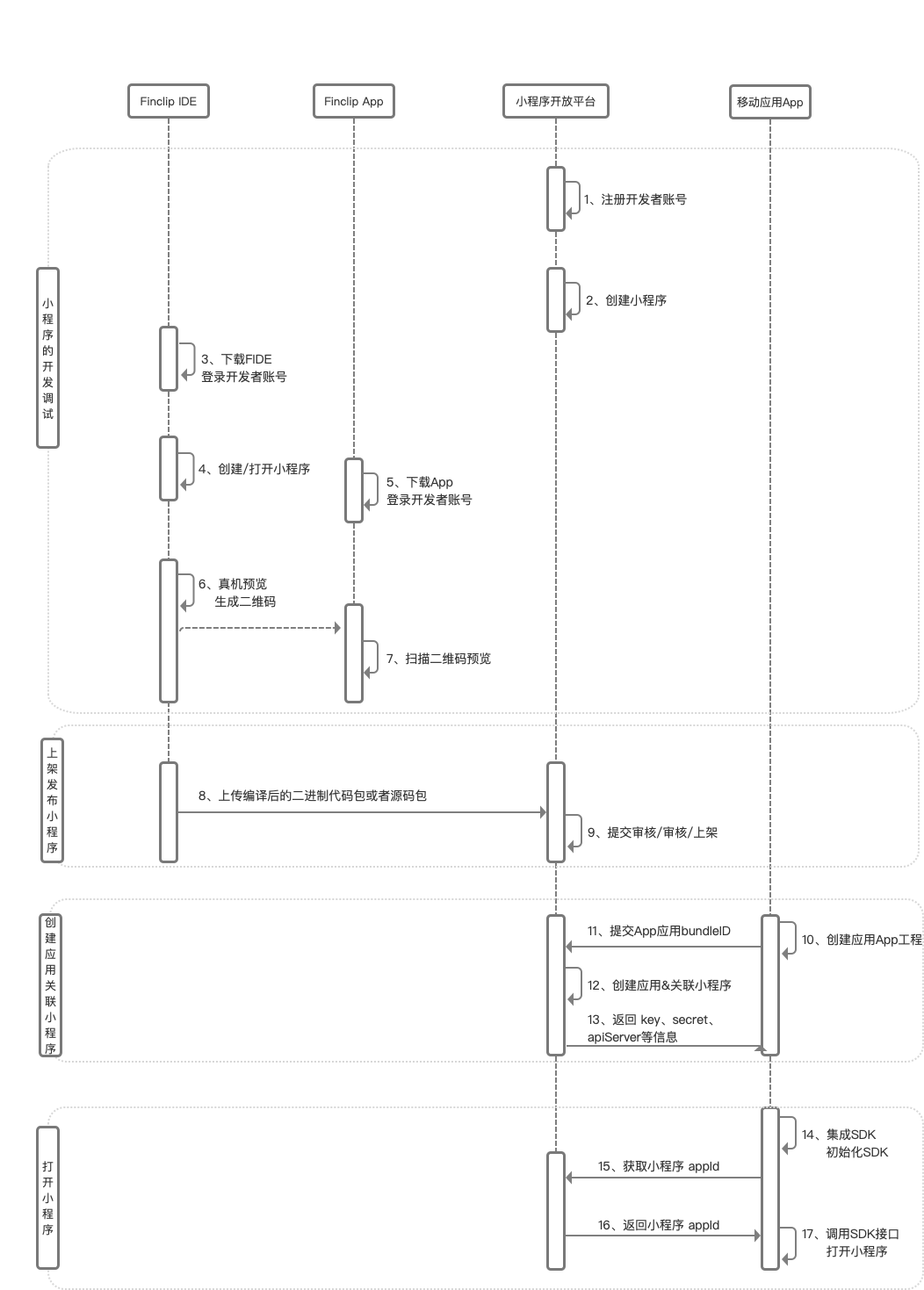
Aiming for the goal of running Mini-Programs within a mobile App, a total of 4 steps are required to complete the process:
- Develop and Debug the Mini-Program: Compile the Mini-Program code in FinClip Studio, complete debugging and layout work, ensuring it displays correctly on the simulator;
- Publish and List the Mini-Program: Register and log in to the FinClip platform, create and fill in the Mini-Program information. Then submit the Mini-Program obtained in the previous step for listing review (in this step, you will obtain the
Mini-Program's AppID); - Associate the Mini-Program with an Application: Add an application in the FinClip platform and associate the Mini-Program with it (in this step, you will obtain three parameters:
SDK KEY,SDK SECRET, andAPI SERVER, which can be used to initialize the SDK subsequently); - Integrate the SDK and Open the Mini-Program: After the application integrates the FinClip Mini-Program SDK, initialize the SDK using the parameters from the previous step, and then you can open the Mini-Program within the App.
Specific operations can be seen in the sequence diagram below:
# 6. Detailed PoC Guidance
TIP
After completing the above steps, you can click here to start your PoC process.
# 7. Other Reference Materials
We have also prepared the following materials for your reference:
- Articles & Information
- Video Tutorials
# 8. Conclusion
Thank you very much for your experience. We sincerely invite you to submit feedback on this document (opens new window) to help us further improve the quality of our documentation.
You can also visit FinClip.com or scan the QR code below for more detailed information.