
# SDK Security and Privacy FAQ
# 1. What information does the FinClip Mini-Program SDK collect?
The FinClip Mini-Program SDK and its related data collection content are as follows:
| SDK Name | Function Type | Data Types Collected | Permissions Requested | Privacy Policy Link |
|---|---|---|---|---|
| FinClip Mini-Program SDK | Mini-Program SDK | Mobile terminal identification information, IP, MAC address; System type, system version, phone manufacturer, phone model | Location, Camera, Photo Album, Microphone, Storage, Get Phone Status | /operate/privacy-policy.html |
Simply put, when you use FinClip Mini-Programs, you may need to integrate the FinClip Mini-Program SDK (or Fantuan Zhenglian SDK) into your App based on the usage environment. The SDK will request corresponding information from your device through the getSystemInfo or getSuperviseInfo (opens new window) interfaces to facilitate SDK environment security verification and meet security supervision requirements.
You can integrate the above FinClip Mini-Program SDK information into your "Privacy Agreement" according to your privacy requirements.
Please Note
After the SDK collects the above data, developers still need to configure whether to report it. The data will only be uploaded to the developer's privately deployed environment (meaning all data essentially remains within the APP provider's database and IT environment). The FinClip Mini-Program SDK cannot obtain any business or user data.
# 2. Explanation of FinClip Mini-Program SDK Compliance with Securities and Futures Industry Security Standards
The China Securities Regulatory Commission (CSRC) announced the financial industry recommended standard "Securities and Futures Industry Mobile Internet Application Security Testing Specification (JR/T 0240—2021) (opens new window)" on December 29, 2021, which came into effect from the date of announcement.
Announcement details: 【No. 48 Announcement】"Securities and Futures Industry Mobile Internet Application Security Testing Specification (opens new window)"
Specification details: Securities and Futures Industry Mobile Internet Application Security Testing Specification (opens new window)
Following this announcement, FinClip promptly conducted a review of the relevant standard content. After review: The FinClip Mini-Program SDK meets the requirements related to SDK business specified in this "Security Testing Specification." Furthermore, FinClip provides standard SDK APIs for developers to use, enabling them to meet or implement the corresponding capabilities.
# 3. Other Common Questions
# 3.1 What kind of information interaction occurs between the FinClip Mini-Program SDK and the Host-App?
The specific information interaction depends on the particular business scenario.
The FinClip Mini-Program SDK itself does not perform any data or information interaction. If a business requiring user login status (i.e., a Mini-Program) is run through the SDK, parameter passing must also be implemented via interfaces. Whether parameters are passed and the details of such passing are entirely controlled and managed by the Host-App itself.
# 3.2 Does the FinClip Mini-Program SDK comply with the relevant requirements of the People's Bank of China's "Mobile Financial Client Application Software Security Management Specification"? For example, not retaining customer information, packing, reinforcement, etc.?
Yes, it complies.
The FinClip Mini-Program SDK complies with the relevant requirements of the "Mobile Financial Client Application Software Security Management Specification (JR/T 0092-2019) (opens new window)" issued by the People's Bank of China.
Preview details: Financial Standards Full-text Public System - Mobile Financial Client Application Software Security Management Specification (opens new window)
# 3.3 Will security issues arise after upgrading the FinClip Mini-Program SDK?
No, they will not.
If you need to upgrade the SDK, it also requires going through a series of operations such as application packaging and release. Users also need to update the App to experience the capabilities in the new SDK version. All risks during this process are monitorable and preventable.
# 3.4 Is there a security testing report for the FinClip Mini-Program SDK, and how can I obtain it?
We consistently monitor various authoritative security policies and regulations domestically and internationally, and actively improve our own security system construction according to rules and regulations, completing relevant certifications. We passed the SDK Security Special Assessment by the China Academy of Information and Communications Technology (CAICT) in 2021 and obtained the assessment certificate in October of the same year.
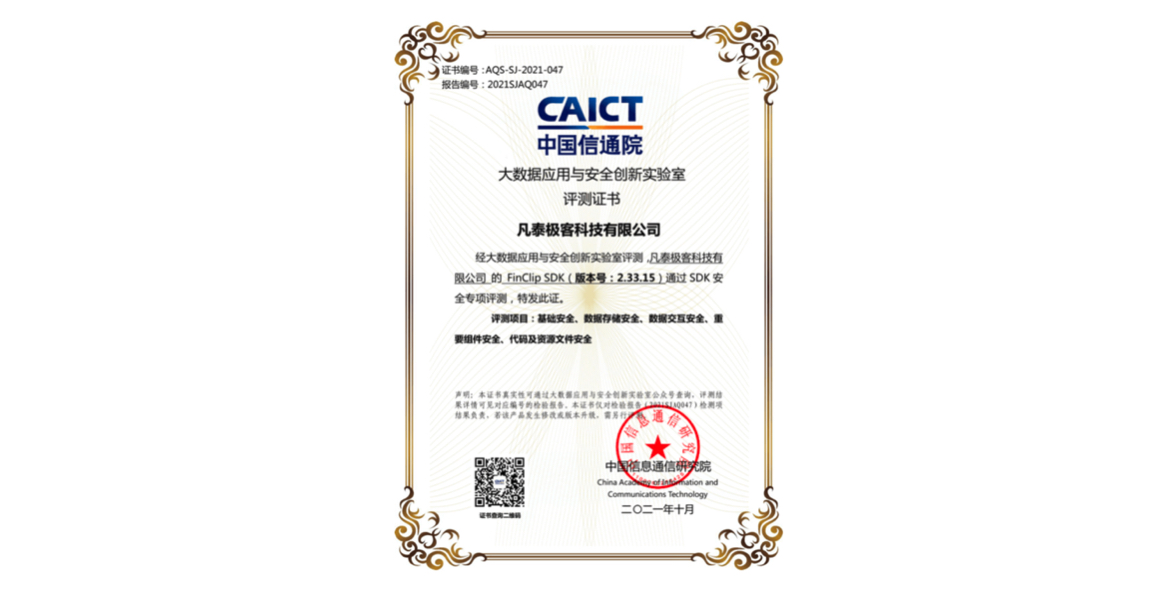
If you require a copy of the FinClip Mini-Program SDK testing report, please contact us.
# 3.5 Security Explanation for WebView File Protocol Usage within the FinClip Mini-Program SDK
In the WebView setting properties of the Mini-Program SDK, three properties are related to File Access: allowFileAccess, allowFileAccessFromFileURLs, and allowUniversalAccessFromFileURLs.
- allowFileAccess - In Android Q and lower versions, the default value is true; in Android R and higher versions, the default value is false. In the FinClip Mini-Program SDK (hereinafter referred to as SDK), regardless of the version, it is set to true because this is the operational foundation of the Mini-Program Framework's View Layer, aiming to load relevant page and logic code files within the Mini-Program. The SDK will not load pages or logic code files outside the Mini-Program code or not specified by the Mini-Program developer. Once this property is set to false, Mini-Program pages will not display correctly, and operational logic will not execute normally.
- allowFileAccessFromFileURLs - In the Android system versions supported by the SDK, the default value is false. This property is divided into two scenarios within the SDK: Mini-Programs and Mini-Games.
- In the Mini-Program scenario, this value is set to false. In versions 2.41.5 and earlier, it was implicitly set to false; in versions after 2.41.5, it is explicitly set to false.
- In the Mini-Game scenario, this value is set to true. The reason is that games need to execute WebGL-related commands, which include instructions like texImage2D or texSubImage2D. These commands require access to cross-origin data, which necessitates support from allowFileAccessFromFileURLs. Otherwise, errors such as
Uncaught SecurityError: Failed to execute 'texImage2D' on 'WebGLRenderingContext': The image element contains cross-origin data, and may not be loaded.will occur, preventing the Mini-Game from running normally.
- allowUniversalAccessFromFileURLs - In the Android system versions supported by the SDK, the default value is false. In versions 2.41.5 and earlier, it was implicitly set to false; in versions after 2.41.5, it is explicitly set to false.
In summary, due to the operational mechanism of the SDK, allowFileAccess must be true; allowFileAccessFromFileURLs is false in the Mini-Program scenario, but must be true in the Mini-Game scenario due to WebGL command limitations; allowUniversalAccessFromFileURLs is always false.