
# Data Prefetching and Periodic Updates
Supported since Base Library 3.2.1, SDK 2.43.1, and FinClip Studio 2.0.18
Prefetching allows the SDK to proactively fetch business data from the developer's third-party server during the cold start of a Mini-Program. When the code package finishes loading, pages can be rendered faster, reducing user wait time, thereby improving the Mini-Program's launch speed and enhancing the user experience.
For the product operation instructions of this feature, please click here (opens new window)
# Usage Process
# 1. Configure Request URL in the Management Console
Configure in the Management Console. The entry point is 【My Mini-Programs】-【Details】-【Others】. Enable Periodic Data Updates or Data Prefetching and fill in the relevant URL.
# 2. Set Token in the Mini-Program
During the first launch of the Mini-Program, call wx.setBackgroundFetchToken() to set a token string. This token will be included when the SDK subsequently makes requests to the developer's server, used for the server to verify the request's validity.
App({
  onLaunch() {
    ft.setBackgroundFetchToken({
      token: 'some token'
    })
  }
})
# 3. Launch the Mini-Program
When a URL for Periodic Data Updates or Data Prefetching is configured, opening the Mini-Program will cause the SDK to initiate an HTTP GET request to the configured URL. The request includes the following query parameters. Once the data is fetched, the entire HTTP body is cached locally.
| Property | Type | Required | Description |
|---|---|---|---|
| appId | string | Yes | Mini-Program identifier |
| token | string | No | Token set by setBackgroundFetchToken |
| timeStamp | number | Yes | Timestamp when the client initiated the request, in ms |
| path | string | No | Mini-Program page path |
| query | string | No | Query parameters passed to the page |
| scene | number | No | Scene value when entering the Mini-Program |
| customMiniprogramVersion | number | No | Mini-Program version number; fixed as 'devtool' in the developer tools |
# 4. Read Data in the Mini-Program
App({
  onLaunch() {
    ft.onBackgroundFetchData(function (res) {
      console.log(res.fetchType)
      console.log(res.fetchedData)
      console.log(res.timeStamp)
      console.log(res.path)
      console.log(res.query)
      console.log(res.scene)
    })
    ft.getBackgroundFetchData({
      fetchType: 'pre',
      success(res) {
        console.log(res.fetchedData) // Cached data
        console.log(res.timeStamp) // Timestamp when the client obtained the cached data
        console.log(res.path) // Page path
        console.log(res.query) // Query parameters
        console.log(res.scene) // Scene value
      }
    })
  }
})
# Debugging Methods
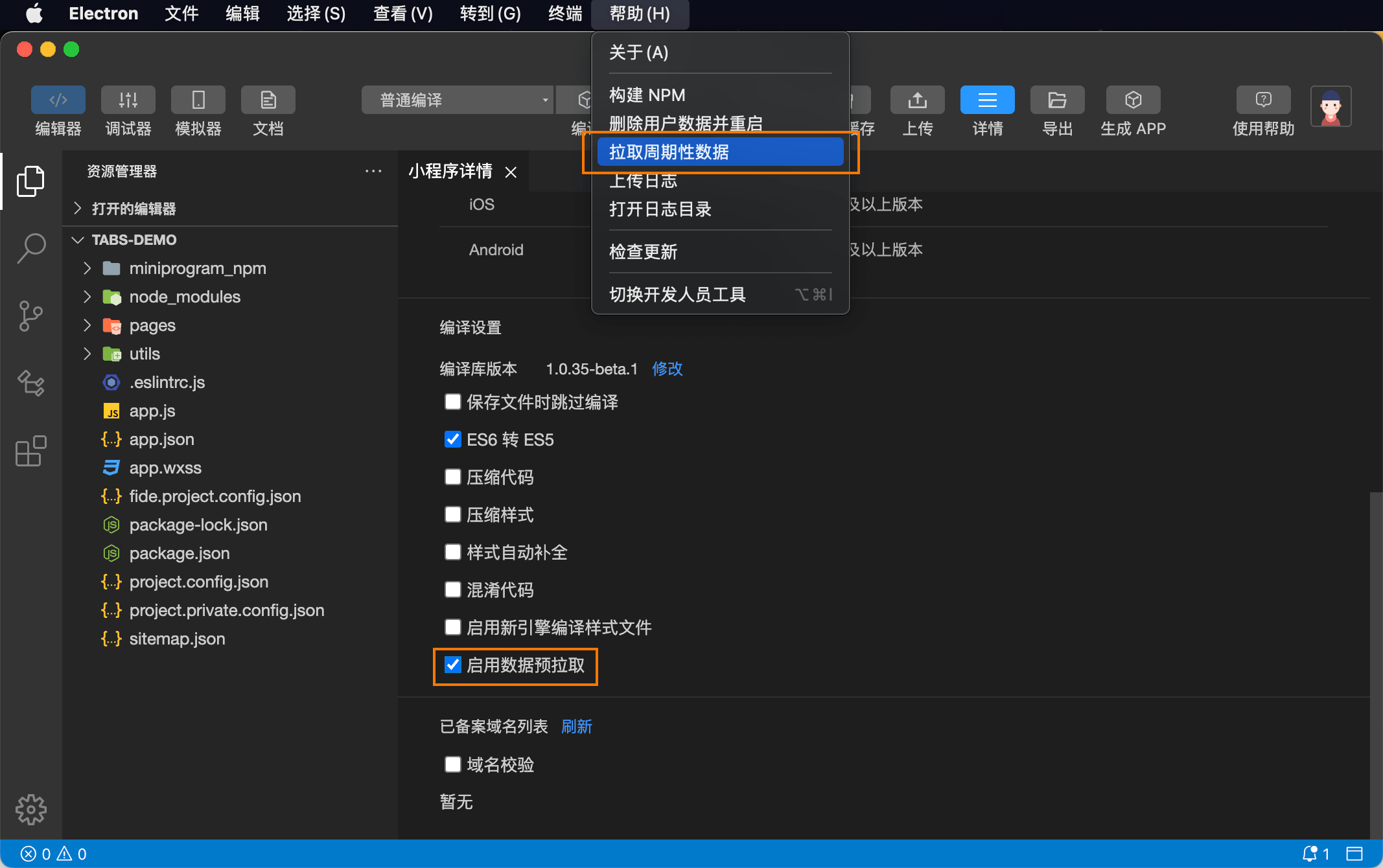
FinClip Studio must be upgraded to the supported version 2.0.18.
- In the Mini-Program details, there will be a checkbox for 【Data Prefetching】. Checking it and recompiling the Mini-Program will trigger the 【Data Prefetching】 request.
- In the top help bar, there will be an option for 【Fetch Periodic Data】. Selecting it will trigger the 【Fetch Periodic Data】 request.
Note
If the request URL is not configured in the backend, triggering the request will log a warning about the unconfigured URL in the log panel, which developers can use for debugging and identification.