
# Desktop FAQ
# 1. Common Issues During Integration
# 1.1 What is the minimum environment configuration required to integrate the desktop version of FinClip?
Answer: The SDK is developed based on qt 5.15 and Chromium Embedded Framework, and supports the following systems:
Windows:
- Windows 10
- Windows 8.1
- Windows 7
macOS:
- macOS 10.13
# 1.2 Languages supported by the desktop version of FinClip
Answer: The SDK provides header files, lib, and dll files. Theoretically, all languages on the .net platform are supported. We also provide DEMOs in various languages for your reference.
# 2. Security Description
# 2.1 Security Overview
The FinClip Mini-Program SDK ensures the security and reliability of the Mini-Program runtime environment through the following methods and means:
- The FinClip Mini-Program SDK provides a closed and secure runtime environment for business code, effectively preventing risks such as interference from external code and data leakage. Hosts on third-party network platforms can only start the runtime through interfaces actively exposed by the SDK;
- The FinClip Mini-Program SDK can fully control the runtime environment required by business applications and the required external communication, and can ensure that network communication is not intercepted or interfered with through multiple mechanisms;
- The desktop version of the FinClip Mini-Program SDK uses the
Chromium Embedded Frameworkbrowser kernel. The runtime environment is completely isolated from the system browser. Based on this browser kernel, better data isolation and data protection can be achieved.
# 2.2 Mini-Program Security Sandbox
The FinClip Mini-Program SDK is also a security sandbox for Mini-Program execution. In the Mini-Program Host Environment, mobile or desktop applications need to exchange data with the App Service / Logic Layer and the View Layer separately. The two cannot communicate directly and can only communicate through the Host-App.
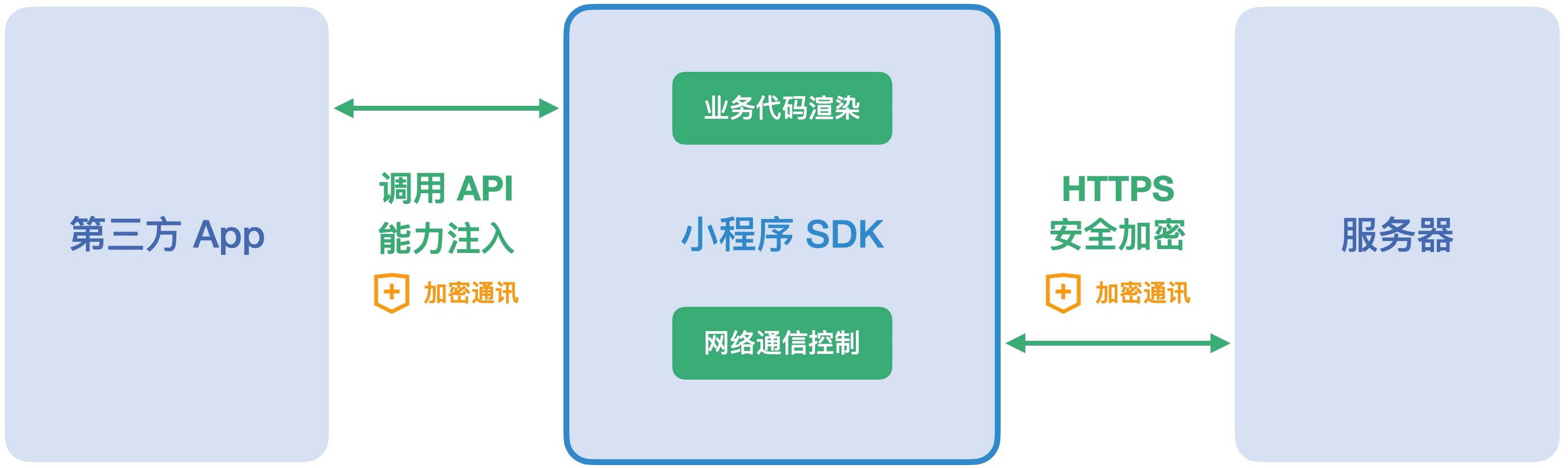
For this reason, FinClip can also be used to ensure the security and reliability of the Mini-Program runtime environment:
- The FinClip Mini-Program SDK provides a closed and secure runtime environment for business code, effectively preventing risks such as interference from external code and data leakage. Hosts on third-party network platforms can only start the runtime through interfaces actively exposed by the SDK;
- The FinClip Mini-Program SDK can fully control the runtime environment required by business applications and the required external communication, and can ensure that network communication is not intercepted or interfered with through multiple mechanisms;
In desktop and Android environments, we also use the following methods and means to ensure the security and reliability of the Mini-Program runtime environment:
- The desktop version uses the
Chromium Embedded Frameworkbrowser kernel. The runtime environment is completely isolated from the system browser. Based on this browser kernel, better data isolation and data protection can be achieved.
# 3. Get the DEMO
You can click here (opens new window) to get the C++ Mini-Program DEMO.
# 4. Add ThirdPartyLegalNotices.txt
When integrating the desktop SDK, please download the ThirdPartyLegalNotices.txt file and place it in the same directory as the application's executable file.
Download link: thirdpartylegalnotices.txt (opens new window)
In addition, you also need to display the contents of this file on the program's "About" page or component.