
# Plugin SDK Initialization
Before using the Mini-Program APIs, you need to initialize the Plugin SDK first. The APIs provided by the SDK can only be used after the SDK is successfully initialized; otherwise, all API calls will fail.
# 1 Plugin SDK Initialization
Example
MopSdk.initialize({
    finStoreConfigs:[{
      'sdkKey': '22LyZEib0gLTQdU3MUauAa2CctUv+NxTLFWyPxC28y2gA4x+JWh7hhNS5aO52BFs',
      'sdkSecret': '65146ffa924ecfdc',
      'apiServer': 'https://api.finclip.com'
    }]
  },
  (ret) => {
    console.log('App Launch Success', ret)
   },
   (ret) =>{
    console.log('App Launch Fail', ret)
   });
Parameters
| Configuration Name | Type | Configuration Description |
|---|---|---|
| options | Object | Plugin SDK initialization information |
| onSuccess | Function | Plugin SDK initialization success callback |
| onFail | Function | Plugin SDK initialization failure callback |
options Configuration Items
| Configuration Name | Type | Configuration Description |
|---|---|---|
| finStoreConfigs | Array[FinStoreConfig] | Collection of Mini-Program server configuration information |
| userId | String | Unique identifier for the current user. Mini-Program cache information will be stored in different directories named after userId. If you need to modify userId in subsequent logic, you can directly use MopSdk.setUserId("newUserId") |
| phone | String | Phone number, which can also be a Token. Not required. Used when implementing getPhoneNumber in the Mini-Program plugin. |
| channel | String | Channel identifier. If not filled in, defaults to the project's AppliationId. Used when implementing getPhoneNumber and login in the Mini-Program plugin. |
| encryptUserId | Boolean | (Backend API) Whether to encrypt and transmit userId. You need to ensure the backend service is upgraded to version 1.4.1 or above; otherwise, encryption will cause API requests to fail. Defaults to false |
| productIdentification | String | Product identifier. The configuration will change identifiers such as FinClip in folders and UserAgent to the configured value |
| isDebugMode | boolean | Whether the application is currently in Debug mode. |
| isEnableLog | boolean | Whether to enable logs |
| isEnableXLogConsole | boolean | Whether to enable XLog console logs. If false, logs are only persisted and not displayed in the console |
| apmExtendInfo | Array[{key:'aa',value:'aaa'}] | Extended information for APM statistics. |
| disableRequestPermissions | boolean | Whether to prohibit the SDK from triggering permission requests. Defaults to false. If set to true, APIs that use permissions within the SDK will not proactively request permissions. |
| needToRemoveCookiesDomains | boolean | List of domains whose cookies need to be removed during SDK initialization |
| appletIntervalUpdateLimit | int | Number of Mini-Programs to automatically check for updates in the background. Value range: 0~50. 0 means no update check; if not set, defaults to 3. |
| appletText | String | Mini-Program text. Defaults to "小程序". You can set it to "快应用", "轻应用" |
| customWebViewUserAgent | String | Content to be added to the UserAgent (Android only) |
| enableApmDataCompression | boolean | Whether to compress data when reporting APM data. Defaults to false |
| disableGetSuperviseInfo | boolean | Whether to disable the SDK's supervision API. Defaults to false. If set to true, the SDK disables the supervision API (getSuperviseInfo) |
| appletAutoAuthorize | boolean | Whether to allow the SDK to automatically grant Mini-Program permissions. Defaults to false. If set to true, the permission dialog will not be displayed when permissions are first triggered in the Mini-Program |
| appletDebugMode | boolean | Whether to enable vconsole debugging for the Mini-Program. Defaults to false |
| pageCountLimit | int | Maximum limit on the number of page stacks in the Mini-Program. Default value is 0, meaning no limit. |
| header | Array[{key:'aa',value:'aaa'}] | Header for network requests (request/uploadFile/downloadFile) in the Mini-Program |
| headerPriority | String | Header configuration priority. Defaults to GLOBAL. Optional values (SPECIFIED, APPLET_FILE, GLOBAL) |
| ignoreWebviewCertAuth | boolean | Whether to ignore SSL certificate verification. Defaults to false. When set to true, the Mini-Program's request, uploadFile, downloadFile, and web-view component can load untrusted https links and http links |
| schemes | Array[String] | Custom scheme array. The SDK internally supports WeChat, Alipay, FinClip App, and tel schemes by default |
| locale | String | Language type for the SDK's common UI. Currently only supports Chinese and English. Defaults to Simplified Chinese. Optional values are zh, en |
| uiConfig | UIConfig | Mini-Program UI configuration information |
| startCrashProtection | boolean | Whether to enable crash protection. Defaults to false. UnrecognizedSelector, KVO, Notification, Timer, Container (array out of bounds, dictionary inserting nil, etc.), String (out of bounds, nil, etc.) (iOS only) |
| enableWebViewDownloadFile | boolean | Whether to allow the web-view component to download files. Defaults to true (Android only) |
| enableHoleRender | boolean | Enable webView hole-punching same-layer rendering. Only supports components (live-player, live-pusher). Priority is higher than X5 same-layer rendering (for precautions, see Initialization Integration (opens new window) Section 3.6) (Android only) |
| needToRemoveCookiesDomains | Array[String] | List of domains whose cookies need to be removed during SDK initialization (Android only) |
| maxRunningApplet | int | Number of Mini-Programs that can run simultaneously. Defaults to 5 (Android only) |
| webViewMixedContentMode | int | WebView mixed content mode. Optional values 0, 1, 2, where 0 means never allow insecure loading, 0 means always allow loading all, 2 means mixed loading, allowing https to load http (Android only) |
| bindAppletWithMainProcess | boolean | Whether the Mini-Program process is bound to the app's main process. If set to true, the Mini-Program process will be closed synchronously when the main process is killed (Android only) |
| killAppletProcessNotice | String | Prompt text displayed after the app's main process is killed and the Mini-Program is closed (Android only) |
| minAndroidSdkVersion | int | Minimum supported Android SDK version (Android only) |
| enablePreNewProcess | boolean | Whether to create the process in advance. Defaults to true (Android only) |
| disableTbs | boolean | Whether to disable the tbs sdk (Android only) |
| useLocalTbsCore | boolean | Whether to load the TBS X5 kernel locally. Needs to be set to true (Android only) |
| tbsCoreUrl | String | Server address for downloading TBS X5 kernel files (Android only) |
FinStoreConfig Configuration Items
| Configuration Name | Type | Required | Description |
|---|---|---|---|
| sdkKey | String | Yes | sdkKey generated when creating the application |
| sdkSecret | String | Yes | sdkKey generated when creating the application |
| apiServer | String | Yes | Server address, the backend address deployed by the customer |
| apmServer | String | No | Server address for APM event reporting. If not set, apiServer is used |
| cryptType | String | No | Network API encryption type. Defaults to "MD5". Can also be set to "SM" (Chinese national cryptography) |
| fingerprint | String | No | SDK fingerprint. Must be passed in the certificate-link environment; otherwise, API access will fail |
| encryptServerData | Boolean | No | Defaults to false. Currently can only be set to false; setting to true will cause API access to fail |
| enablePreloadFramework | Boolean | No | Defaults to true. Whether to pre-download the Base Library. If set to false, pre-downloading the Base Library is disabled during SDK initialization |
UIConfig Configuration Items
| Configuration Name | Type | Configuration Description |
|---|---|---|
| navigationBarTitleLightColor | String | Light color for Navigation Bar title text, used for Dark Mode |
| navigationBarTitleDarkColor | String | Dark color for Navigation Bar title text, used for light theme |
| navigationBarBackBtnLightColor | String | Light color for Navigation Bar back button, used for Dark Mode |
| navigationBarBackBtnDarkColor | String | Dark color for Navigation Bar back button, used for light theme |
| isHideFeedbackAndComplaints | boolean | Whether to hide the "Feedback and Complaints" button in the "More" menu |
| isHideBackHome | boolean | Whether to hide the "Back to Home" button on the Navigation Bar |
| isHideForwardMenu | boolean | Whether to hide the "Forward" button in the "More" menu |
| isHideSettingMenu | boolean | Whether to hide the "Settings" button in the "More" menu |
| isHideRefreshMenu | boolean | Whether to hide the "Re-enter Mini-Program" button in the "More" menu |
| isHideShareAppletMenu | boolean | Whether to hide the "Share" button in the "More" menu. Defaults to true |
| isHideAddToDesktopMenu | boolean | Whether to hide the "Add to Desktop" button in the "More" menu. Defaults to true |
| isHideFavoriteMenu | boolean | Whether to hide the "Favorite" button in the "More" menu. Defaults to true |
| hideDebugMenu | boolean | Whether to hide the debug button in the More menu |
| hideTransitionCloseButton | boolean | Whether to hide the close button on the Mini-Program loading page |
| hideCapsuleCloseButton | boolean | Whether to hide the close button in the Capsule Button at the top right corner of all Mini-Programs |
| disableSlideCloseAppletGesture | boolean | Whether to disable the swipe-to-close Mini-Program gesture |
| moreMenuStyle | int | Style of the More menu |
| autoAdaptDarkMode | boolean | Whether to automatically adapt to the system Dark Mode |
| hideWebViewProgressBar | boolean | Whether to hide the progress bar when the web-view component loads H5 links |
| webViewProgressBarColor | String | Color of the progress bar when the web-view component loads H5 links |
| forwadMenuTitle | String | Title of the "Forward" button in the "More" menu |
| navHomeConfig | NavHomeConfig | Configuration for the Navigation Bar Back to Home button |
| capsuleConfig | CapsuleConfig | Capsule configuration |
| authViewConfig | AuthViewConfig | Authorization dialog configuration |
| navigationBarHeight | Number | Navigation Bar height. Default value is 44 (iOS only) |
| useNativeLiveComponent | boolean | Whether to use the built-in live component. Defaults to false. When set to true. |
| navigationBarTitleTextLayoutGravity | String | Gravity of the Navigation Bar title relative to the parent control (Android only). Optional values: Left, Center |
| isAlwaysShowBackInDefaultNavigationBar | boolean | Whether to always show the back button (Android only) |
| isClearNavigationBarNavButtonBackground | boolean | Whether to clear the background of Navigation Bar buttons (Android only) |
NavHomeConfig Configuration Items
| Configuration Name | Type | Configuration Description |
|---|---|---|
| width | float | Width of the Back to Home button. Defaults to 44 |
| height | float | Height of the Back to Home button. Defaults to 32 |
| leftMargin | float | Left margin of the Back to Home button. Defaults to 8 |
| cornerRadius | float | Corner radius of the Back to Home button border. Defaults to 5 |
| borderWidth | float | Border width of the Back to Home button. Defaults to 0.75 |
| borderLightColor | String | Light border color of the Back to Home button. Defaults to 0X80FFFFFF |
| borderDarkColor | String | Dark border color of the Back to Home button. Defaults to 0X26000000 |
| bgLightColor | String | Light background of the Back to Home button. Defaults to 0x33000000 |
| bgDarkColor | String | Dark background of the Back to Home button. Defaults to 0x80ffffff |
CapsuleConfig Configuration Items
| Configuration Name | Type | Configuration Description |
|---|---|---|
| capsuleWidth | float | Width of the Capsule Control at the top right corner. Default value is 88 |
| capsuleHeight | float | Height of the Capsule Control at the top right corner. Default value is 32 |
| capsuleRightMargin | float | Right margin of the Capsule Control at the top right corner |
| capsuleCornerRadius | float | Corner radius of the Capsule Control at the top right corner. Default value is 5 |
| capsuleBorderWidth | float | Border width of the Capsule Control at the top right corner. Default value is 0.75 |
| moreBtnWidth | float | Width of the More button in the Capsule. Height equals width. Defaults to 32 |
| moreBtnLeftMargin | float | Left margin of the More button in the Capsule. Defaults to 6 |
| closeBtnWidth | float | Width of the Close button in the Capsule. Note: height equals width. Default value is 32 |
| closeBtnLeftMargin | float | Left margin of the Close button in the Capsule. Defaults to 6 |
| capsuleBgLightColor | String | Light background color of the Capsule. Defaults to 0x33000000 |
| capsuleBgDarkColor | String | Light background color of the Capsule. Defaults to 0x80ffffff |
| capsuleBorderLightColor | String | Light border color of the Capsule Control at the top right corner. Defaults to 0x80ffffff |
| capsuleBorderDarkColor | String | Dark border color of the Capsule Control at the top right corner. Defaults to 0x26000000 |
AuthViewConfig Configuration Items
| Configuration Name | Type | Configuration Description |
|---|---|---|
| appletNameTextSize | float | Font size of the Mini-Program name. Defaults to 16 |
| appletNameLightColor | String | Light color of the Mini-Program name. Defaults to #222222 |
| appletNameDarkColor | String | Dark color of the Mini-Program name. Defaults to #d0d0d0 |
| authorizeTitleTextSize | float | Font size of the permission title. Defaults to 17 |
| authorizeTitleLightColor | String | Light color of the permission title. Defaults to #222222 |
| authorizeTitleDarkColor | String | Dark color of the permission title. Defaults to #d0d0d0 |
| authorizeDescriptionTextSize | float | Font size of the permission description. Defaults to 14 |
| authorizeDescriptionLightColor | String | Dark color of the permission description. Defaults to #5c5c5c |
| authorizeDescriptionDarkColor | String | Dark color of the permission description. Defaults to #5c5c5c |
| agreementTitleTextSize | float | Font size of the agreement title. Defaults to 16 |
| agreementTitleLightColor | String | Light color of the agreement title. Defaults to #222222 |
| agreementTitleDarkColor | String | Dark color of the agreement title. Defaults to #d0d0d0 |
| agreementDescriptionTextSize | float | Font size of the agreement description. Defaults to 14 |
| agreementDescriptionLightColor | String | Light color of the agreement description. Defaults to #222222 |
| agreementDescriptionDarkColor | String | Dark color of the agreement description. Defaults to #d0d0d0 |
| linkLightColor | String | Light color of links. Defaults to #4285f4 |
| linkDarkColor | String | Dark color of links. Defaults to #4285f4 |
| allowButtonLightConfig | AuthButtonConfig | Light configuration for the Allow button. See AuthButtonConfig for details |
| allowButtonDarkConfig | AuthButtonConfig | Dark configuration for the Allow button. See AuthButtonConfig for details |
| rejectButtonLightConfig | AuthButtonConfig | Light configuration for the Reject button. See AuthButtonConfig for details |
| rejectButtonDarkConfig | AuthButtonConfig | Dark configuration for the Reject button. See AuthButtonConfig for details |
AuthButtonConfig Configuration Items
| Configuration Name | Type | Configuration Description |
|---|---|---|
| cornerRadius | float | Corner radius of the button |
| normalBackgroundColor | String | Default background color of the button |
| pressedBackgroundColor | String | Pressed background color of the button |
| normalBorderColor | String | Default border color of the button |
| pressedBorderColor | String | Pressed border color of the button |
| normalTextColor | String | Default text color of the button |
| pressedTextColor | String | Pressed text color of the button |
# 2 Using TBS X5 WebView (Android Only)
The SDK uses the system WebView to load Mini-Programs by default, and also supports using TBS X5 WebView to load Mini-Programs. Using the TBS X5 kernel enables same-layer rendering for some Native Components. Currently, the Native Components that support same-layer rendering via the TBS X5 kernel are:
video
live-player
live-pusher
map
input
textarea
How to enable TBS X5 WebView:
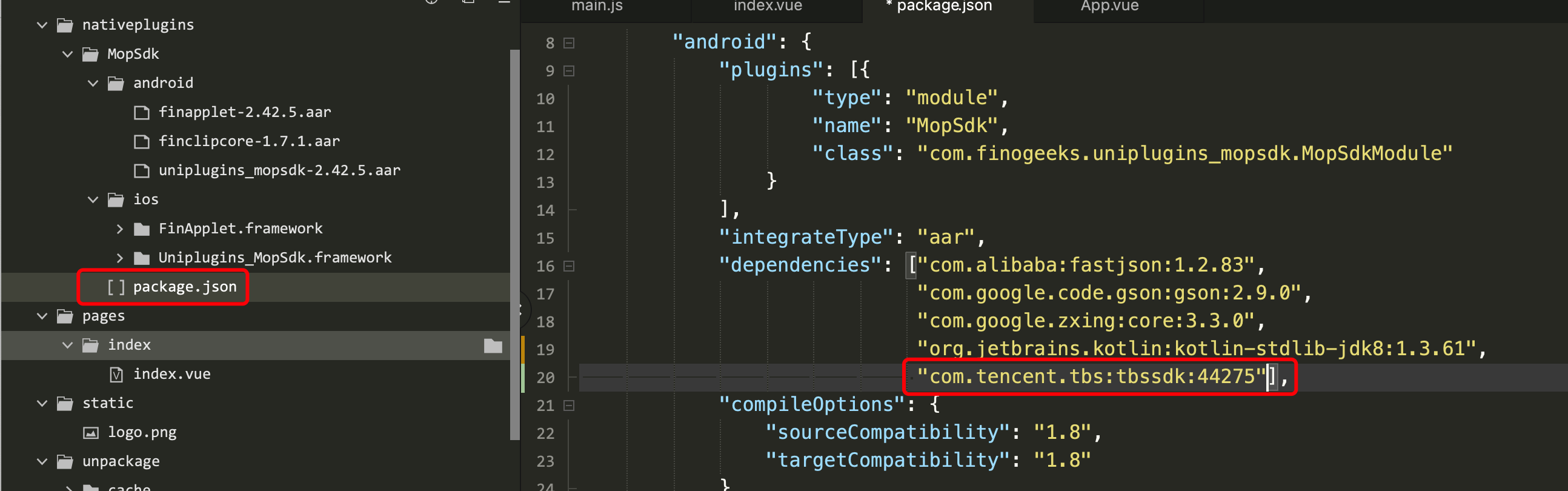
After depending on the TBS SDK, the WebView used internally by the SDK will automatically switch to X5 WebView. During SDK initialization, the TBS SDK will be initialized. Once the X5 kernel is successfully loaded, all capabilities provided by the X5 kernel can be used. Since Tencent's distribution of X5 kernel files may be affected by network conditions, which may cause slow or failed X5 kernel downloads, the SDK also supports downloading X5 kernel files from your own server. The implementation is as follows:
Download TBS X5 kernel files: armeabi architecture X5 kernel file (opens new window) arm64-v8a architecture X5 kernel file (opens new window)
Upload the downloaded X5 kernel files to your own server, and rename the kernel files after uploading to the server: Rename the armeabi architecture X5 kernel file to: armeabi_release.tbs Rename the arm64-v8a architecture X5 kernel file to: arm64-v8a_release.tbs Renaming is for the convenience of the SDK internally concatenating the complete kernel file download address.
Set the SDK initialization configuration parameters:
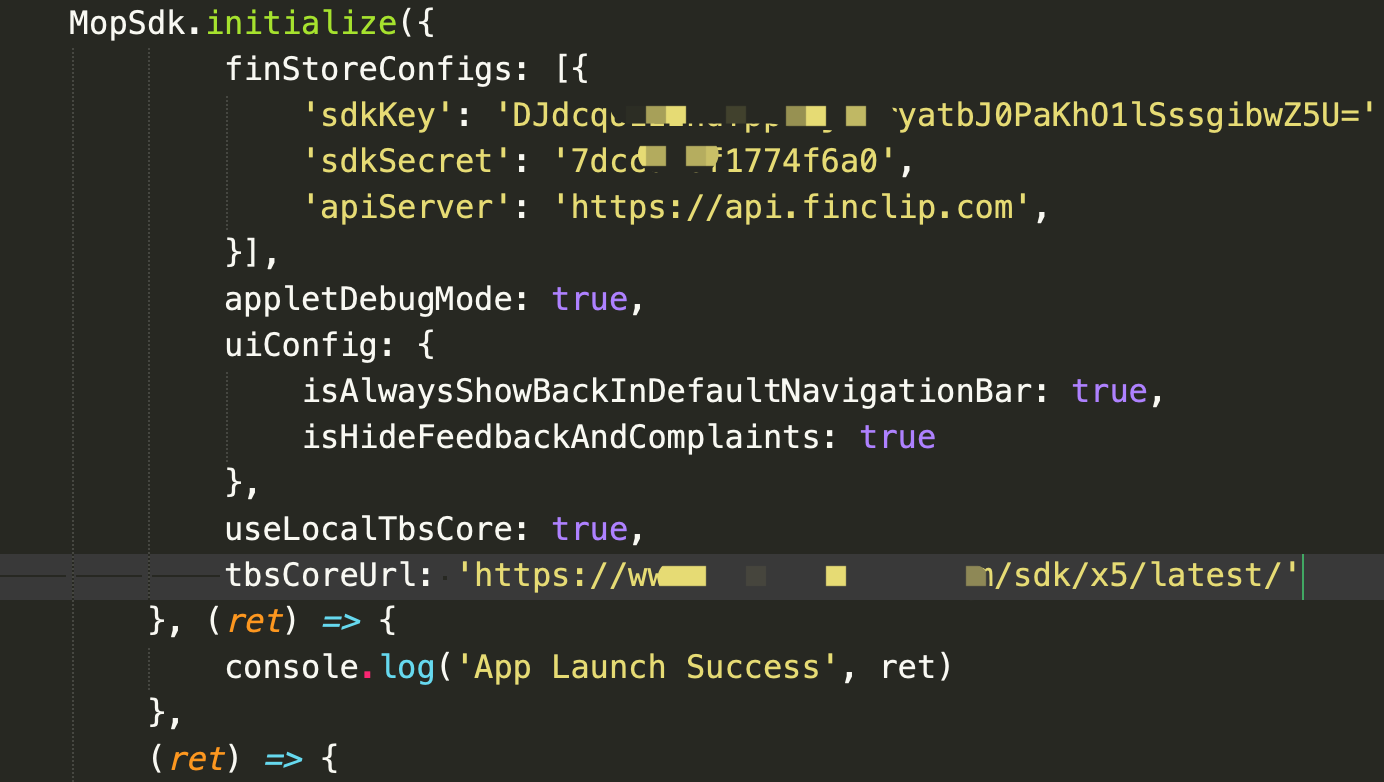
After the above steps, the SDK will be able to download X5 kernel files from your own server during initialization.