
# Authorization Management API Class
Apps can call authorization-related APIs via [FATClient sharedClient].authApiManager.
# 1. Get Mini-Program Authorization Configuration
Supported App Types
Mini-Program✅ Mini-Game✅ H5 Application🚫
//// Get Mini-Program authorization settings
/// @param appletId  Mini-Program ID
- (NSArray<FATAuthModel *> *)getAppletAuthSetting:(NSString *)appletId;
# 2. Update Mini-Program Authorization
Supported App Types
Mini-Program✅ Mini-Game✅ H5 Application🚫
/// Update Mini-Program authorization
/// @param scope  Authorization type
/// @param authValue  New authorization value, 1 represents allow, 2 represents deny. For background location permission modification, 1: represents foreground location 2: deny 3: represents background location
/// @param appletId  Mini-Program ID
- (BOOL)updateAppletScopeAuth:(FATScopeName)scope authValue:(NSInteger)authValue forApplet:(NSString *)appletId;

/// Update Mini-Program authorization (to be deprecated subsequently)
/// @param authType  Authorization type  scope.location
/// @param authValue  New authorization value. 1 represents allow, 2 represents deny. For background location permission modification, 1: represents foreground location 2: deny 3: represents background location
/// @param appletId  Mini-Program ID
- (BOOL)updateAppletAuth:(FATAuthorizationType)authType authValue:(NSInteger)authValue forApplet:(NSString *)appletId;
# 3. Open Personal Information and Authorization Management Page
Opening this page does not require distinguishing between Mini-Program, Mini-Game, or H5 Application.
# 3.1 Default Style
Open the Personal Information and Authorization Management page with the default style.
/// Open Personal Information and Authorization Management page
/// @param parentViewController Parent view controller, the opened Personal Information and Authorization Management page will be presented modally on the parent controller
- (void)openPrivacyManage:(UIViewController *)parentViewController;
# 3.2 Modify Navigation Bar Style
Configure custom back button and title, then open the Personal Information and Authorization Management page.
/// Open Personal Information and Authorization Management page
/// @param parentViewController parentViewController Parent view controller, the opened Personal Information and Authorization Management page will be presented modally on the parent controller
/// @param pageConfig Page configuration, such as back button image, title position
- (void)openPrivacyManage:(UIViewController *)parentViewController pageConfig:(FATExternalPageConfig *)pageConfig;
# 4. Get Mini-Program Privacy Agreement Configuration
Supported App Types
Mini-Program✅ Mini-Game✅ H5 Application🚫
/// Get Mini-Program privacy agreement configuration
/// @param appletId  Mini-Program ID
/// @param complete  Result callback, privacyInfo contains privacy configuration related information
- (void)getAppletPrivacyInfo:(NSString *)appletId complete:(void (^)(FATPrivacyInfo *privacyInfo, FATError *error))complete;
# 5. Custom Scope Authorization
Supported App Types
Mini-Program✅ Mini-Game✅ H5 Application🚫
Custom scope authorization is associated with custom APIs, so it is generally used together with custom APIs.
Within the App project, you can create a custom View, controlled by the App for its style, permissions to display, authorization results, etc. When this view is hidden, notify the Mini-Program of the result.
/**
 Register asynchronous extension API for authorization
 Note: The asynchronous result returned in the handler must be a dictionary convertible to JSON. Use [NSJSONSerialization isValidJSONObject:xxxx] to check
 @param extApiName API name
 @return Registration result
 */
- (BOOL)registerScopeExtensionApi:(NSString *)extApiName handler:(void (^)(FATAppletInfo *appletInfo, id param, FATScopeChecker *scopeChecker,FATExtensionApiCallback callback))handler;
Specific implementation is as follows:
# 1. Register and bind the custom scope View.
Custom view .h file
@interface FATScopeCustomView : UIView
@property (nonatomic, copy) void(^scopeAuthCompleteHandler)(NSInteger result, NSArray <FATAppletScope *>*scopeArray);
@property (weak, nonatomic) IBOutlet UISwitch *switch1;
@property (weak, nonatomic) IBOutlet UISwitch *switch2;
@property (weak, nonatomic) IBOutlet UISwitch *switch3;
- (IBAction)refuseOnClick:(id)sender;
- (IBAction)allowOnClick:(id)sender;
@end
Custom view .m file
- (IBAction)allowOnClick:(id)sender {

    FATAppletScope *scope1 = [[FATAppletScope alloc] init];
   scope1.title = @"scope1.title";
    scope1.scope = @"scope1";
    scope1.desc = @"scope1.desc";
    scope1.scopeName = @"scope1.scopeName";
    scope1.scopeStatus = self.switch1.on ? 0 : 1;

    FATAppletScope *scope2 = [[FATAppletScope alloc] init];
    scope2.title = @"scope2.title";
    scope2.scope = @"scope2";
    scope2.desc = @"scope2.desc";
    scope2.scopeName = @"scope2.scopeName";
    scope2.scopeStatus = self.switch2.on ? 0 : 1;

    FATAppletScope *scope3 = [[FATAppletScope alloc] init];
    scope3.title = @"scope3.title";
    scope3.scope = @"scope.phoneNumber";
    scope3.desc = @"scope3.desc";
    scope3.scopeName = @"scope3.scopeName";
    scope3.scopeStatus = self.switch3.on ? 0 : 1;

    if (self.scopeAuthCompleteHandler) {
        self.scopeAuthCompleteHandler(1, @[scope1, scope2, scope3]);
    }
}

- (IBAction)refuseOnClick:(id)sender {
    if (self.scopeAuthCompleteHandler) {
        self.scopeAuthCompleteHandler(0, @[]);
    }
}
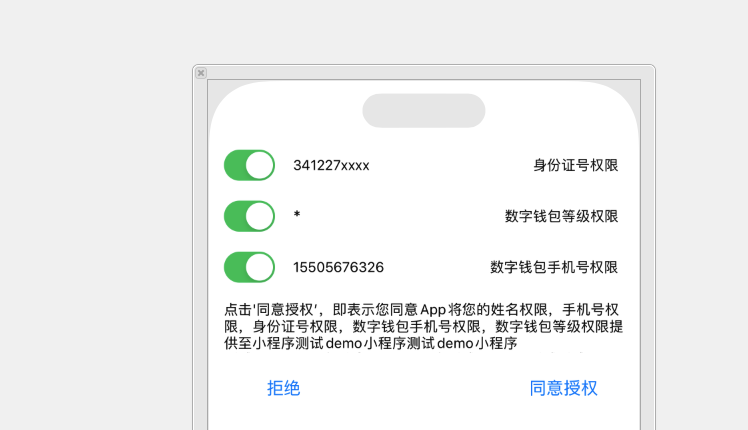
Example effect of the view:
# 2. In the custom API implementation, notify the Mini-Program of the App's authorization result.
    __block FATScopeCustomView *customView = [[[NSBundle mainBundle] loadNibNamed:@"FATScopeCustomView" owner:self options:nil] lastObject];
    [[FATClient sharedClient] registerScopeExtensionApi:@"finclipLogin" handler:^(FATAppletInfo *appletInfo, id param, FATScopeChecker *scopeChecker, FATExtensionApiCallback callback) {
        customView.frame = CGRectMake(0, 0, [UIScreen mainScreen].bounds.size.width, 300);
        [scopeChecker checkScopeWithView:customView];
        customView.scopeAuthCompleteHandler = ^(NSInteger result, NSArray<FATAppletScope *> * _Nonnull scopeArray) {
            if (result == 0) {
                // Deny
                callback(FATExtensionCodeFailure, nil);
            } else {
                // Allow
                callback(FATExtensionCodeSuccess, nil);
            }
            [scopeChecker dismissViewWithScopeList:scopeArray];
        };
    }];
# 3. Create the FinClipConf.js file in the Mini-Program's root directory and add this custom API.
module.exports = {
  extApi:[
    { //General interaction API
      name: 'finclipExtScope', //Extension API name, this API must be implemented by the Native side
      sync: false, //Whether it is a synchronous API
      params: { //Parameter format of the extension API, only necessary properties can be listed
        url: ''
      }
    }
  ]
}
# 4. Call this custom API in the Mini-Program.
ft.finclipExtScope({
    success: function (res) {
        console.log("Call custom API success");
        console.log(res);
    },
    fail: function (res) {
        console.log("Call custom API fail");
        console.log(res);
    }
});