
# Set More Menu in Mini-Program
# 1. Effect Display
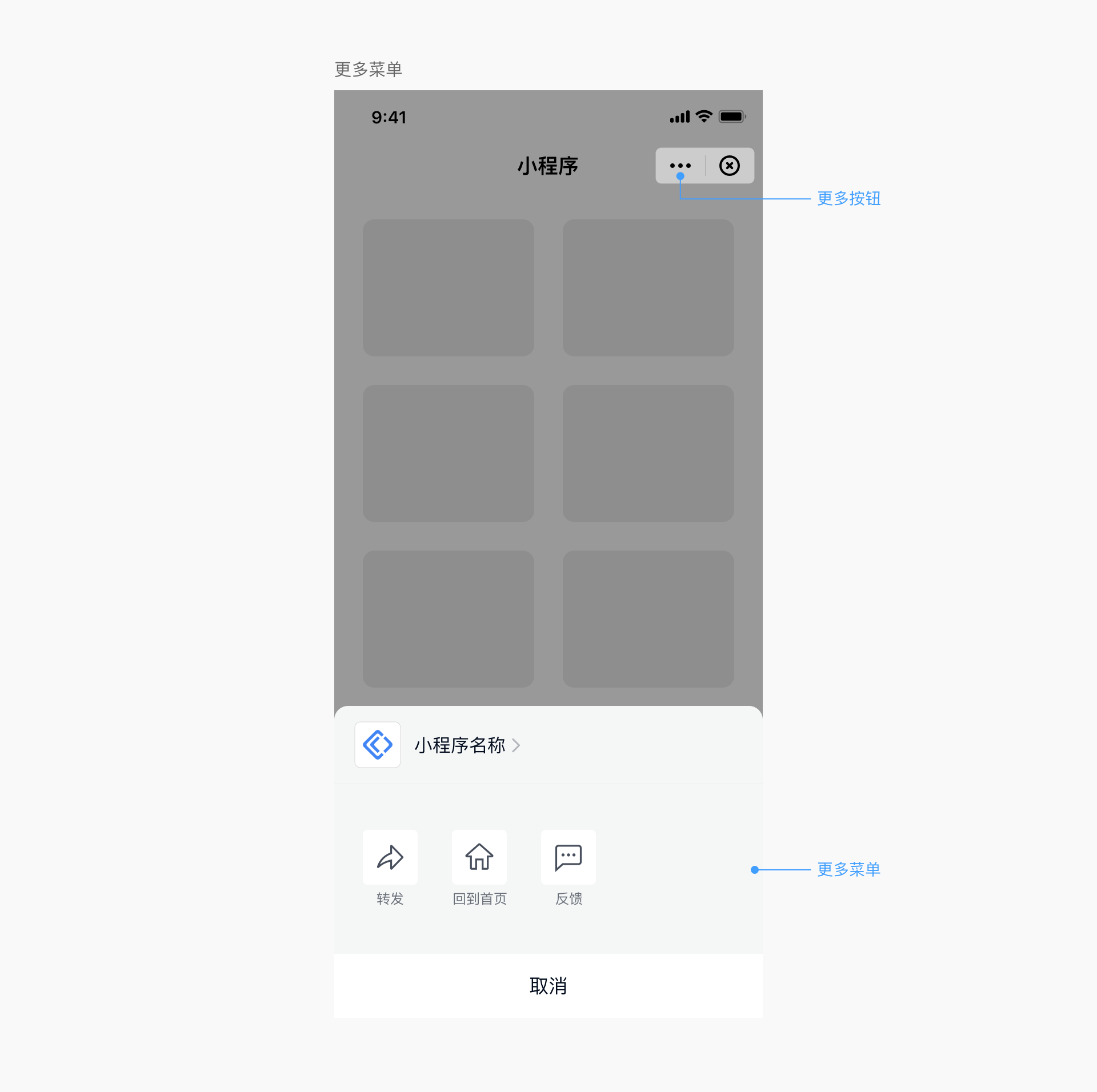
Click the "..." in the upper-right capsule to bring up the following more menu page:
# 2. Hide the "Forward" Button in the More Menu
# 2.1 Coverage Scope
This setting is implemented by the Host-App. Once set, all Mini-Programs, mini-games, and H5 applications within the App will implement this effect.
# 2.2 iOS Setting Method
When initializing the SDK, configure through the UI configuration item as follows:
FATUIConfig *uiConfig = [[FATUIConfig alloc] init];
//Hide the "Forward" button in the more menu
uiConfig.hideForwardMenu = YES;
# 2.3 Android Setting Method
When initializing the SDK, configure through the UI configuration item as follows:
FinAppConfig.UIConfig uiConfig = new FinAppConfig.UIConfig();
//Hide the "Forward" button in the more menu
uiConfig.setHideForwardMenu(true);
# 2.4 Desktop Setting Method
When initializing the SDK, configure using the finclip_init_with_config / finclip_init_with_json functions:
Pseudo-code example:
  params = finclip_create_params();
  finclip_params_set("appkey", "XXXXXXXXXX");
  // ... other required parameters
  finclip_params_set("more_menu.forward.visiable", "hidden");
  finclip_init_with_config(appstore, params);

  // Or use a JSON string
  params = {
      "appkey": "XXXXXXXXXX",
      // ... other required parameters
      "more_menu.forward.visiable": "hidden"
  }
  finclip_init_with_json(appstore, params);
# 2.5 Harmony Setting Method
When initializing the SDK, configure through the UI configuration item as follows:
//Hide the "Forward" button in the more menu
const uiConfig: IFinAppConfig.IUIConfig = {
  hideForwardMenu: true,
}
# 3. Hide the "Settings" Button in the More Menu
# 3.1 Coverage Scope
This setting is implemented by the Host-App. Once set, all Mini-Programs, mini-games, and H5 applications within the App will implement this effect.
# 3.2 iOS Setting Method
When initializing the SDK, configure through the UI configuration item as follows:
FATUIConfig *uiConfig = [[FATUIConfig alloc] init];
//Hide the "Settings" button in the more menu
uiConfig.hideSettingMenu = YES;
# 3.3 Android Setting Method
When initializing the SDK, configure through the UI configuration item as follows:
FinAppConfig.UIConfig uiConfig = new FinAppConfig.UIConfig();
//Hide the "Settings" button in the more menu
uiConfig.setHideSettingMenu(true);
# 3.4 Desktop Setting Method
When initializing the SDK, configure using the finclip_init_with_config / finclip_init_with_json functions:
Pseudo-code example:
  params = finclip_create_params();
  finclip_params_set("appkey", "XXXXXXXXXX");
  // ... other required parameters
  finclip_params_set("more_menu.setting.visiable", "hidden");
  finclip_init_with_config(appstore, params);

  // Or use a JSON string
  params = {
      "appkey": "XXXXXXXXXX",
      // ... other required parameters
      "more_menu.setting.visiable": "hidden",
  }
  finclip_init_with_json(appstore, params);
# 3.5 Harmony Setting Method
When initializing the SDK, configure through the UI configuration item as follows:
//Hide the "Settings" button in the more menu
const uiConfig: IFinAppConfig.IUIConfig = {
  hideSettingMenu: true,
}
# 4. Hide the "Back to Home" Button in the More Menu
# 4.1 Coverage Scope
This setting is implemented by the Host-App. Once set, all Mini-Programs, mini-games, and H5 applications within the App will implement this effect.
# 4.2 iOS Setting Method
When initializing the SDK, configure through the UI configuration item as follows:
FATUIConfig *uiConfig = [[FATUIConfig alloc] init];
//Hide the "Back to Home" button in the more menu
uiConfig.hideBackToHome = YES;
# 4.3 Android Setting Method
When initializing the SDK, configure through the UI configuration item as follows:
FinAppConfig.UIConfig uiConfig = new FinAppConfig.UIConfig();
//Hide the "Back to Home" button in the more menu
uiConfig.setHideBackHome(true);
# 4.4 Desktop Setting Method
When initializing the SDK, configure using the finclip_init_with_config / finclip_init_with_json functions:
Pseudo-code example:
  params = finclip_create_params();
  finclip_params_set("appkey", "XXXXXXXXXX");
  // ... other required parameters
  finclip_params_set("more_menu.home.visiable", "hidden");
  finclip_init_with_config(appstore, params);

  // Or use a JSON string
  params = {
      "appkey": "XXXXXXXXXX",
      // ... other required parameters
      "more_menu.home.visiable": "hidden",
  }
  finclip_init_with_json(appstore, params);
# 4.5 Harmony Setting Method
When initializing the SDK, configure through the UI configuration item as follows:
//Hide the "Back to Home" button in the more menu
const uiConfig: IFinAppConfig.IUIConfig = {
  hideBackToHome: true,
}
Note: The "Back to Home" button in the more menu has been deprecated after version 2.36.1. This configuration item now controls the "Back to Home" button on the navigation bar.
# 5. Hide the "Feedback and Complaints" Button in the More Menu
# 5.1 Coverage Scope
This setting is implemented by the Host-App. Once set, all Mini-Programs, mini-games, and H5 applications within the App will implement this effect.
# 5.2 iOS Setting Method
When initializing the SDK, configure through the UI configuration item as follows:
FATUIConfig *uiConfig = [[FATUIConfig alloc] init];
//Hide the "Feedback and Complaints" button in the more menu
uiConfig.hideFeedbackMenu = YES;
# 5.3 Android Setting Method
When initializing the SDK, configure through the UI configuration item as follows:
FinAppConfig.UIConfig uiConfig = new FinAppConfig.UIConfig();
//Hide the "Feedback and Complaints" button in the more menu
uiConfig.setHideFeedbackAndComplaints(true);
# 5.4 Desktop Setting Method
When initializing the SDK, configure using the finclip_init_with_config / finclip_init_with_json functions:
Pseudo-code example:
  params = finclip_create_params();
  finclip_params_set("appkey", "XXXXXXXXXX");
  // ... other required parameters
  finclip_params_set("more_menu.feedback.visiable", "hidden");
  finclip_init_with_config(appstore, params);

  // Or use a JSON string
  params = {
      "appkey": "XXXXXXXXXX",
      // ... other required parameters
      "more_menu.feedback.visiable": "hidden",
  }
  finclip_init_with_json(appstore, params);
# 5.5 Harmony Setting Method
When initializing the SDK, configure through the UI configuration item as follows:
//Hide the "Feedback and Complaints" button in the more menu
const uiConfig: IFinAppConfig.IUIConfig = {
  isHideFeedbackAndComplaints: true,
}
# 6. Hide the "Re-enter" Button in the More Menu
# 6.1 Coverage Scope
This setting is implemented by the Host-App. Once set, all Mini-Programs, mini-games, and H5 applications within the App will implement this effect.
# 6.2 iOS Setting Method
When initializing the SDK, configure through the UI configuration item as follows:
FATUIConfig *uiConfig = [[FATUIConfig alloc] init];
//Hide the "Re-enter" button in the more menu
uiConfig.hideRefreshMenu = YES;
# 6.3 Android Setting Method
When initializing the SDK, configure through the UI configuration item as follows:
FinAppConfig.UIConfig uiConfig = new FinAppConfig.UIConfig();
//Hide the "Re-enter" button in the more menu
uiConfig.setHideRefreshMenu(true);
# 6.4 Desktop Setting Method
When initializing the SDK, configure using the finclip_init_with_config / finclip_init_with_json functions:
  params = finclip_create_params();
  finclip_params_set("appkey", "XXXXXXXXXX");
  // ... other required parameters
  finclip_params_set("more_menu.refresh.visiable", "hidden");
  finclip_init_with_config(appstore, params);

  // Or use a JSON string
  params = {
      "appkey": "XXXXXXXXXX",
      // ... other required parameters
      "more_menu.refresh.visiable": "hidden",
  }
  finclip_init_with_json(appstore, params);
# 6.5 Harmony Setting Method
When initializing the SDK, configure through the UI configuration item as follows:
//Hide the "Re-enter" button in the more menu
const uiConfig: IFinAppConfig.IUIConfig = {
  hideRefreshMenu: true,
}
# 7. Hide the "Enable Debugging"/"Disable Debugging" Button in the More Menu
# 7.1 Scope
This setting is implemented by the Host-App. Once configured, all Mini-Programs, Mini-Games, and H5 applications within the Host-App will follow this effect.
# 7.2 iOS Configuration Method
When initializing the SDK, configure it through the UI configuration item as follows:
FATUIConfig *uiConfig = [[FATUIConfig alloc] init];
// Hide the "Enable Debugging"/"Disable Debugging" button in the more menu
uiConfig.hideDebugMenu = YES;
# 7.3 Android Configuration Method
When initializing the SDK, configure it through the UI configuration item as follows:
FinAppConfig.UIConfig uiConfig = new FinAppConfig.UIConfig();
// Hide the "Enable Debugging"/"Disable Debugging" button in the more menu
uiConfig.setHideDebugMenu(true);
# 7.4 Harmony Configuration Method
When initializing the SDK, configure it through the UI configuration item as follows:
// Hide the "Re-enter" button in the more menu
const uiConfig: IFinAppConfig.IUIConfig = {
  hideDebugMenu: true,
}
# 8. Display the "Share" Button in the More Menu
# 8.1 Scope
This setting is implemented by the App. Once configured, all Mini-Programs, Mini-Games, and H5 applications within the App will follow this effect.
# 8.2 iOS Configuration Method
When initializing the SDK, configure it through the UI configuration item as follows:
FATUIConfig *uiConfig = [[FATUIConfig alloc] init];
// Hide the "Share" button in the more menu
// Default value is YES (hidden)
uiConfig.hideShareAppletMenu = NO;
# 8.3 Android Configuration Method
When initializing the SDK, configure it through the UI configuration item as follows:
FinAppConfig.UIConfig uiConfig = new FinAppConfig.UIConfig();
// Hide the "Share" button in the more menu
// Default value is true (hidden)
uiConfig.setHideShareAppletMenu(false);
# 8.4 Harmony Configuration Method
When initializing the SDK, configure it through the UI configuration item as follows:
// Hide the "Re-enter" button in the more menu
const uiConfig: IFinAppConfig.IUIConfig = {
  hideShareAppletMenu: true,
}
# 9. Display the "Add to Desktop" Button in the More Menu
# 9.1 Scope
This setting is implemented by the App. Once configured, all online Mini-Programs within the App will follow this effect.
# 9.2 iOS Configuration Method
When initializing the SDK, configure it through the UI configuration item as follows:
FATUIConfig *uiConfig = [[FATUIConfig alloc] init];
// Hide the "Add to Desktop" button in the more menu
// Default value is YES (hidden)
uiConfig.hideAddToDesktopMenu = NO;
# 9.3 Android Configuration Method
When initializing the SDK, configure it through the UI configuration item as follows:
FinAppConfig.UIConfig uiConfig = new FinAppConfig.UIConfig();
// Whether to hide the "Add to Desktop" button in the more menu
// Default value is true (hidden)
uiConfig.setHideAddToDesktopMenu(false);
# 10. Display the "Favorite" Button in the More Menu
# 10.1 Scope
This setting is implemented by the App. Once configured, all online Mini-Programs, Mini-Games, and H5 applications within the App will follow this effect.
# 10.2 iOS Configuration Method
When initializing the SDK, configure it through the UI configuration item as follows:
FATUIConfig *uiConfig = [[FATUIConfig alloc] init];
// Hide the "Favorite/Unfavorite" button in the more menu
// Default value is YES (hidden)
uiConfig.hideFavoriteMenu = NO;
# 10.3 Android Configuration Method
FinAppConfig.UIConfig uiConfig = new FinAppConfig.UIConfig();
// Hide the "Favorite/Unfavorite" button in the more menu
// Default value is true (hidden)
uiConfig.setHideFavoriteMenu(false);
Note: The "Favorite" button must be used in conjunction with UserID. If UserID is not set, even if this is set to false (not hidden), the favorite button will not be displayed.
# 11. Custom Implementation of the More Panel
If you do not want to use the more panel provided by the SDK and wish to implement a custom more panel, you can achieve this as follows.
# 11.1 Scope
This setting is implemented by the App. Once configured, it only applies to all online Mini-Programs within the App.
You can implement different more panel effects for different Mini-Program IDs. The more panel is entirely designed and implemented by the App, where the view styles and displayed menu items can be controlled independently.
# 11.2 iOS Configuration Method
Implement appletInfo:didClickMoreBtnAtPath: in FATAppletDelegate.
First, define a custom FATClientHelper class that implements the FATAppletDelegate protocol.
#import <Foundation/Foundation.h>
#import <FinApplet/FinApplet.h>

@interface FATClientHelper : NSObject<FATAppletDelegate>

+ (instancetype)shareInstance;

@end
Then, after successfully initializing the SDK, set the SDK's delegate to the FATClientHelper object.
Example Code
[[FATClient sharedClient] initWithConfig:config error:nil];
[FATClient sharedClient].delegate = [FATClientHelper shareInstance];
- (BOOL)appletInfo:(FATAppletInfo *)appletInfo didClickMoreBtnAtPath:(NSString *)path
{
    // If you need to customize the more panel, write the logic to display the more panel here and return YES.
    // If you do not need to customize the more panel, you can omit this method or return NO.
    return NO;
}
# 11.3 Android Configuration Method
Customizing the more panel is achieved through CapsuleHandler. The CapsuleHandler will pass the onMoreButtonClick callback triggered by the Mini-Program's "..." click event to the Host Environment, which then implements the more panel effect.
/**
 * Proxy class used by the Host-App to take over capsule operations
 */
open class CapsuleHandler {
    /**
     * Triggered when the Mini-Program capsule "More" button is clicked
     *
     * @param context Mini-Program Context
     * @param appId Mini-Program ID
     */
    open fun onMoreButtonClick(context: Context, appId: String, handler: MoreButtonClickHandler)
}
An example implementation of the onMoreButtonClick method is as follows:
public class AppletCapsuleHandler extends CapsuleHandler {
    @Override
    public void onMoreButtonClick(@NotNull Context context, @NotNull String appId, @NotNull MoreButtonClickHandler handler) {
        // Implement the logic to show/hide the custom more panel.
        // If you do not need a custom more panel, call handler.changeDefaultMoreMenuVisibility() to show/hide the default more panel.
    }
}
# 11.4 Desktop Configuration Method
When initializing the SDK, configure it using the finclip_register_more_btn_handler function:
/**
 * @brief More menu button type
 *
 */
enum FinClipMoreMenuBtnType {
  /**
   * @brief Normal menu type, no interaction with the Mini-Program required
   */
  kMoreBtnCommon = 0,
  /**
   * @brief Menu type requiring interaction with the Mini-Program, such as the share Mini-Program button. When clicking the button to share the Mini-Program, some data from the Mini-Program may need to be obtained.
   */
  kMoreBtnMiniProgram = 1
};

/**
 * @brief Top-right corner more button callback
 * @param appId Mini-Program ID
 * @param id Icon ID, null/empty string indicates clicking the top-right corner more button
 * @param params Data returned by the Mini-Program for onMiniProgram type
 * @return Return 1 to indicate handling the button click event yourself, without executing the default action (popup menu). Return 0 to indicate needing to execute the default action.
 */
typedef int (*FinclipMoreHandle)(const char* appid, const char* id, const char* params, void* input);

/**
 * @brief Register top-right corner more menu callback
 *
 * @param appid Mini-Program corresponding appid
 * @param menu_id Icon ID, if it's the top-right corner more button, fill in nullptr
 * @param title Menu item title, if it's the top-right corner more button, fill in nullptr
 * @param icon Menu item icon path, if it's the top-right corner more button, fill in nullptr
 * @param type Button type, if it's the top-right corner more button, fill in kMoreBtnCommon
 * @param handle Callback handler
 * @param input Pass-through to callback function
 *
 * @return Call result
 * @retval 0 Success
 * @retval <0 Failure
 */
FINCLIP_DLL_EXPORT int FINSTDMETHODCALLTYPE finclip_register_more_btn_handler(
    const char* appid, const char* menu_id, const char* title, const char* icon,
    FinClipMoreMenuBtnType type, FinclipMoreHandle handle, void* input);
# 11.5 Harmony Configuration Method
Customizing the more panel is achieved through CapsuleHandler. The CapsuleHandler will pass the onMoreButtonClick callback triggered by the Mini-Program's "..." click event to the Host Environment, which then implements the more panel effect.
/**
 * Proxy class used by the Host-App to take over capsule operations
 */
class CapsuleHandler {
    /**
     * Triggered when the close button is clicked
     * @param appId Mini-Program id
     * @param apiServer Mini-Program apiServer
     * @returns Return true to indicate the host handles it itself, return false to indicate the host has handled it and still executes subsequent default actions
     */
    public onCloseButtonClick(appId: string, apiServer: string): boolean

    /**
     * Triggered when the more button is clicked
     * @param appId Mini-Program id
     * @param apiServer Mini-Program apiServer
     * @returns Return true to indicate the host handles it itself, return false to indicate the host has handled it and still executes subsequent default actions
     */
    public onMoreButtonClick(appId: string, apiServer: string): boolean
  }
The implementation example of the onMoreButtonClick method is as follows:
import { FinAppProxyHandlerManager, IFinProxyHandlerItem } from '@finclip/sdk'

class CapsuleHandler extends IFinProxyHandlerItem.CapsuleHandler {
   onMoreButtonClick(appId: string, apiServer: string): boolean {
    // do something
    return false
  }
}


FinAppProxyHandlerManager.capsuleHandler = new CapsuleHandler()
# 12. Injecting More Menu Items into the More Panel
The current SDK supports adding custom menu items to the more panel, and these menu items can be categorized into two types: common and onMiniProgram.
- common: This type does not require additional handling by the Mini-Program.
- onMiniProgram: When this type of menu item is clicked, it fetches data from the Mini-Program to provide to the App's business logic.
Note
- Custom menu items can be configured in the Management Console to show or hide. The icon ID configured in the Management Console must match the custom icon ID. If the Management Console does not configure, it will not affect the menus injected by the App.
- For
onMiniProgramtype menus, if they need to be displayed, the current page must implement theon{MenuId}ButtonHandler(with id capitalized), for example, if the icon ID isShareDingDing, then the methodonShareDingDingButtonHandlermust be implemented. - The final menu items displayed in the more panel are the intersection of the menu items returned by the Management Console, the menu items injected by the App, and the menu items implemented by the current page of the Mini-Program.
For example:
If the set of menu item events implemented on the current page of the Mini-Program is A;
The set of menu items injected by the App is B, including the set B1 of common type menus and the set B2 of onMiniProgram type menus;
The set of menus configured in the Management Console is C;
The final result of the custom menu set displayed is divided into two cases:
If C is empty (null on Android, nil on iOS), then:
Take the intersection of A and B2 to get D;
Take the union of D and B1 to get E;
The final result is E.If C is not empty (not null on Android, not nil on iOS), then:
Take the intersection of A and B2 to get D;
Take the union of D and B1 to get E;
Take the intersection of E and C to get F;
The final result is F.
Note
- If C is [], it means no custom menus will be displayed.
- For work that needs to be done on the Mini-Program side, refer to Mini-Program-API-Custom Menu
- Why take the intersection? Since the behavior of custom menus needs to be implemented by the App, if only configured by the backend, it could lead to a situation where the menu is displayed but clicking it has no response.
# 12.1 Scope
This setting is implemented by the App and can inject different custom menu items into the more panel of the SDK for different Mini-Program IDs.
# 12.2 iOS Setting Method
First, implement the custom menu model, which needs to conform to the FATAppletMenuProtocol protocol.
#import <Foundation/Foundation.h>
#import <FinApplet/FinApplet.h>

@interface FATCustomMenuModel : NSObject<FATAppletMenuProtocol>

@end
#import "FATCustomMenuModel.h"

@implementation FATCustomMenuModel

@synthesize menuId, menuIconImage, menuIconDarkImage, menuTitle, menuType;

@end
Then, create a custom FATClientHelper class that implements customMenusInApplet:atPath: and customMenu:inApplet:didClickAtPath: in FATAppletDelegate.
#import <Foundation/Foundation.h>
#import <FinApplet/FinApplet.h>

@interface FATClientHelper : NSObject<FATAppletMoreMenuDelegate>

+ (instancetype)shareInstance;

@end
Next, after the SDK initialization is successful, set the SDK's delegate to the FATClientHelper object.
Example Code
[[FATClient sharedClient] initWithConfig:config error:nil];
[FATClient sharedClient].moreMenuDelegate = [FATClientHelper shareInstance];
Finally, implement the delegate methods in FATClientHelper
// Return the menu objects to be injected; the menu objects must conform to the FATAppletMenuProtocol protocol
// Menu objects are divided into two types (default is Common type):
// 1.Common type: Displayed when configured
// 2.OnMiniProgram type: Requires backend configuration + Mini-Program configuration, displaying the set with the same menuId
// PS: Here we maintain compatibility with older versions. If the backend version is not upgraded or not configured after upgrading, just adapt the menu object’s menuId to NSString type
- (NSArray<id<FATAppletMenuProtocol>> *)customMenusInApplet:(FATAppletInfo *)appletInfo atPath:(NSString *)path
{
    FATCustomMenuModel *favModel1 = [[FATCustomMenuModel alloc] init];
    favModel1.menuId = @"WXShareAPPFriends";
    favModel1.menuTitle = @"WeChat Friends";
    favModel1.menuIconImage = [UIImage imageNamed:@"mini_menu_chat"];
    favModel1.menuType = FATAppletMenuStyleOnMiniProgram;// For menu types that need interaction with the Mini-Program, such as sharing buttons, which may need to obtain some data from the Mini-Program when clicked

    // Default is a normal menu type, no interaction with the Mini-Program needed
    FATCustomMenuModel *favModel2 = [[FATCustomMenuModel alloc] init];
    favModel2.menuId = @"WXShareAPPTimeline";
    favModel2.menuTitle = @"WeChat Moments";
    favModel2.menuIconImage = [UIImage imageNamed:@"mini_menu_timeline"];

    return @[favModel1, favModel2];
}

// Event when a custom menu is clicked (old version, used when the backend is not upgraded or not configured after upgrading)
- (void)customMenu:(id<FATAppletMenuProtocol>)customMenu inApplet:(FATAppletInfo *)appletInfo didClickAtPath:(NSString *)path
{
    NSLog(@"Clicked %@",customMenu.menuTitle);
    NSLog(@"path = %@",path);
}

// Event when a custom menu is clicked (new version, used when the backend and Mini-Program are configured)
- (void)clickCustomItemMenuWithInfo:(NSDictionary *)contentInfo inApplet:(FATAppletInfo *)appletInfo completion:(void (^)(FATExtensionCode code, NSDictionary *result))completion
{
    /**
    contentInfo contains
    {
         @"title": @"Title",
         @"description": @"Description",
         @"imageUrl": @"Image Path",
         @"path": @"Mini-Program page path when clicked",
         @"menuId": @"ID of the clicked menu button",
         @"params": self.params     // Original parameter data provided by the Mini-Program
    }
    */
    // Callback to the Mini-Program to notify the click event processing status
    completion(FATExtensionCodeSuccess, contentInfo);
}
# 12.3 Android Setting Method
The injection of menu items in the "More" menu is achieved through IAppletHandler. IAppletHandler provides callback methods getRegisteredMoreMenuItems and onRegisteredMoreMenuItemClicked to the Host-App, which implements specific business logic.
getRegisteredMoreMenuItems and onRegisteredMoreMenuItemClicked are as follows:
/**
 * Get registered "More" menu items
 *
 * @param appId Mini-Program ID
 * @return Registered "More" menu items
 */
fun getRegisteredMoreMenuItems(appId: String): List<MoreMenuItem>?

/**
 * Registered "More" menu item is clicked
 *
 * @param appId Mini-Program ID
 * @param path Mini-Program page path
 * @param menuItemId ID of the clicked menu item
 * @param appInfo Mini-Program information, a JSON string containing Mini-Program ID, name, icon, user ID, and forwarded data content.
 * The format of [appInfo] is as follows:
 * {
 *      "appTitle": " FinClip Mini-Program",
 *      "appAvatar": "https:\/\/www.finogeeks.club\/statics\/images\/swan_mini\/swan_logo.png",
 *      "appId": "5df36b3f687c5c00013e9fd1",
 *      "appType": "trial",
 *      "userId": "finogeeks",
 *      "params": {
 *           "title": "apt-test-tweet-API test published dynamic!@#¥%……&*(",
 *           "desc": "Your service expert nearby",
 *           "imageUrl": "finfile:\/\/tmp_fc15edd8-2ff6-4c54-9ee9-fe5ee034033d1576550313667.png",
 *           "path": "pages\/tweet\/tweet-detail.html?fcid=%40staff_staff1%3A000000.finogeeks.com&timelineId=db0c2098-031e-41c4-b9c6-87a5bbcf681d&shareId=3dfa2f78-19fc-42fc-b3a9-4779a6dac654",
 *           "appInfo": {
 *               "weixin": {
 *                   "path": "\/studio\/pages\/tweet\/tweet-detail",
 *                   "query": {
 *                       "fcid": "@staff_staff1:000000.finogeeks.com",
 *                       "timelineId": "db0c2098-031e-41c4-b9c6-87a5bbcf681d"
 *                    }
 *               }
 *           }
 *       }
 * }
 * Description of fields in [appInfo]:
 * appId Mini-Program ID
 * appTitle Mini-Program name
 * appAvatar Mini-Program avatar
 * appType Mini-Program type, where trial indicates trial version, temporary indicates temporary version, review indicates review version, release indicates online version, development indicates development version
 * userId User ID
 * params Other parameters passed through by the Mini-Program
 *
 * @param bitmap Mini-Program cover image. If [appInfo].params.imageUrl field is an http, https link address, then the Mini-Program cover image
 * takes the image corresponding to [appInfo].params.imageUrl, otherwise the Mini-Program cover image takes [bitmap].
 * @param callback Result callback.
 */
fun onRegisteredMoreMenuItemClicked(appId: String, path: String, menuItemId: String, appInfo: String?, bitmap: Bitmap?, callback: IAppletCallback)
The IAppletHandler instance needs to be passed in by calling the setAppletHandler(appletHandler: IAppletHandler) method of IAppletApiManager.
The implementation examples of the getRegisteredMoreMenuItems method and onRegisteredMoreMenuItemClicked method are as follows:
/**
 * {@link IAppletHandler} implementation class, used to implement some business scenarios, such as registering "More" menu items, forwarding Mini-Programs, etc.
 */
public class AppletHandler implements IAppletHandler {

    @NonNull
    private Context mContext;

    private AppletHandler() {
    }

    public AppletHandler(@NonNull Context context) {
        this.mContext = context;
    }

    @Nullable
    @Override
    public List<MoreMenuItem> getRegisteredMoreMenuItems(@NotNull String appId) {
        List<MoreMenuItem> items = new ArrayList<>();
        MoreMenuItem item0 = new MoreMenuItem("WXShareAPPFriends", "WeChat Good Friends", MoreMenuType.ON_MINI_PROGRAM);
        items.add(item0);
        MoreMenuItem item1 = new MoreMenuItem("WXShareAPPMoments", "WeChat Moments", MoreMenuType.ON_MINI_PROGRAM, true);
        items.add(item1);
        MoreMenuItem item2 = new MoreMenuItem("ShareSinaWeibo", "Sina Weibo", MoreMenuType.ON_MINI_PROGRAM);
        items.add(item2);
        MoreMenuItem item3 = new MoreMenuItem("ShareQQFirends", "QQ", MoreMenuType.ON_MINI_PROGRAM);
        items.add(item3);
        MoreMenuItem item4 = new MoreMenuItem("ShareDingDing", "Dingding", MoreMenuType.ON_MINI_PROGRAM);
        items.add(item4);
        MoreMenuItem item5 = new MoreMenuItem("ShareLinks", "Title to be determined by backend configuration", MoreMenuType.ON_MINI_PROGRAM);
        items.add(item5);
        MoreMenuItem item6 = new MoreMenuItem("SharePicture", "SharePicture", MoreMenuType.ON_MINI_PROGRAM);
        items.add(item6);
        MoreMenuItem item7 = new MoreMenuItem("Restart", "Restart", MoreMenuType.COMMON);
        items.add(item7);
        MoreMenuItem item8 = new MoreMenuItem("Desktop", "Desktop", MoreMenuType.COMMON);
        items.add(item8);
        return items;
    }

    @Override
    public void onRegisteredMoreMenuItemClicked(@NotNull String appId, @NotNull String path, @NotNull String menuItemId, @Nullable String appInfo, @Nullable Bitmap bitmap, @NotNull IAppletCallback callback) {
        Toast.makeText(mContext, "Mini-Program " + appId + "'s " + path + " page menu " + menuItemId + " was clicked, appInfo : " + appInfo + " bitmap : " + bitmap, Toast.LENGTH_SHORT).show();
        callback.onSuccess(null);
    }
}
MoreMenuItem is a data class for menu items, as follows:
/**
 * More menu item
 *
 * @param id Menu item ID
 * @param title Menu item title
 * @param image Menu item icon URL
 * @param darkImage Menu item dark mode image URL
 * @param icon Resource ID corresponding to the menu item icon
 * @param type Menu item type
 * @param isEnable Whether the menu item is enabled
 */
data class MoreMenuItem(val id: String,
                        val title: String,
                        val image: String,
                        val darkImage: String,
                        @DrawableRes val icon: Int,
                        val type: MoreMenuType = MoreMenuType.COMMON,
                        val isEnable: Boolean = true) {

    /**
     * Constructor
     * @param id Menu item ID
     * @param title Menu item title
     * @param type Menu item type [MoreMenuType.COMMON] or [MoreMenuType.ON_MINI_PROGRAM]
     */
    constructor(id: String, title: String, type: MoreMenuType) : this(id, title, "", -1, type, true)
}
MoreMenuType is an enumeration class, as follows:
/**
 * More menu type
 * [COMMON] is a normal menu type that does not require interaction with Mini-Programs
 * [ON_MINI_PROGRAM] is a menu type that requires interaction with Mini-Programs, such as a Mini-Program sharing button. When clicking the button to share the Mini-Program, it may need to obtain some data from the Mini-Program
 */
enum class MoreMenuType {
    COMMON, ON_MINI_PROGRAM
}
# 12.4 Desktop Configuration Method
During SDK initialization, configure via the finclip_register_more_btn_handler function:
/**
 * @brief More menu button type
 *
 */
enum FinClipMoreMenuBtnType {
  /**
   * @brief Normal menu type, no interaction with Mini-Program required
   */
  kMoreBtnCommon = 0,
  /**
   * @brief A menu type that requires interaction with Mini-Programs, such as a Mini-Program sharing button. When clicking the button to share the Mini-Program, it may need to obtain some data from the Mini-Program
   */
  kMoreBtnMiniProgram = 1
};

/**
 * @brief Top-right corner more button callback
 * @param appId Mini-Program ID
 * @param id Icon ID, null/empty string indicates clicking the top-right corner more button
 * @param params Data returned by the Mini-Program for onMiniProgram type
 * @return Return 1 to handle the button click event independently without executing the default action (popup menu). Return 0 to execute the default action
 */
typedef int (*FinclipMoreHandle)(const char* appid, const char* id, const char* params, void* input);

/**
 * @brief Register top-right corner more menu callback
 *
 * @param appid Appid corresponding to the Mini-Program
 * @param menu_id Icon ID, if it's the top-right corner more button, fill in nullptr
 * @param title Menu item title, if it's the top-right corner more button, fill in nullptr
 * @param icon Menu item icon path, if it's the top-right corner more button, fill in nullptr
 * @param type Button type, if it's the top-right corner more button, fill in kMoreBtnCommon
 * @param handle Callback handler
 * @param input Pass-through parameter for the callback function
 *
 * @return Call result
 * @retval 0 Success
 * @retval <0 Failure
 */
FINCLIP_DLL_EXPORT int FINSTDMETHODCALLTYPE finclip_register_more_btn_handler(
    const char* appid, const char* menu_id, const char* title, const char* icon,
    FinClipMoreMenuBtnType type, FinclipMoreHandle handle, void* input);
# 12.5 Harmony Configuration Method
Customizing the more panel is implemented through MoreMenuHandler, specific parameters can be referenced at MoreMenuHandler.
class MoreMenuHandler {
  /**
   * Triggered when receiving information returned by the Mini-Program
   * @param contentInfo Information returned by the Mini-Program
   * @returns
   */
  public onCustomMenuItemClickWithInfo(appId: string, apiServer: string,
    contentInfo: IFinAppProxy.IMoreMenuItemContentInfo)

  /**
   * Triggered when the more menu button is clicked
   * @param type Unique identifier of the menu button
   * @param currentPath Current page path of the Mini-Program
   * @returns
   */
  public onMoreMenuItemClick(appId: string, apiServer: string, type: string, currentPath: string): boolean | void

  /**
   * Get the list of buttons for the more menu
   * @returns List of buttons for the more menu
   */
  public getMoreMenuItems(): IFinAppProxy.IMoreMenuItem[]
}
Example code
import { FinAppProxyHandlerManager, IFinAppProxy, IFinProxyHandlerItem } from '@finclip/sdk'
import { promptAction } from '@kit.ArkUI'

class MoreMenuHandler extends IFinProxyHandlerItem.MoreMenuHandler {
  onCustomMenuItemClickWithInfo(appId: string, apiServer: string,
    contentInfo: IFinAppProxy.IMoreMenuItemContentInfo) {
    // do something
  }

  onMoreMenuItemClick(appId: string, apiServer: string, menuItemId: string, currentPath: string): boolean | void {
    // do something
  }

  getMoreMenuItems(): IFinAppProxy.IMoreMenuItem[] {
    return [
      {
        label: 'Custom',
        icon: $r('app.media.app_icon'),
        menuItemId: 'custom',
        menuType: 'onMiniProgram'
      }
    ]
  }
}

FinAppProxyHandlerManager.moreMenuHandler = new MoreMenuHandler()
# 13. Hide the "Clear Cache" Button in the More Menu
# 13.1 Coverage Scope
This setting is implemented by the App. Once set, all Mini-Programs, Mini-Games, and H5 applications within the App will follow this effect.
# 13.2 iOS Configuration Method
During SDK initialization, configure via UI configuration options, as follows:
FATUIConfig *uiConfig = [[FATUIConfig alloc] init];
//Hide the "Clear Cache" button in the more menu
uiConfig.hideClearCacheMenu = YES;
# 13.3 Android Configuration Method
During SDK initialization, configure via UI configuration options, as follows:
FinAppConfig.UIConfig uiConfig = new FinAppConfig.UIConfig();
//Hide the "Clear Cache" button in the more menu
uiConfig.setHideClearCacheMenu(true);
# 13.4 Harmony Configuration Method
During SDK initialization, configure via UI configuration options, as follows:
//Hide the "Settings" button in the more menu
const uiConfig: IFinAppConfig.IUIConfig = {
  hideClearCacheMenu: true,
}