
# Setting Mini-Program Capsule
# 1. Effect Preview
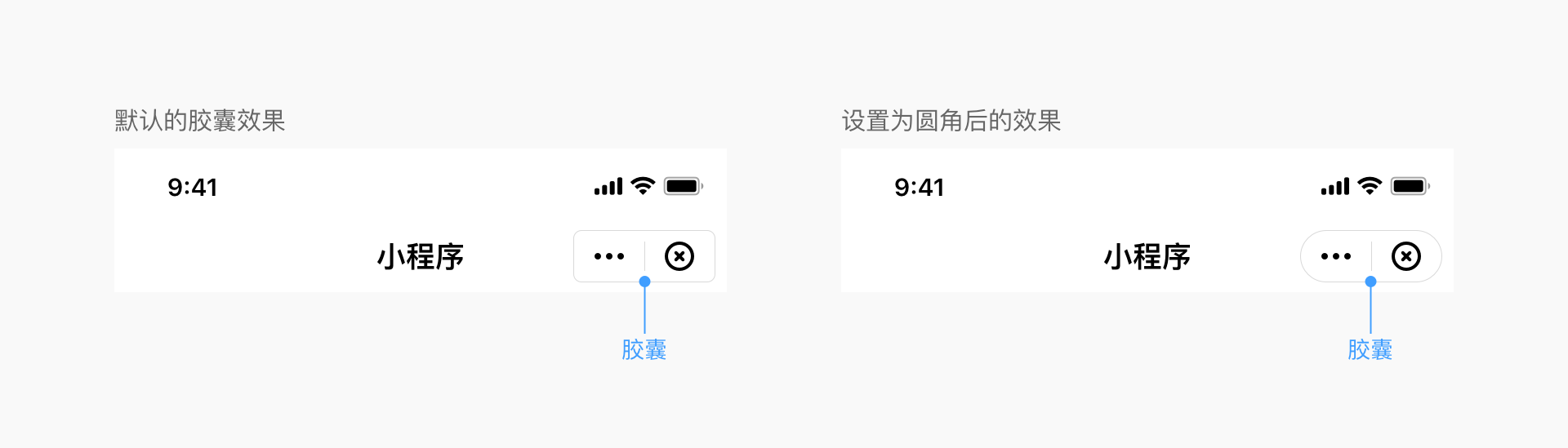
# 2. Setting Mini-Program Capsule UI Style
# 2.1 Scope
Modifications to the Mini-Program Capsule UI style must be implemented by the Host-App. Once set, all Mini-Programs, Mini-Games, and H5 applications within the Host-App will adopt this effect.
# 2.2 iOS Configuration Method
Configure via the CapsuleConfig class during SDK initialization:
//Set the width of the top-right capsule view to 88
[FATClient sharedClient].uiConfig.capsuleConfig.capsuleWidth = 88;
Description of specific configurable properties:
/**
 Width of the top-right capsule view, default value is 88
 */
@property (nonatomic, assign) CGFloat capsuleWidth;

/**
 Height of the top-right capsule view, default value is 32
 */
@property (nonatomic, assign) CGFloat capsuleHeight;

/**
 Right margin of the top-right capsule view, default value is 10
 */
@property (nonatomic, assign) CGFloat capsuleRightMargin;

/**
 Corner radius of the top-right capsule view, default value is 5
 */
@property (nonatomic, assign) CGFloat capsuleCornerRadius;

/**
 Border width of the top-right capsule view, default value is 0.8
 */
@property (nonatomic, assign) CGFloat capsuleBorderWidth;

/**
 Light color for the border of the top-right capsule view
 */
@property (nonatomic, strong) UIColor *capsuleBorderLightColor;

/**
 Dark color for the border of the top-right capsule view
 */
@property (nonatomic, strong) UIColor *capsuleBorderDarkColor;

/**
 Light background color for the top-right capsule view
 */
@property (nonatomic, strong) UIColor *capsuleBgLightColor;

/**
 Dark background color for the top-right capsule view
 */
@property (nonatomic, strong) UIColor *capsuleBgDarkColor;

/**
 Image object for the light 'More' button inside the capsule. Uses default icon if not provided.
 */
@property (nonatomic, strong) UIImage *moreLightImage;

/**
 Image object for the dark 'More' button inside the capsule. Uses default icon if not provided.
 */
@property (nonatomic, strong) UIImage *moreDarkImage;

/**
 Width of the 'More' button inside the capsule; height equals width.
 */
@property (nonatomic, assign) CGFloat moreBtnWidth;

/**
 Left margin of the 'More' button inside the capsule.
 */
@property (nonatomic, assign) CGFloat moreBtnLeftMargin;

/**
 Image object for the light 'Close' button inside the capsule. Uses default icon if not provided.
 */
@property (nonatomic, strong) UIImage *closeLightImage;

/**
 Image object for the dark 'Close' button inside the capsule. Uses default icon if not provided.
 */
@property (nonatomic, strong) UIImage *closeDarkImage;

/**
 Width of the 'Close' button inside the capsule; height equals width.
 */
@property (nonatomic, assign) CGFloat closeBtnWidth;

/**
 Left margin of the 'Close' button inside the capsule.
 */
@property (nonatomic, assign) CGFloat closeBtnLeftMargin;

/**
 Light color for the divider inside the capsule.
 */
@property (nonatomic,strong) UIColor *capsuleDividerLightColor;

/**
 Dark color for the divider inside the capsule.
 */
@property (nonatomic,strong) UIColor *capsuleDividerDarkColor;
# 2.3 Android Configuration Method
Configure via the CapsuleConfig class during SDK initialization:
FinAppConfig.UIConfig uiConfig = new FinAppConfig.UIConfig();
CapsuleConfig capsuleConfig = new CapsuleConfig();
uiConfig.setCapsuleConfig(capsuleConfig);
Description of specific configurable properties:
/**
 * Capsule button configuration
 */
public static class CapsuleConfig {

    /**
     * Width of the top-right capsule view, default value is 88
     */
    public float capsuleWidth = 88;

    /**
     * Height of the top-right capsule view, default value is 32
     */
public float capsuleHeight = 32;

    /**
     * Right margin of the top-right capsule view
     */
    public float capsuleRightMargin = 7;

    /**
     * Corner radius of the top-right capsule view, default value is 5
     */
    public float capsuleCornerRadius = 5;

    /**
     * Border width of the top-right capsule view, default value is 0.8
     */
    public float capsuleBorderWidth = 1f;

    /**
     * Light background color for the capsule
     */
    public int capsuleBgLightColor = 0x33000000;

    /**
     * Dark background color for the capsule
     */
    public int capsuleBgDarkColor = 0x80ffffff;

    /**
     * Light color for the border of the top-right capsule view
     */
    public int capsuleBorderLightColor = 0x80ffffff;

    /**
     * Dark color for the border of the top-right capsule view
     */
    public int capsuleBorderDarkColor = 0x26000000;

    /**
     * Light color for the capsule divider
     */
    public int capsuleDividerLightColor = 0x80ffffff;

    /**
     * Dark color for the capsule divider
     */
    public int capsuleDividerDarkColor = 0x26000000;

    /**
     * Image resource for the light 'More' button inside the capsule. Uses default icon if not provided.
     */
    public int moreLightImage = R.drawable.miniapps_more_light;

    /**
     * Image resource for the dark 'More' button inside the capsule. Uses default icon if not provided.
     */
    public int moreDarkImage = R.drawable.miniapps_more_dark;

    /**
     * Width of the 'More' button inside the capsule; height equals width.
     */
    public float moreBtnWidth = 32;

    /**
     * Left margin of the 'More' button inside the capsule.
     */
    public float moreBtnLeftMargin = 6;

    /**
     * Image resource for the light 'Close' button inside the capsule. Uses default icon if not provided.
     */
    public int closeLightImage = R.drawable.miniapps_close_light;

    /**
     * Image resource for the dark 'Close' button inside the capsule. Uses default icon if not provided.
     */
    public int closeDarkImage = R.drawable.miniapps_close_dark;

    /**
     * Width of the 'Close' button inside the capsule; height equals width.
     */
    public float closeBtnWidth = 32;

    /**
     * Left margin of the 'Close' button inside the capsule.
     */
    public float closeBtnLeftMargin = 6;
}
# 2.4 Desktop Configuration Method
Configure via the finclip_init_with_config / finclip_init_with_json function during SDK initialization:
Pseudo-code example:
  params = finclip_create_params();
  finclip_params_set("appkey", "XXXXXXXXXX");
  // ... Other required parameters
  finclip_params_set("capsule.width", "56");
  finclip_params_set("capsule.height", "32");
 finclip_params_set("capsule.right_margin", "40");
  finclip_init_with_config(appstore, params);

  // Or use JSON string
  params = {
      "appkey": "XXXXXXXXXX",
      // ... Other required parameters
      "capsule.width": "56",
      "capsule.height": "32",
      "capsule.right_margin": "40",
  }
  finclip_init_with_json(appstore, params);
Specific configurable properties:
| Property | Type | Description |
|---|---|---|
| capsule.width | string | Width of the top-right capsule view, default value is 88 |
| capsule.height | string | Height of the top-right capsule view, default value is 32 |
| capsule.right_margin | string | Right margin of the top-right capsule view, default value is 10 |
| capsule.radius | string | Corner radius of the top-right capsule view, default value is 4 |
| capsule.border.width | string | Border width of the top-right capsule view, default value is 1 |
| capsule.border.light_color | string | Light color for the border of the top-right capsule view |
| capsule.border.dark_color | string | Dark color for the border of the top-right capsule view |
| capsule.background.light_color | string | Light background color for the top-right capsule view |
| capsule.background.dark_color | string | Dark background color for the top-right capsule view |
| capsule.more.light_image | string | Image path for the light 'More' button inside the capsule |
| capsule.more.dark_image | string | Image path for the dark 'More' button inside the capsule |
| capsule.more.width | string | Width of the 'More' button inside the capsule; height equals width |
| capsule.more.left_margin | string | Left margin of the 'More' button inside the capsule |
| capsule.close.light_image | string | Image path for the light 'Close' button inside the capsule |
| capsule.close.dark_image | string | Image path for the dark 'Close' button inside the capsule |
| capsule.close.width | string | Width of the 'Close' button inside the capsule; height equals width |
| capsule.close.left_margin | string | Left margin of the 'Close' button inside the capsule |
| capsule.hide_before_open | string | Hide the capsule during the opening animation |
# 2.5 HarmonyOS Configuration Method
Set capsuleConfig during SDK initialization.
const capsuleConfig: IFinAppConfig.ICapsuleConfig = {}
Specific configurable properties:
| Property | Type | Description |
|---|---|---|
| capsule.capsuleWidth | number | Width of the top-right capsule view, default value is 88 |
| capsule.capsuleHeight | number | Height of the top-right capsule view, default value is 32 |
| capsule.capsuleRightMargin | number | Right margin of the top-right capsule view, default value is 7 |
| capsule.capsuleCornerRadius | number | Corner radius of the top-right capsule view, default value is 16 |
| capsule.capsuleBorderWidth | number | Border width of the top-right capsule view, default value is 0.5 |
| capsule.capsuleBorderLightColor | string | Light color for the border of the top-right capsule view |
| capsule.capsuleBorderDarkColor | string | Dark color for the border of the top-right capsule view |
| capsule.capsuleBgLightColor | string | Light background color for the top-right capsule view |
| capsule.capsuleBgDarkColor | string | Dark background color for the top-right capsule view |
| capsule.moreLightImage | ResourceStr | Image path for the light 'More' button inside the capsule |
| capsule.moreDarkImage | ResourceStr | Image path for the dark 'More' button inside the capsule |
| capsule.moreBtnWidth | number | Width of the 'More' button inside the capsule; height equals width |
| capsule.moreBtnLeftMargin | number | Left margin of the 'More' button inside the capsule |
| capsule.closeLightImage | ResourceStr | Image path for the light 'Close' button inside the capsule |
| capsule.closeDarkImage | ResourceStr | Image path for the dark 'Close' button inside the capsule |
| capsule.closeBtnWidth | number | Width of the 'Close' button inside the capsule; height equals width |
| capsule.closeBtnLeftMargin | number | Left margin of the 'Close' button inside the capsule |
| capsule.capsuleDividerLightColor | string | Light color for the divider inside the capsule |
| capsule.capsuleDividerDarkColor | string | Dark color for the divider inside the capsule |
# 3. Hiding the 'More' Button
# 3.1 Scope
This configuration is set by the Mini-Program itself. Each Mini-Program displays different effects based on its own configuration.
# 3.2 Configuration Method
Modify the global window configuration in the Mini-Program's app.json file.
{
  "window":{
    "navigationBarHideMoreButton": true
  }
}
# 4. Method to Hide the Close Button During Mini-Program Opening Animation
# 4.1 Scope
This setting is implemented by the Host-App. Once set, all Mini-Programs within the Host-App will adopt this effect.
This method is primarily used to control whether to hide the close button in the Navigation Bar during the Mini-Program loading process (before the Mini-Program Service Layer loads successfully and before the Base Library transmits the Mini-Program configuration information to the SDK).
# 4.2 iOS Configuration Method
Configure via the CapsuleConfig class during SDK initialization:
//Hide the close button during the Mini-Program opening animation
[FATClient sharedClient].uiConfig.hideTransitionCloseButton = YES;
# 4.3 Android Configuration Method
Configure via UIConfig during SDK initialization, as follows:
// UI configuration
FinAppConfig.UIConfig uiConfig = new FinAppConfig.UIConfig();
// Whether to hide the top-right close button
uiConfig.setHideNavigationBarCloseButton(true);
# 4.4 HarmonyOS Configuration Method
Add the configuration item when starting the Mini-Program, as follows:
client?.startApplet({
  appId: appid,
  apiServer: apiServer,
  hideTransitionCloseButton: true
})
# 5. Method to Hide the Close Button After the Mini-Program is Fully Opened
# 5.1 Scope
This configuration is set by the Mini-Program itself. Each Mini-Program displays different effects based on its own configuration.
# 5.2 Configuration Method
Modify the global window configuration in the Mini-Program's app.json file.
{
  "window":{
    "navigationBarHideCloseButton": true
  }
}