
# Mini-Program Management
Mini-Program Management primarily introduces the APIs for operating Mini-Programs, including: opening a Mini-Program, closing a Mini-Program, searching for Mini-Programs, etc.
# 1. Open a Mini-Program
Supported App Types
Mini-Program ✅ Mini-Game ✅ H5 Application ✅
Different scenarios use different APIs to open a Mini-Program. Therefore, we provide multiple APIs for opening Mini-Programs.
- Open an online Mini-Program. This generally only requires the Mini-Program ID and server address. This API can only open the official version and the review version of the Mini-Program.
- Open a Mini-Program via QR code. In this scenario, scan the QR code on the Mini-Program platform, extract the content from the QR code, and then use that content to open the Mini-Program. QR codes for the official version, trial version, review version, real-device debugging version, and preview versions of the Mini-Program can all be opened using this API.
- Open a Mini-Program via URL Scheme. This scenario involves embedding a URL Scheme URI in an H5 webpage, triggering the opening of the Mini-Program within the app. It only supports opening the officially published version of the Mini-Program.
# 1.1 Normal Opening of a Mini-Program
When opening a Mini-Program, it first checks if there is a cached Mini-Program locally. If not, it automatically downloads the Mini-Program from the remote server and then opens it. If there is a cached Mini-Program, it opens the local version first and then verifies whether there is a new version on the server.
If a new version exists, it downloads the updated Mini-Program, which will be used the next time it is opened. If no new version exists, nothing happens.
RemoteFinAppletRequest
| Property | Type | Description |
|---|---|---|
| appId | String | Mini-Program ID, required |
| apiServer | String | Server where the Mini-Program belongs, required |
| appTitle | String | Mini-Program name, optional |
| appAvatar | String | Network address of the Mini-Program icon, optional |
| startParams | FinAppInfo.StartParams | Mini-Program startup parameters, supported keys include path and query, optional |
| processMode | ProcessMode | Process mode. Enum type, default is [ProcessMode.MULTI], i.e., multi-process mode |
| taskMode | TaskMode | Task parameter. Enum type, default is [TaskMode.MULTI], i.e., multi-task mode |
| schemes | Array.<String> | Custom scheme array |
| hideMiniProgramCloseButton | boolean | Whether to hide the close button in the Mini-Program page capsule, default is false |
| hideMiniProgramMoreButton | boolean | Whether to hide the more button in the Mini-Program page capsule, default is false |
| sequence | Int | Mini-Program index, optional |
| offlineLibraryPath | String | Path to the offline Mini-Program package. You can pass in a local Mini-Program package path to speed up the first launch, optional |
| offlineFrameworkZipPath | String | Path to the offline Base Library package. You can pass in a Base Library path to speed up the first launch, optional |
| from | Int | Source, recorded in APM events during data reporting |
| reLaunchMode | ReLaunchMode | Mode for executing reLaunch when the Mini-Program hot starts. Enum type, default is [ReLaunchMode.PARAMS_EXIST], i.e., as long as there are startup parameters (startup parameters are neither null nor empty strings, regardless of whether they are the same as the last startup parameters), reLaunch is executed |
| backgroundColorContent | Int | Background color of the Mini-Program page container |
| forceUpdate | boolean | Whether to force the latest version to open, default is false |
| appletAutoAuthorize | boolean? | Whether to automatically allow permissions requested at the Mini-Program level, default is null |
# 1.1.1 Open a Mini-Program (Basic Parameters)
# API
/**
 * Start a Mini-Program by passing a parameter encapsulation object
 * @param request Parameter encapsulation, including RemoteFinAppletRequest, QrCodeFinAppletRequest, LocalFinAppletRequest, DecryptFinAppletRequest,
 * It is recommended to use IFinAppletRequest.fromAppId, IFinAppletRequest.fromQrCode, IFinAppletRequest.fromDecrypt methods to generate corresponding request objects.
 */
fun startApplet(context: Context, request: IFinAppletRequest, callback: FinCallback<String?>? = null)
# Example Usage
# 1.1.2 Open a Mini-Program (With Startup Parameters)
# API
/**
 * Start a Mini-Program by passing a parameter encapsulation object
 * @param request Parameter encapsulation, including RemoteFinAppletRequest, QrCodeFinAppletRequest, LocalFinAppletRequest, DecryptFinAppletRequest,
 * It is recommended to use IFinAppletRequest.fromAppId, IFinAppletRequest.fromQrCode, IFinAppletRequest.fromDecrypt methods to generate corresponding request objects.
 */
fun startApplet(context: Context, request: IFinAppletRequest, callback: FinCallback<String?>? = null)
Pass in a RemoteFinAppletRequest object and set the startup parameters using the setStartParams method.
# Example Usage
# 1.1.3 Open a Mini-Program (Using Offline Package)
Since the first time you open a Mini-Program, both the Mini-Program package and the Base Library package need to be downloaded, the initial startup may be slow. To address this situation, we can download the Mini-Program package and Base Library package in advance and place them in the project for packaging; or we can download the Mini-Program and Base Library package at an appropriate time after the app is launched.
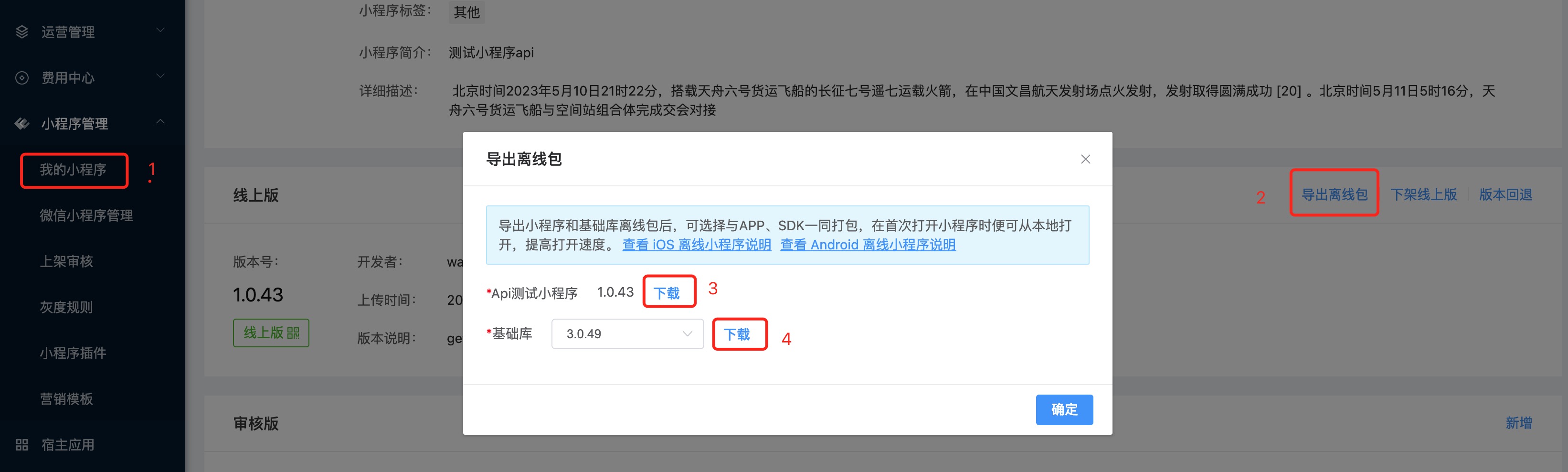
Note:
- If the offline package is placed in the project's assets directory, it needs to be copied or moved to the app's sandbox directory first.
- If the offline package is downloaded to the app's sandbox directory, you only need to set the path in the request.
# 1.2 Open a Mini-Program via QR Code
Scan the Mini-Program QR code in the platform, parse the QR code content, and pass it to the interface to open the Mini-Program.
QrCodeFinAppletRequest
| Property | Type | Description |
|---|---|---|
| qrCode | String | QR code content, required |
| appTitle | String | Mini-Program name, optional |
| appAvatar | String | Network address of the Mini-Program icon, optional |
| processMode | ProcessMode | Process mode. Enum type, default is [ProcessMode.MULTI], i.e., multi-process mode |
| taskMode | TaskMode | Task parameter. Enum type, default is [TaskMode.MULTI], i.e., multi-task mode |
| schemes | Array.<String> | Custom scheme array |
| hideMiniProgramCloseButton | boolean | Whether to hide the close button in the Mini-Program page capsule, default is false |
| hideMiniProgramMoreButton | boolean | Whether to hide the more button in the Mini-Program page capsule, default is false |
| from | Int | Source, recorded in APM events during data reporting |
| reLaunchMode | ReLaunchMode | Mode for executing reLaunch when the Mini-Program hot starts. Enum type, default is [ReLaunchMode.PARAMS_EXIST], i.e., as long as there are startup parameters (startup parameters are neither null nor empty strings, regardless of whether they are the same as the last startup parameters), reLaunch is executed |
| backgroundColorContent | Int | Background color of the Mini-Program page container |
| forceUpdate | boolean | Whether to force the latest version to open, default is false |
| appletAutoAuthorize | boolean? | Whether to automatically allow permissions requested at the Mini-Program level, default is null |
# API
/**
 * Start a Mini-Program by passing a parameter encapsulation object
 * @param request Parameter encapsulation, including RemoteFinAppletRequest, QrCodeFinAppletRequest, LocalFinAppletRequest, DecryptFinAppletRequest,
 * It is recommended to use IFinAppletRequest.fromAppId, IFinAppletRequest.fromQrCode, IFinAppletRequest.fromDecrypt methods to generate corresponding request objects.
 */
fun startApplet(context: Context, request: IFinAppletRequest, callback: FinCallback<String?>? = null)
Pass in a QrCodeFinAppletRequest object to perform the operation of opening a Mini-Program via QR code. Note: When opening a trial version QR code, you need to add the corresponding trial member userId when initializing the SDK.
# Example Usage
# 1.3 Open a Mini-Program Using URL Scheme
Mini-Programs support being opened via URL Scheme. Links in the format "finapplet://applet/appid/xxxx" can be opened in browsers or other applications.
The default scheme is finapplet. Add a string resource in the app to replace the default scheme:
<string name="fin_applet_router_url_scheme">your scheme</string>
Complete format of the Scheme URI: ${scheme}://applet/appid/${appId}?path=${path}&query=${encoded query}&apiServer=${encoded apiServer}
| Configuration Name | Type | Required | Description |
|---|---|---|---|
| scheme | String | Yes | Default value is finapplet, it is best to set your own to avoid conflicts with other apps. You can use fat{sdkKey's 16-character lowercase md5}, example fat705b46f78820c7a8 |
| appId | String | Yes | Mini-Program ID |
| path | String | No | Mini-Program page path, example pages/index/index |
| query | String | No | Mini-Program parameters, URLEncode(key1=value1&key2=value2) |
| apiServer | String | No | Server where the Mini-Program belongs, defaults to the first initialized server. When multiple servers are initialized, it needs to be passed in. |
Example:
<a href='fatd919cec7395563d7://applet/appid/617bb42f530fb30001509b27?path=pages/index/index&query=key%3Dvalue%26name%3Dtable&apiServer=https%3A%2F%2Fwww.finclip.com'>Open Mini-Program</a>
# 1.4 Set the Process Mode for Mini-Program Execution
Mini-Programs support running in either multi-process or single-process mode, with the default being multi-process mode. The configuration method involves setting the processMode property of IFinAppletRequest when opening the Mini-Program.
/**
 * Set the process mode used when opening the Mini-Program
 * @param processMode Process mode, [ProcessMode.MULTI] for multi-process mode, [ProcessMode.SINGLE] for single-process mode
 */
fun setProcessMode(processMode: ProcessMode): IFinAppletRequest
Process Mode ProcessMode:
/**
 * Process Mode
 */
enum class ProcessMode {
    /**
     * Multi-process
     */
    MULTI,

    /**
     * Single-process
     */
    SINGLE
}
Invocation Example
Differences Between Single-Process and Multi-Process Modes for Mini-Programs
When a Mini-Program runs in single-process mode:
- The Mini-Program will run in the main process, with all logic executed within the main process.
- Custom APIs for the Mini-Program only need to be registered in the main process and will also execute in the main process. Interaction between custom APIs and the main process does not require inter-process communication. Interfaces for registering APIs in the Mini-Program process should no longer be used.
- Factory classes exposed by the SDK, such as
watermarkFactoryClass,offlinePackageFactoryClass, andofflineAccountInfoClass, will execute in the main process along with the Mini-Program.
When a Mini-Program runs in multi-process mode:
- The Mini-Program will run in an independent process.
- Custom APIs for the Mini-Program need to be registered in either the main process or the Mini-Program process depending on the situation. Custom APIs registered in the main process require inter-process communication for interaction with the main process.
- Factory classes exposed by the SDK, such as
watermarkFactoryClass,offlinePackageFactoryClass, andofflineAccountInfoClass, will execute in the Mini-Program process.
# 1.5 Set the Task Mode for Mini-Program Execution
Mini-Programs support running in either multi-task or single-task mode, with the default being multi-task mode. The configuration method involves setting the taskMode property of IFinAppletRequest when opening the Mini-Program.
/**
 * Set the task mode used when opening the Mini-Program
 * @param taskMode Task mode, [TaskMode.MULTI] for multi-task mode, [TaskMode.SINGLE] for single-task mode
 */
fun setTaskMode(taskMode: TaskMode): IFinAppletRequest
Task Mode TaskMode:
/**
 * Task Mode
 */
enum class TaskMode {
    /**
     * Multi-task
     */
    MULTI,

    /**
     * Single-task
     */
    SINGLE
}
Invocation Example
Differences Between Single-Task and Multi-Task Modes for Mini-Programs
When a Mini-Program runs in single-task mode:
- The Mini-Program pages will be part of the same task as the page that launched the Mini-Program. Switching to the system's recent tasks list will show the Mini-Program pages added to the task containing the launching page.
- When closing the Mini-Program, its pages will be finished, and reopening requires restarting the Mini-Program; it cannot perform a hot start.
When a Mini-Program runs in multi-task mode:
- The Mini-Program pages will be in a different task from the page that launched the Mini-Program. Switching to the system's recent tasks list will show the Mini-Program in an independent task.
- When closing the Mini-Program, its task will be moved to the background, and reopening will bring the task back to the foreground, allowing the Mini-Program to perform a hot start.
# 1.6 Mini-Program Hot Start
If a Mini-Program has already been opened and is opened again without a new version, a hot start will be performed, which directly resumes the already opened Mini-Program. Based on the ReLaunch mode and launch parameters set during startup, it determines whether to reload the page:
- If the ReLaunch mode for hot start is
ReLaunchMode.PARAMS_EXIST, it means that if there are any launch parameters (where fieldspath,query, orreferrerInfoare neither null nor empty strings, regardless of whether they differ from the previous launch parameters), a reLaunch will be executed. - If the ReLaunch mode for hot start is
ReLaunchMode.ONLY_PARAMS_DIFF, it means that a reLaunch will be executed only if there are launch parameters (where fieldspath,query, orreferrerInfoare neither null nor empty strings) and they differ from the previous launch parameters. - If the ReLaunch mode for hot start is
ReLaunchMode.ALWAYS, it means that launch parameters are ignored (regardless of their presence or similarity to the previous launch parameters), and a reLaunch will always be executed. - If the ReLaunch mode for hot start is
ReLaunchMode.NEVER, it means that launch parameters are ignored (regardless of their presence or similarity to the previous launch parameters), and a reLaunch will never be executed.
# 2. Close Mini-Program
Supported App Types
Mini-Program ✅ Mini-Game ✅ H5 Application ✅
- Using a multi-task stack to load the Mini-Program, this API will not truly terminate the Mini-Program but move it to the system background. The next time the Mini-Program is opened, it will perform a hot start.
- Using a single-task stack to load the Mini-Program, this API will terminate the Mini-Program (i.e., destroy it). The next time the Mini-Program is opened, it will perform a cold start.
# 2.1 Close a Specific Mini-Program
# API
/**
 * Close the Mini-Program
 *
 * @param appId Mini-Program ID
 */
fun closeApplet(appId: String)
# Invocation Example
# 2.2 Close All Mini-Programs
# API
/**
 * Close all Mini-Programs
 */
fun closeApplets()
# Invocation Example
# 3. Terminate Mini-Program
Supported App Types
Mini-Program ✅ Mini-Game ✅ H5 Application ✅
Terminating a Mini-Program means destroying it. The next time a Mini-Program with the same ID is opened, a new Mini-Program object will be created, i.e., a cold start.
When opening a Mini-Program using a multi-task stack, closing the Mini-Program via the capsule button in the upper right corner or calling the close Mini-Program API will move the Mini-Program to the background. Reopening it will result in a hot start.
A cold start of a Mini-Program is most intuitively characterized by a loading page, and entering the Mini-Program page will take slightly longer.
# 3.1 Terminate a Specific Mini-Program
# API
/**
 * Terminate the currently running Mini-Program
 *
 * @param appId Mini-Program ID
 */
fun finishRunningApplet(appId: String)
# Invocation Example
# 3.2 Terminate All Mini-Programs
# API
/**
 * Terminate all running Mini-Programs
 */
fun finishAllRunningApplets()
# Usage Example
# 4. Delete Mini-Programs
Supported App Types
Mini-Program ✅ Mini-Game ✅ H5 Application ✅
Since the Mini-Program package and its information are cached locally, subsequent launches will be significantly faster.
Therefore, if you want to delete all information related to a Mini-Program, you can use the following APIs to delete a specific Mini-Program or all Mini-Programs. The deletion includes the Mini-Program itself, databases, files, etc.
# 4.1 Delete a Specific Mini-Program
# API
/**
 * Remove a previously used Mini-Program
 *
 * @param appId Mini-Program ID
 */
fun removeUsedApplet(appId: String)
# Usage Example
# 4.2 Delete All Mini-Programs
# API
/**
 * Clear all data related to Mini-Programs (databases, files, etc.)
 */
fun clearApplets()
# Usage Example
# 4.3 Clear Cache for a Specific User
# API
/**
 * Clear the cache and configuration of the current user's Mini-Program
 * 1. Permission-related configurations
 * 2. Storage-related data
 * @param userId Specify the user whose data needs to be deleted; if null, delete the current user's data
 */
fun clearUserCache(userId: String? = null,completion:()->Unit)
# Usage Example
# 5. Batch Download Mini-Programs
Supported App Types
Mini-Program ✅ Mini-Game ✅ H5 Application ✅
Pre-downloading Mini-Programs to the local device can improve the initial launch time.
# API
/**
 * Batch download Mini-Programs to the local device
 * @param context [Context] instance
 * @param apiServer Server address of the Mini-Program App Market
 * @param appIds List of Mini-Program IDs to download
 * @param callback Result callback
 * Note: Fields of the callback result object [AppletDownLoadInfo]
         @param appId       ID of the downloaded Mini-Program
         @param success     Whether the Mini-Program was successfully retrieved
         @param needUpdate  Whether the local Mini-Program needs to be updated; true: Mini-Program comes from the network; false: Local Mini-Program is already up-to-date (this field is meaningful only when success is true)
 */
fun downloadApplets(context: Context ,apiServer:String ,appIds: List<String>,callback: FinSimpleCallback<List<AppletDownLoadInfo>>)
/**
 * Batch download Mini-Programs to the local device
 * @param context [Context] instance
 * @param apiServer Server address of the Mini-Program App Market
 * @param appIds List of Mini-Program IDs to download
 * @param isBatchDownloadApplets Whether to download these Mini-Programs after retrieving their details
 * @param callback Result callback
 * Note: Fields of the callback result object [AppletDownLoadInfo]
         @param appId       ID of the downloaded Mini-Program
         @param success     Whether the Mini-Program was successfully retrieved
         @param needUpdate  Whether the local Mini-Program needs to be updated; true: Mini-Program comes from the network; false: Local Mini-Program is already up-to-date (this field is meaningful only when success is true)
 */
fun downloadApplets(context: Context ,apiServer:String ,appIds: List<String>, isBatchDownloadApplets: Boolean, callback: FinSimpleCallback<List<AppletDownLoadInfo>>)
# Usage Example
# 6. Bring a Mini-Program to the Foreground
In certain special scenarios, you may need to manually bring a Mini-Program page to the top of the page stack. This can be achieved using the following methods.