
# OpenAPI
Please note that FinClip encapsulates services related to Mini-Program business management in the Management Console into APIs for developers to call within their own business systems.
# 1. Function Description
Developers can perform the following operations through the OpenAPI:
- Upload Mini-Program code;
- Submit Mini-Program for review;
- Approve and release the Mini-Program after review;
- Obtain the QR code for the online version of the Mini-Program;
- Obtain the QR code link for the trial version of the Mini-Program;
- Retrieve the version list of the Mini-Program;
- Mini-Program login authentication;
# 2. Usage Process
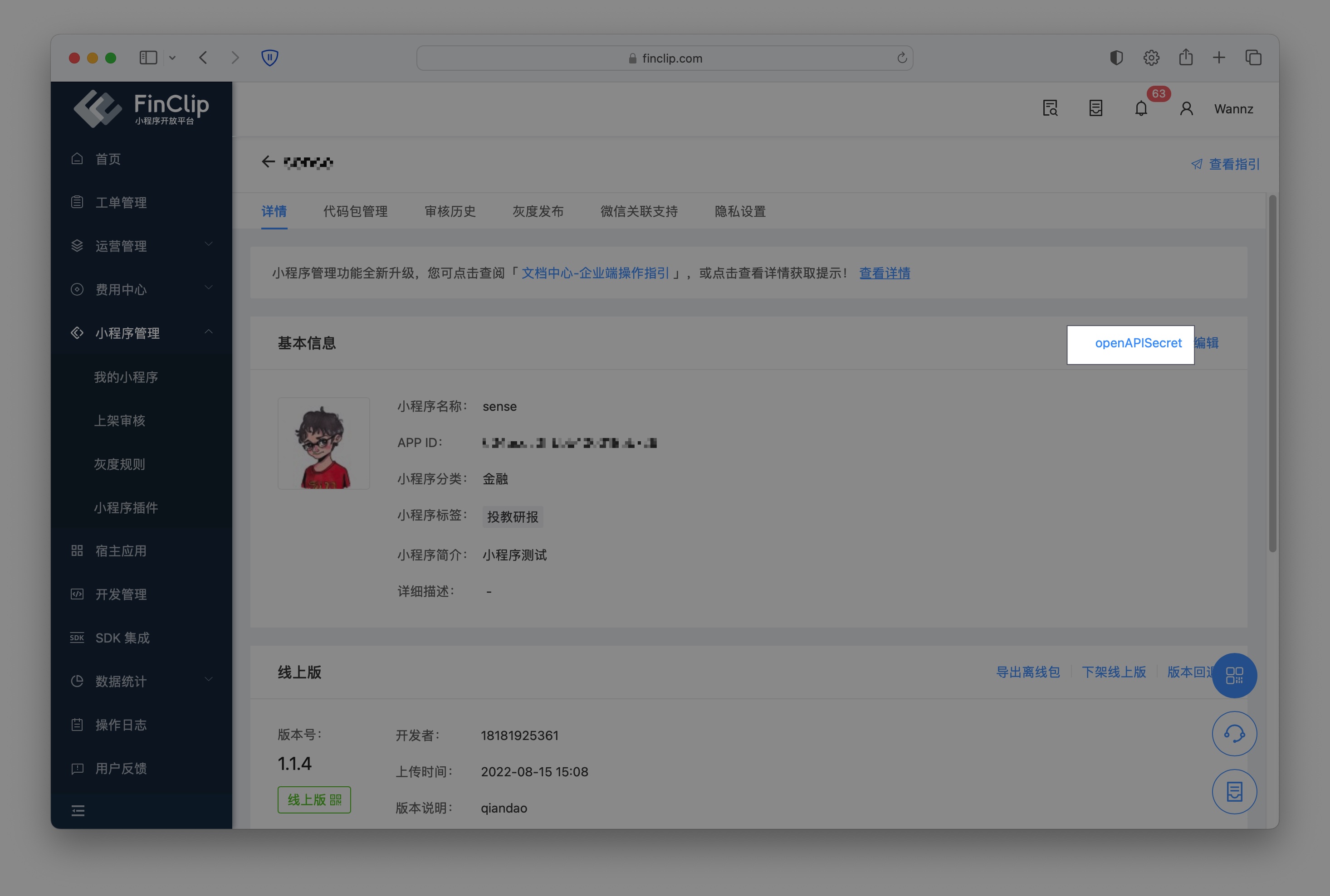
Log in to the FinClip backend, enter the Mini-Program details page, and click "openAPISecret" in the upper right corner of the basic information to start configuring the information.
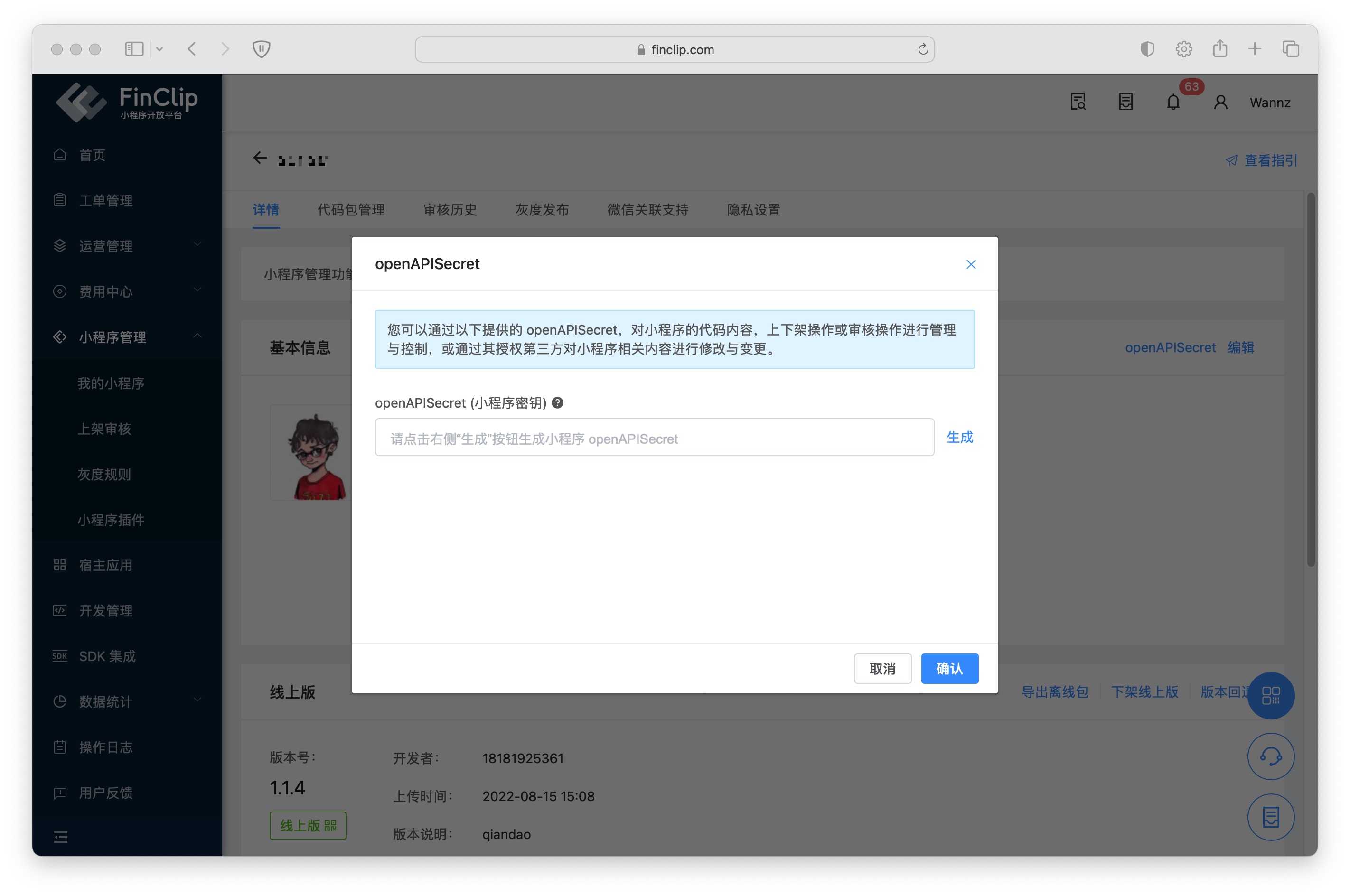
When using it for the first time, the openAPISecret key is empty by default. You need to click the "Generate" button on the right to obtain the corresponding key content.
Then, check the relevant permissions below (currently, there are 5 permission groups: Mini-Program Review, Mini-Program Release, Mini-Program Code Upload, Code Preview, and Account Authentication). Click "Confirm" to make it effective.
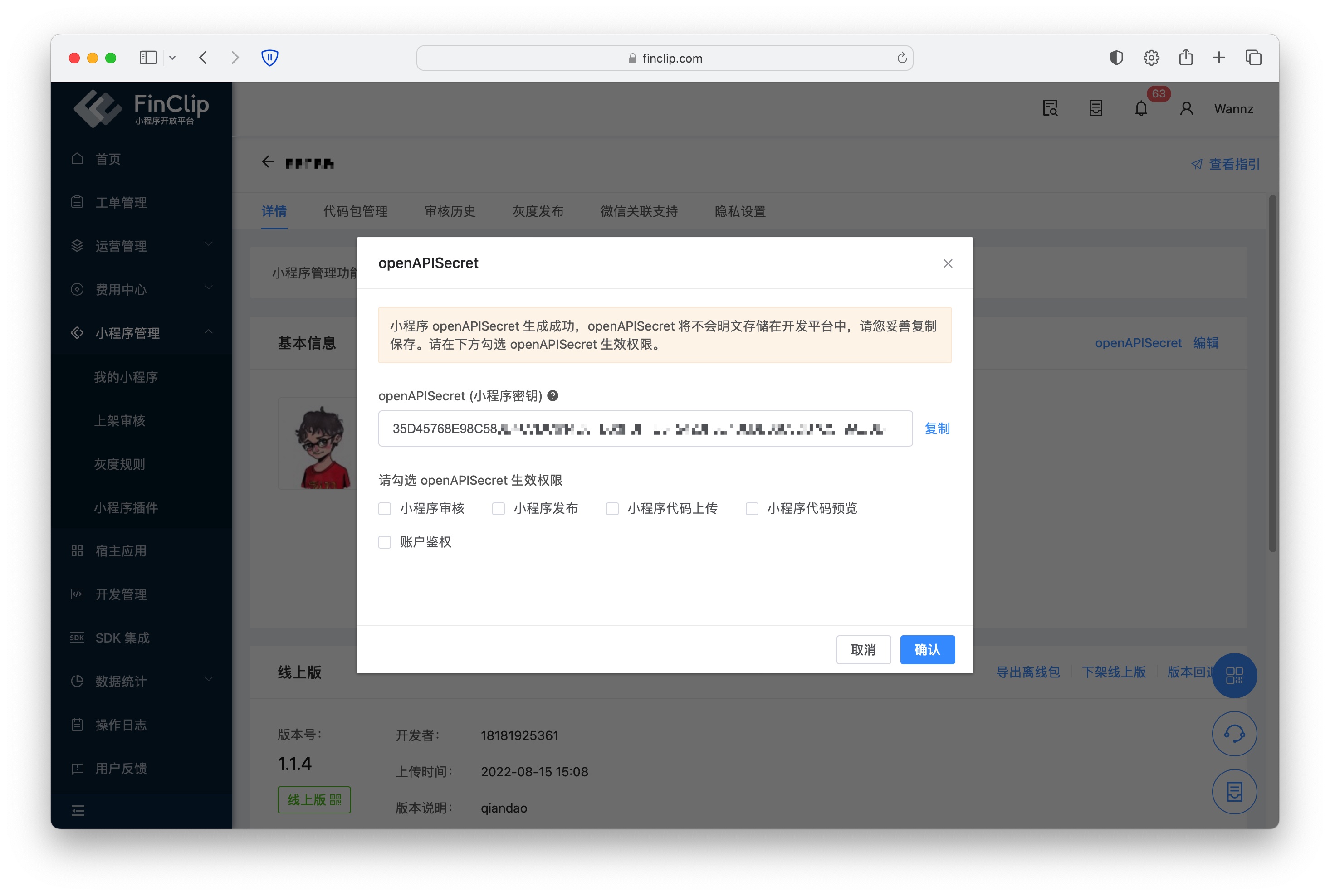
Please note that the openAPISecret will not be stored in plain text in the development platform. Please copy and save it properly. If it is lost or needs to be replaced, enter "openAPISecret" again and click the "Reset" button on the right.
# 3. Function and Environment Comparison
The current functions may have differences and limitations in different environments. For details, please refer to the table below. To learn more about the differences and introductions between different versions, click here (opens new window).
| Community Edition Environment | SaaS Environment | Enterprise Edition (Annual Payment or One-Time Purchase) | |
|---|---|---|---|
| Fee Management | ❌ | ✅ | ✅ |
# 4. API Documentation
# Upload File to Netdisk
API
POST /api/v1/mop/customer-open-api/organ/netdisk/upload
Query Parameters
| Field | Type | Meaning | Remarks |
|---|---|---|---|
| nonce | string | Random string | Must be unique, it is recommended to use uuid |
| timestamp | string | Timestamp, in milliseconds | Use the current system timestamp |
| sign | string | Signature string |
Parameters
content-type: application/form-data
| Field | Type | Meaning | Remarks |
|---|---|---|---|
| appId | string | Mini-Program ID | |
| uploadFile | file | File | File format |
Example
- Concatenate appId, nonce, and timestamp, and sort by parameter alphabetical order to get the pre-signature string salt as follows: appId=6141bd122e0fd10001318982&nonce=b3fceb4f-6766-4a1a-9efb-c07ce85409aa×tamp=1631851443000
Concatenate salt with apiKey to get salt as follows: appId=6141bd122e0fd10001318982&nonce=b3fceb4f-6766-4a1a-9efb-c07ce85409aa×tamp=1631851443000&apiKey=ABCDEFGHIJKLMNOPQ1234567890 3. Perform MD5 signature on salt to get sign=CCA7AC5EDFC1541EBEBA8207A46EB699 4. The final request example is as follows:
POST /api/v1/mop/customer-open-api/organ/netdisk/upload?nonce=b3fceb4f-6766-4a1a-9efb-c07ce85409aa×tamp=1631851443000&sign=CCA7AC5EDFC1541EBEBA8207A46EB699
Body application/form-data
{
"appId": "6141bd122e0fd10001318982",
"uploadFile": File
}
Response
{
"errcode": "OK",
"error": "",
"data": {
"netdiskID": "6141bd122e0fd10001318982", // Netdisk ID
}
}
# Upload Mini-Program Code
API
POST /api/v1/mop/customer-open-api/organ/upload/applet
Query Parameters
| Field | Type | Meaning | Remarks |
|---|---|---|---|
| nonce | string | Random string | Must be unique, it is recommended to use uuid |
| timestamp | string | Timestamp, in milliseconds | Use the current system timestamp |
| sign | string | Signature string |
Parameters
content-type: application/form-data
| Field | Type | Meaning | Remarks |
|---|---|---|---|
| appId | string | Mini-Program ID | |
| version | string | Mini-Program version | Generally use 3 digits, e.g., 1.0.0 |
| versionRemark | string | Version description information | |
| filesFromNetdisk | string | Mini-Program code package netdisk information | JSON string, not included in signature generation |
| packages | string | Mini-Program package file information | JSON string, not included in signature generation |
Example
- Concatenate appId, version, versionRemark, nonce, and timestamp, and sort by parameter alphabetical order to get the pre-signature string salt as follows: appId=6141bd122e0fd10001318982&nonce=b3fceb4f-6766-4a1a-9efb-c07ce85409aa×tamp=1631851443000&version=1.0.0&versionRemark=Debug Version
- Concatenate salt with apiKey to get salt as follows: appId=6141bd122e0fd10001318982&nonce=b3fceb4f-6766-4a1a-9efb-c07ce85409aa×tamp=1631851443000&version=1.0.0&versionRemark=Debug Version &apiKey=ABCDEFGHIJKLMNOPQ1234567890
- Perform MD5 signature on salt to get sign=CCA7AC5EDFC1541EBEBA8207A46EB699
POST /api/v1/mop/customer-open-api/organ/upload/applet?nonce=b3fceb4f-6766-4a1a-9efb-c07ce85409aa×tamp=1631851443000&sign=CCA7AC5EDFC1541EBEBA8207A46EB699
Body application/form-data
{
"appId": "6141bd122e0fd10001318982",
"version":"1.0.0",
"versionRemark":"Debug Version",
"filesFromNetdisk": JSON string,
"packages": JSON string
}
Response
{
"errcode": "OK",
"error": "",
"data": {
"appId": "6141bd122e0fd10001318982", // Mini-Program ID
"buildLog": "", // Upload debug information
"status": true, // Whether the upload was successful
"buildId": "6141bd122e0fd10001318983" // ID of this upload
}
}
# Submit Mini-Program for Review
API
POST /api/v1/mop/customer-open-api/organ/publish/applet
Query Parameters
| Field | Type | Meaning | Remarks |
|---|---|---|---|
| nonce | string | Random string | Must be unique, it is recommended to use uuid |
| timestamp | string | Timestamp, in milliseconds | Use the current system timestamp |
| sign | string | Signature string |
Parameters
content-type: application/json
| Field | Type | Meaning | Remarks |
|---|---|---|---|
| appId | string | Mini-Program ID | |
| buildId | string | Build ID |
The order of JSON fields must be: appId, buildId
Example
- Convert the body to a string, get param={"appId": "6141bd122e0fd10001318982","buildId":"6141bd122e0fd10001318983"}
- Concatenate with nonce and timestamp, and sort by parameter alphabetical order to get the pre-signature string salt as follows: nonce=b3fceb4f-6766-4a1a-9efb-c07ce85409aa¶m={"appId": " 6141bd122e0fd10001318982","buildId":"6141bd122e0fd10001318983"} ×tamp=1631851443000
- Concatenate salt with apiKey to get salt as follows: nonce=b3fceb4f-6766-4a1a-9efb-c07ce85409aa¶m={"appId": "6141bd122e0fd10001318982"," buildId":"6141bd122e0fd10001318983"} ×tamp=1631851443000&apiKey=ABCDEFGHIJKLMNOPQ1234567890
- Perform MD5 signature on salt to get sign=CCA7AC5EDFC1541EBEBA8207A46EB699
POST /api/v1/mop/customer-open-api/organ/publish/applet?nonce=b3fceb4f-6766-4a1a-9efb-c07ce85409aa×tamp=1631851443000&sign=CCA7AC5EDFC1541EBEBA8207A46EB699
Body application/json
{
"appId": "6141bd122e0fd10001318982",
"buildId":"6141bd122e0fd10001318983"
}
Response
{
"data": {
"appId": "629491cdf049b5000127e9ed",
"sequence": 3
},
"errcode": "OK",
"error": ""
}
# Approve and Release Mini-Program
API
POST /api/v1/mop/customer-open-api/organ/audit/applet
Query Parameters
| Field | Type | Meaning | Remarks |
|---|---|---|---|
| nonce | string | Random string | Must be unique, it is recommended to use uuid |
| timestamp | string | Timestamp, in milliseconds | Use the current system timestamp |
| sign | string | Signature string |
Parameters
content-type: application/json
| Field | Type | Meaning | Remarks |
|---|---|---|---|
| appId | string | Mini-Program ID | |
| sequence | int | Build sequence number, this field is returned after submitting the Mini-Program for release review | |
| operation | string | Approve-同意 Reject-取消 | |
| reason | string | Rejection reason |
The order of JSON fields must be: appId, sequence, operation, reason
Example
- Convert the body to a string, get param={"appId": "6141bd122e0fd10001318982","sequence":2,"operation": "Approve","reason": ""}
- Concatenate with nonce and timestamp, and sort by parameter alphabetical order to get the pre-signature string salt as follows: nonce=b3fceb4f-6766-4a1a-9efb-c07ce85409aa¶m={"appId": " 6141bd122e0fd10001318982","sequence":2,"operation": "Approve","reason": ""} ×tamp=1631851443000
- Concatenate salt with apiKey to get salt as follows: nonce=b3fceb4f-6766-4a1a-9efb-c07ce85409aa¶m={"appId": "6141bd122e0fd10001318982"," sequence":2,"operation": "Approve","reason": ""} ×tamp=1631851443000&apiKey=ABCDEFGHIJKLMNOPQ1234567890
- Perform MD5 signature on salt to get sign=CCA7AC5EDFC1541EBEBA8207A46EB699
POST /api/v1/mop/customer-open-api/organ/audit/applet?nonce=b3fceb4f-6766-4a1a-9efb-c07ce85409aa×tamp=1631851443000&sign=CCA7AC5EDFC1541EBEBA8207A46EB699
Body application/json
{
"appId": "629491cdf049b5000127e9ed",
"sequence": 2,
"operation": "Approve",
"reason": ""
}
Response
{
"data": {
"appId": "629491cdf049b5000127e9ed",
"qrcodeUrl": "${host}/api/v1/mop/runtime/applet/-f-YTA0ZWE0OTQ3MzRiYWRmNg--"
},
"errcode": "OK",
"error": ""
}
# Get Mini-Program QR Code Information
API
POST /api/v1/mop/customer-open-api/organ/release/applet/qrcode
Query Parameters
| Field | Type | Meaning | Remarks |
|---|---|---|---|
| nonce | string | Random string | Must be unique, it is recommended to use uuid |
| timestamp | string | Timestamp, in milliseconds | Use the current system timestamp |
| sign | string | Signature string |
Parameters
content-type: application/json
| Field | Type | Meaning | Remarks |
|---|---|---|---|
| appId | string | Mini-Program ID | |
| apiServer | string | API service address |
The order of JSON fields must be: appId, apiServer
Example
- Convert the body to a string, get param={"appId": "6141bd122e0fd10001318982","apiServer": "https://super-apps.ai"}
- Concatenate with nonce and timestamp, and sort by parameter alphabetical order to get the pre-signature string salt as follows: nonce=b3fceb4f-6766-4a1a-9efb-c07ce85409aa¶m={"appId": " 6141bd122e0fd10001318982","apiServer": "https://super-apps.ai"} ×tamp=1631851443000
- Concatenate salt with apiKey to get salt as follows: nonce=b3fceb4f-6766-4a1a-9efb-c07ce85409aa¶m={"appId": "6141bd122e0fd10001318982"," apiServer": "https://super-apps.ai"} ×tamp=1631851443000&apiKey=ABCDEFGHIJKLMNOPQ1234567890
- Perform MD5 signature on salt to get sign=CCA7AC5EDFC1541EBEBA8207A46EB699
POST /api/v1/mop/customer-open-api/organ/release/applet/qrcode?nonce=b3fceb4f-6766-4a1a-9efb-c07ce85409aa×tamp=1631851443000&sign=CCA7AC5EDFC1541EBEBA8207A46EB699
Body json
{
"appId": "6141bd122e0fd10001318982",
"apiServer": "https://super-apps.ai"
}
Response
{
"errcode": "OK",
"error": "",
"data": {
"qrData": "https://super-apps.ai/mop/scattered-page/#/sdktip?type=scanOpen&info=+afT21jLmm4GIvIM2V3Pmad9mLqir+XwuoQVVBrj445XPPRI6eueFFUZcUGP895jz0cGjj0Ne4fcchBRCmJO+As0XFqMrOclsqrXaogsaUOfv+Co/r96qtXEmT529qqdI2JQccA8RSSp0BzLQUVkFfWR2CigS45XtIIGtqS4RCRDFelMrsfr9uUHe8nOXYWW6ompMwFMU6J6S4o2zmG/sHnCmZZRjXDh2MxRiWQF4CkAtCgkJCwwKefA5693YfAvAj8usV+0J93NXGXHtGmU3yrn20vjCfAR5u/tiP7jj+bC38HT2J1GhgK4JuYnhomB&codeType=release"
}
}
# Get Trial Version QR Code Link
API
POST /api/v1/mop/customer-open-api/organ/publish/trial/applet
Query Parameters
| Field | Type | Meaning | Remarks |
|---|---|---|---|
| nonce | string | Random string | Must be unique, it is recommended to use uuid |
| timestamp | string | Timestamp, in milliseconds | Use the current system timestamp |
| sign | string | Signature string |
Parameters
content-type: application/json
| Field | Type | Meaning | Remarks |
|---|---|---|---|
| appId | string | Mini-Program ID | |
| buildId | string | Build ID | |
| apiServer | string | API service address |
The order of JSON fields must be: appId, buildId, apiServer
Example
- Convert the body to a string, get param={"appId": "6141bd122e0fd10001318982","buildId":"6141bd122e0fd10001318983"," apiServer": "https://super-apps.ai"}
- Concatenate with nonce and timestamp, and sort by parameter alphabetical order to get the pre-signature string salt as follows: nonce=b3fceb4f-6766-4a1a-9efb-c07ce85409aa¶m={"appId": " 6141bd122e0fd10001318982","buildId":"6141bd122e0fd10001318983","apiServer": "https://super-apps.ai"} ×tamp=1631851443000
- Concatenate salt with apiKey to get salt as follows: nonce=b3fceb4f-6766-4a1a-9efb-c07ce85409aa¶m={"appId": "6141bd122e0fd10001318982"," buildId":"6141bd122e0fd10001318983","apiServer": "https://super-apps.ai"} ×tamp=1631851443000&apiKey=ABCDEFGHIJKLMNOPQ1234567890
- Perform MD5 signature on salt to get sign=CCA7AC5EDFC1541EBEBA8207A46EB699
POST /api/v1/mop/customer-open-api/organ/publish/trial/applet?nonce=b3fceb4f-6766-4a1a-9efb-c07ce85409aa×tamp=1631851443000&sign=CCA7AC5EDFC1541EBEBA8207A46EB699
Body application/json
{
"appId": "6141bd122e0fd10001318982",
"buildId":"6141bd122e0fd10001318983",
"apiServer": "https://super-apps.ai"
}
Response
{
"errcode": "OK",
"error": "",
"data": {
"qrData":"https://super-apps.ai/api/v1/mop/runtime/applet/-f-ZjExNmZhZDdmNGQ0NTU5MA--""
}
}
# Get Mini-Program Version List
API
GET /api/v1/mop/customer-open-api/organ/applet/ver-list/:appId
Query Parameters
| Field | Type | Meaning | Remarks |
|---|---|---|---|
| nonce | string | Random string | Must be unique, it is recommended to use uuid |
| timestamp | string | Timestamp, in milliseconds | Use the current system timestamp |
| sign | string | Signature string |
URL Param Parameters
| Field | Type | Meaning | Remarks |
|---|---|---|---|
| appId | string | Mini-Program ID |
Example
- Convert the request parameters to a string, concatenate with nonce and timestamp, and sort by parameter alphabetical order to get the pre-signature string salt as follows: appId=62997e8b9fbba10001d44847&nonce=b3fceb4f-6766-4a1a-9efb-c07ce85409aa×tamp=1631851443000
- Concatenate salt with apiKey to get salt as follows: appId=62997e8b9fbba10001d44847&nonce=b3fceb4f-6766-4a1a-9efb-c07ce85409aa×tamp=1631851443000&apiKey=ABCDEFGHIJKLMNOPQ1234567890
- Perform MD5 signature on salt to get sign=CCA7AC5EDFC1541EBEBA8207A46EB699
GET /api/v1/mop/customer-open-api/organ/applet/ver-list/62997e8b9fbba10001d44847?nonce=b3fceb4f-6766-4a1a-9efb-c07ce85409aa×tamp=1631851443000&sign=CCA7AC5EDFC1541EBEBA8207A46EB699
Response
{
"data": {
"list": [
{
"createTime": 1662436084640, // Upload time
"version": "1.1.1", // Version number
"verType": "pubVer", // Version type: pubVer: online version, trialVer: trial version, devVer: development version, multiple version types separated by ","
"buildId": "6141bd122e0fd10001318983" // Build ID
}
...
]
"total": 25 // Total count
},
"errcode": "OK",
"error": ""
}
# Mini-Program Login Authentication
API
POST /api/v1/mop/customer-open-api/organ/applet/login/auth
Query Parameters
| Field | Type | Meaning | Remarks |
|---|---|---|---|
| nonce | string | Random string | Must be unique, it is recommended to use uuid |
| timestamp | string | Timestamp, in milliseconds | Use the current system timestamp |
| sign | string | Signature string |
Parameters
content-type: application/json
| Field | Type | Meaning | Remarks |
|---|---|---|---|
| appId | string | Mini-Program ID | |
| encodeAuth | string | Encrypted authentication string |
The order of JSON fields must be: appId, encodeAuth
Example
- Convert the body to a string, get param={"appId": "6141bd122e0fd10001318982","encodeAuth":"6141bd122e0fd10001318983"}
- Concatenate with nonce and timestamp, and sort by parameter alphabetical order to get the pre-signature string salt as follows: nonce=b3fceb4f-6766-4a1a-9efb-c07ce85409aa¶m={"appId": " 6141bd122e0fd10001318982","encodeAuth":"6141bd122e0fd10001318983"} ×tamp=1631851443000
- Concatenate salt with apiKey to get salt as follows: nonce=b3fceb4f-6766-4a1a-9efb-c07ce85409aa¶m={"appId": "6141bd122e0fd10001318982"," encodeAuth":"6141bd122e0fd10001318983"} ×tamp=1631851443000&apiKey=ABCDEFGHIJKLMNOPQ1234567890
- Perform MD5 signature on salt to get sign=CCA7AC5EDFC1541EBEBA8207A46EB699
POST /api/v1/mop/customer-open-api/organ/applet/login/auth?nonce=b3fceb4f-6766-4a1a-9efb-c07ce85409aa×tamp=1631851443000&sign=CCA7AC5EDFC1541EBEBA8207A46EB699
Body application/json
{
"appId": "6141bd122e0fd10001318982",
"encodeAuth":"qW5qtr4b5idqdi+UvM4bjd1XqpEU4/1+xYai6juNvfo="
}
Response
{
"errcode": "OK",
"error": "",
"data": {
"decodeAuth":"www.finclip.com"
}
}