
# Mini-Program Message Subscription and Push Process
The Mini-Program subscription message is an essential part of the Mini-Program's capabilities. Through this feature, developers can send service notifications to users after obtaining user authorization, achieving a closed-loop service and providing a better user experience. The implementation method of the subscription message is customized by the APP and can achieve functionalities similar to in-site messages, notification bars, etc.
This document will explain the complete process of Mini-Program message subscription and push in the following three sections:
- Configuration of Message Templates and Channels in the Management Console: Introduces how developers configure message templates, set up application message channels, associate message templates with channels, and configure application Webhooks.
- User Authorization Process: Explains how users authorize message reception and the handling process of authorization information.
- Message Push Process: Details the entire process from message triggering to sending, receiving, and displaying.
# 1. Configuration of Message Templates and Channels in the Management Console
# 1.1 Configuring Application Message Channels
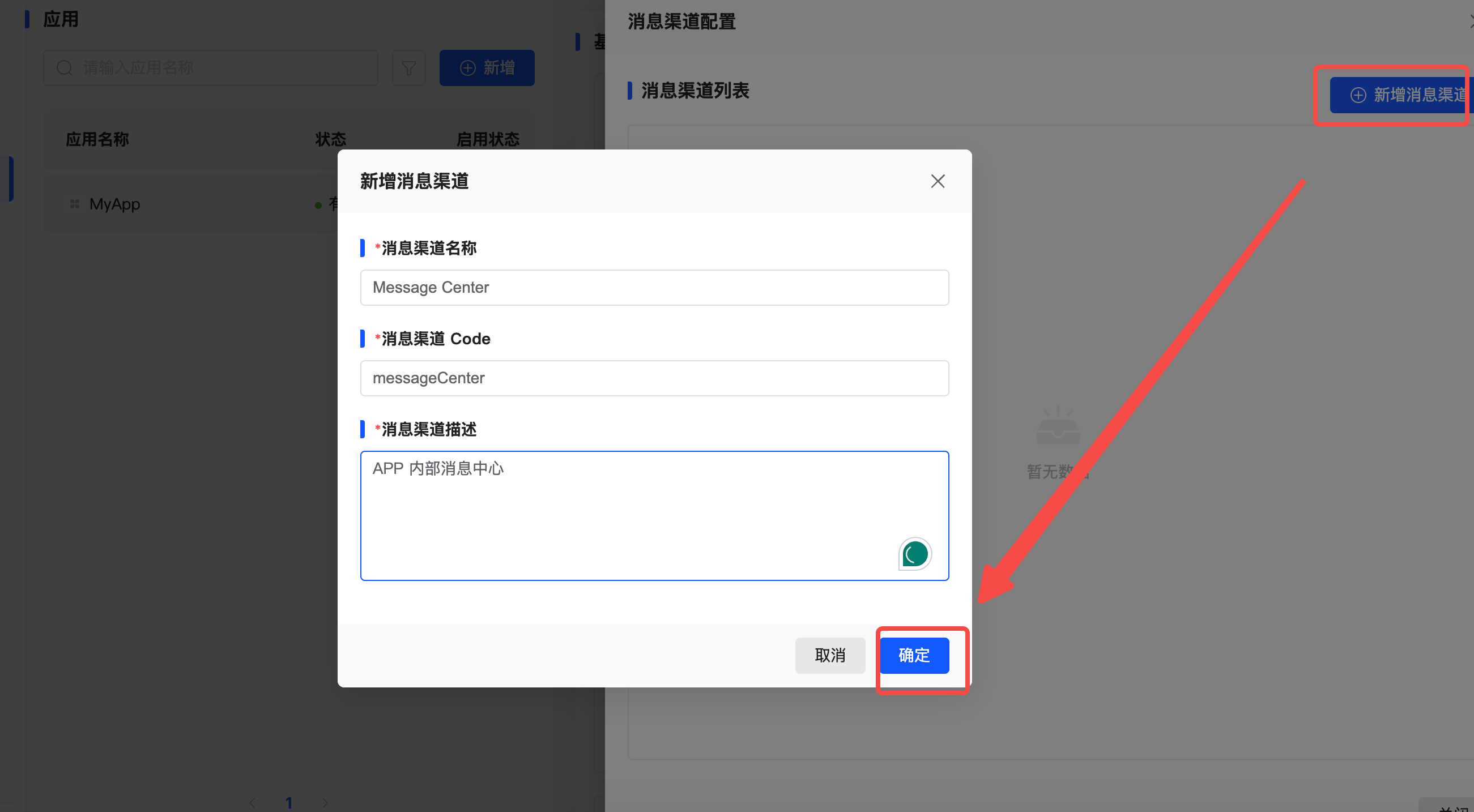
Description The application's message channels are configurations maintained by the application side and belong to the application-level settings. The platform does not limit or cannot limit the implementation methods of the application’s message channels. The application side can flexibly configure based on its business needs. Applications can set up various message channels such as in-site messages, SMS, emails, etc., to meet message push requirements in different scenarios.
Entry
Developer Center - "Applications" - "Message Channels" - "Message Channel Configuration"
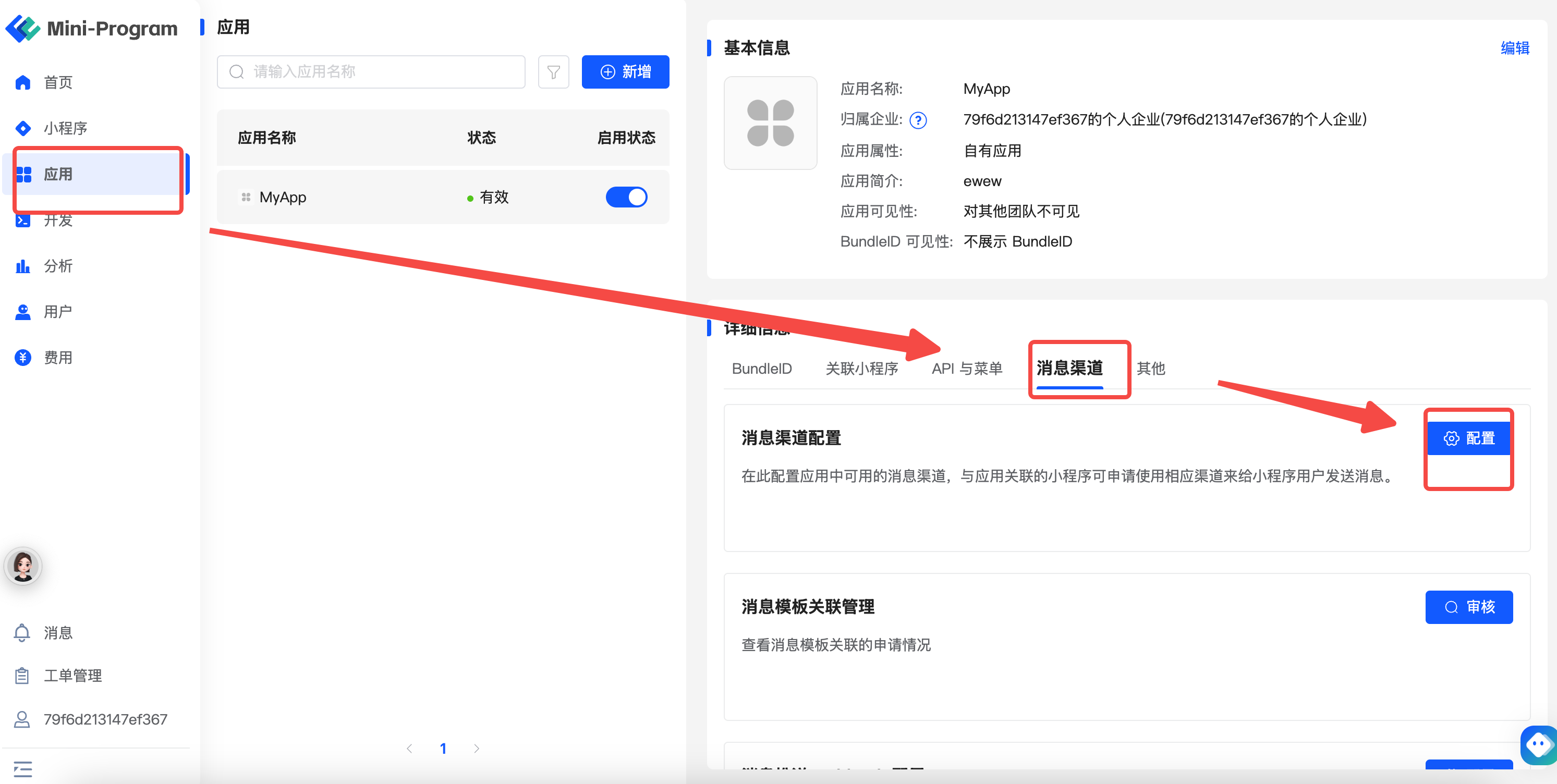
Adding New Message Channels
# 1.2 Configuring Application Message Push Webhook
Description Webhook is the target address where the platform pushes messages to the application. During the message push process, the platform sends the message content via an HTTP POST request to the Webhook address configured by the application. Since the platform does not limit the implementation method of the application’s message push, the Webhook mechanism allows for flexible message pushing. The application side can handle received messages and proceed with subsequent business processes, such as user notifications.
Entry
Developer Center - "Applications" - "Message Channels" - "Message Push Webhook Configuration"
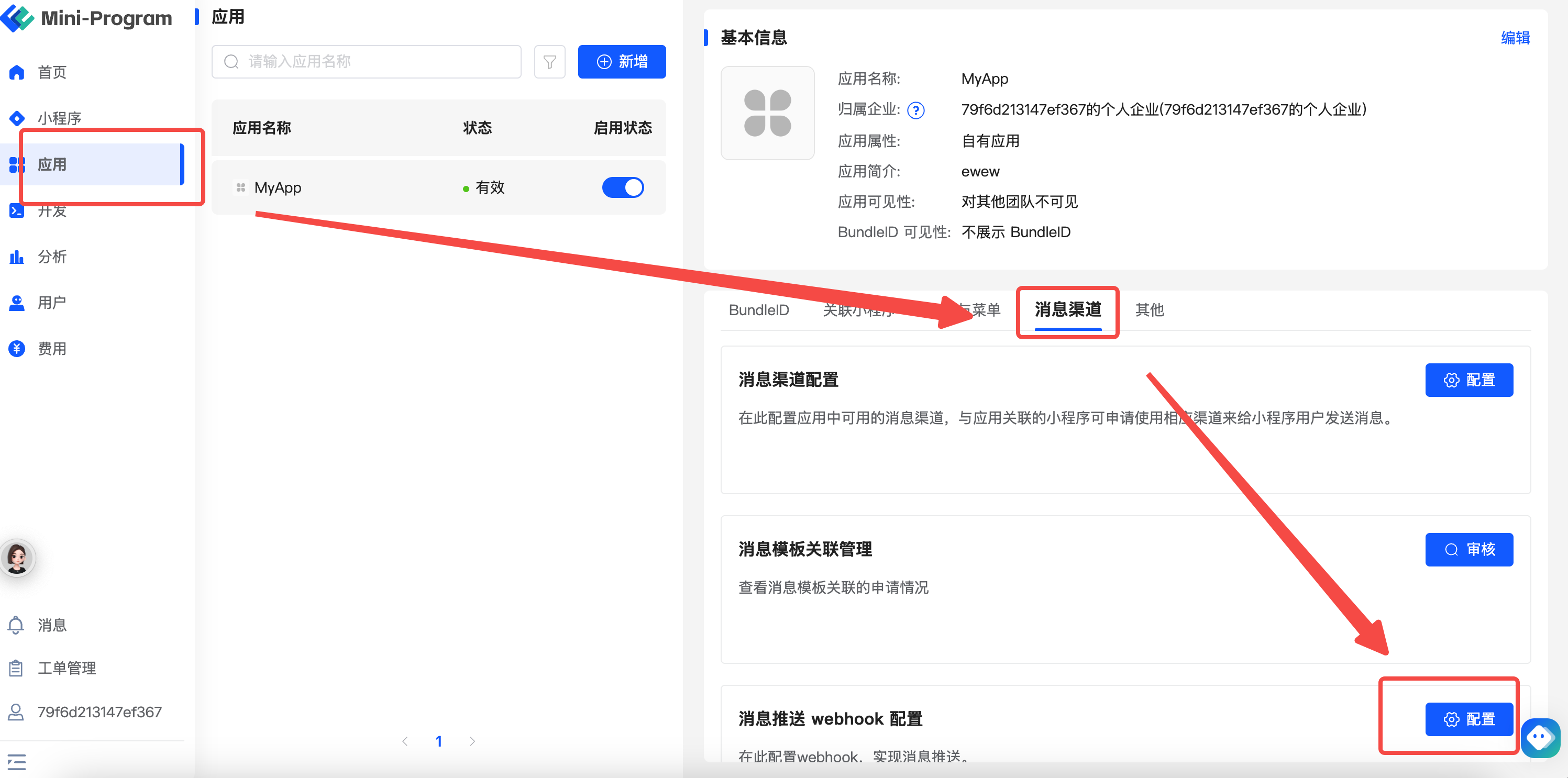
Configuring Message Push Webhook

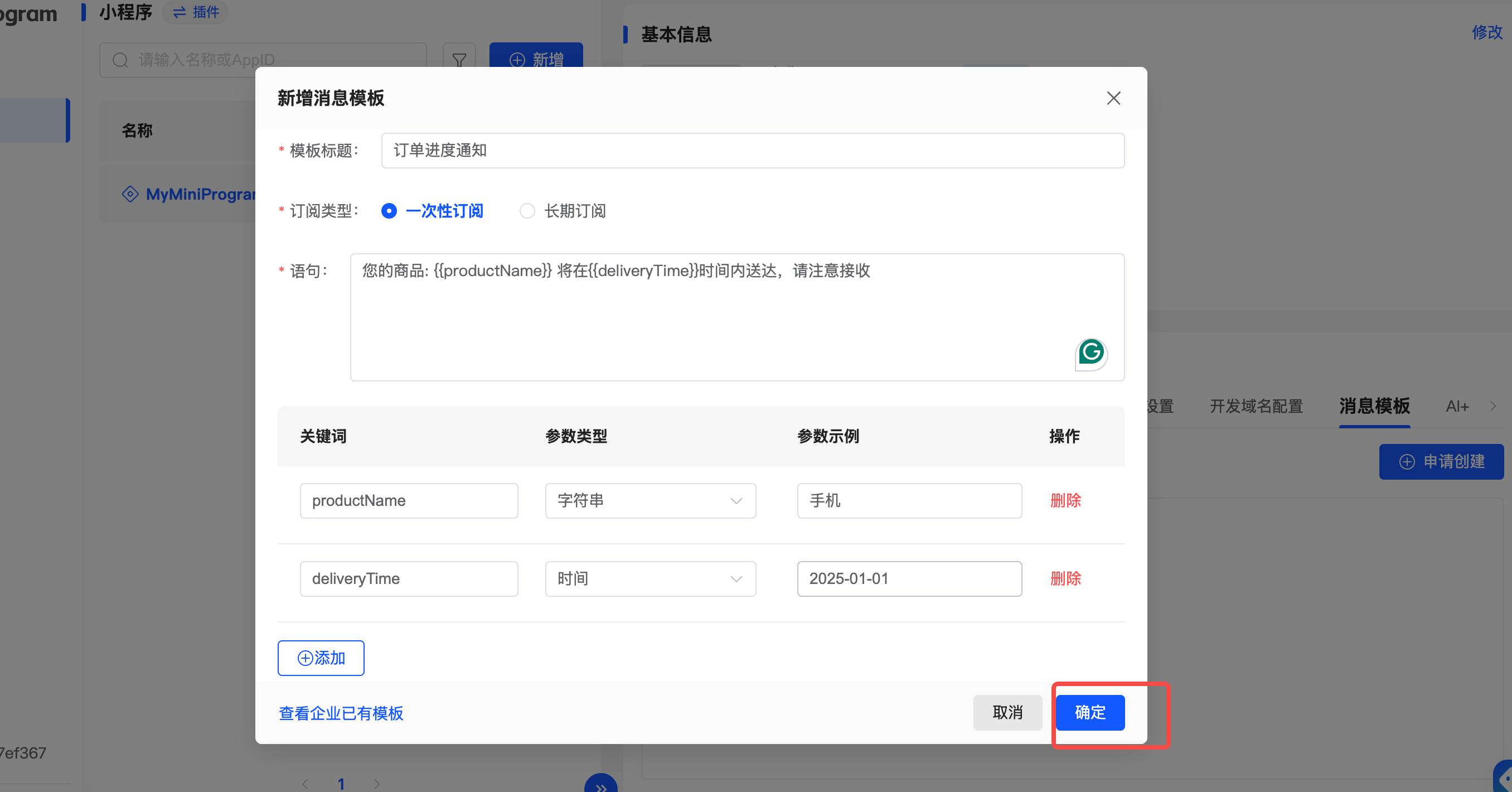
# 1.3 Creating Mini-Program Message Templates
Description Creating Mini-Program message templates requires an approval process by the "Digital Center." Developers can create message templates in the management console, define the content format and variables of the messages, and submit them for review by the Digital Center to ensure that the message content complies with regulatory requirements. Only approved message templates can be used for actual message pushes, ensuring compliance and user experience.
Entry
Developer Center - "Mini-Programs" - "Message Templates" - "Apply for Creation"
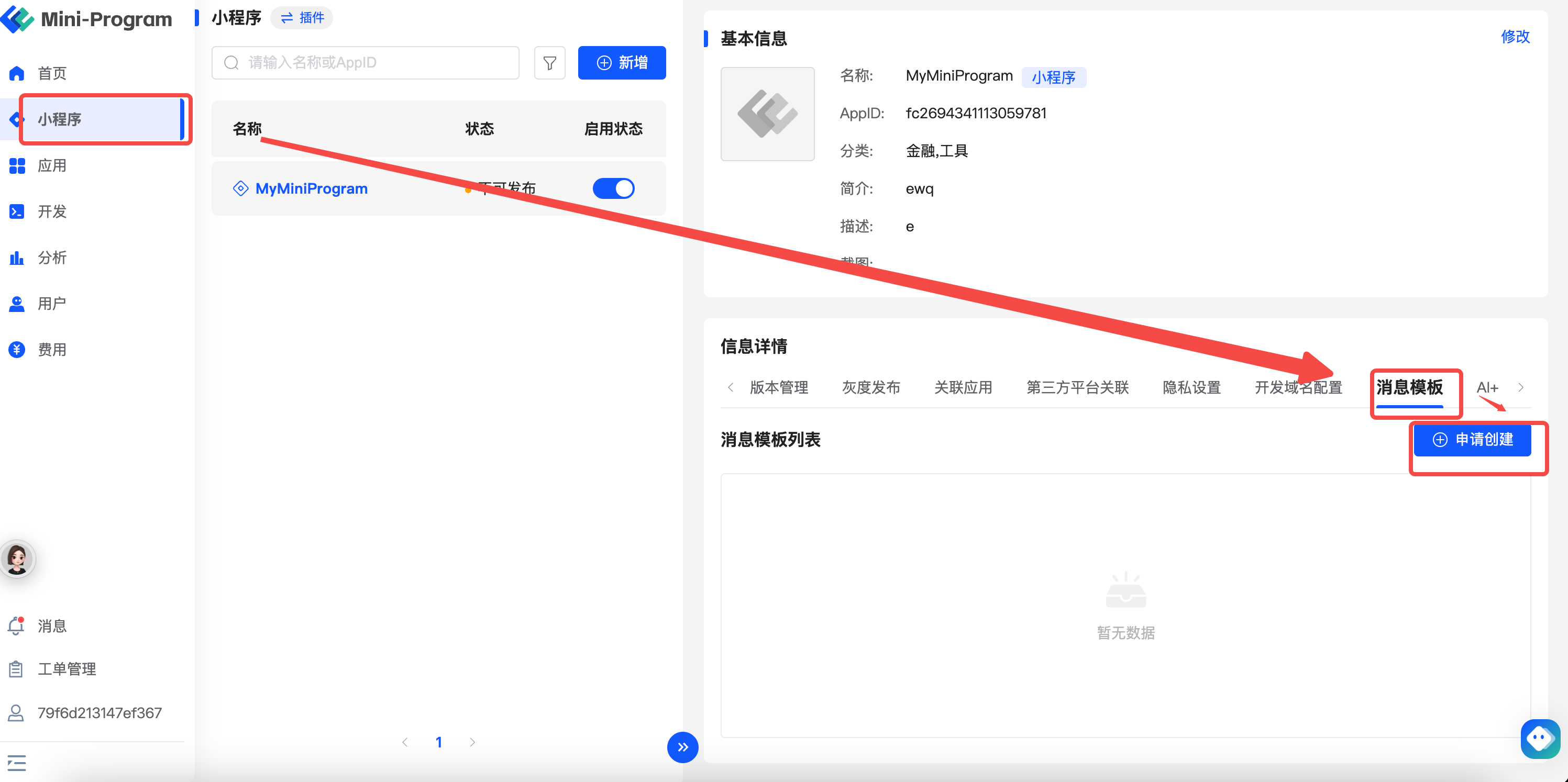
Applying for Message Templates
# 1.4 Associating Message Templates with Application Message Channels
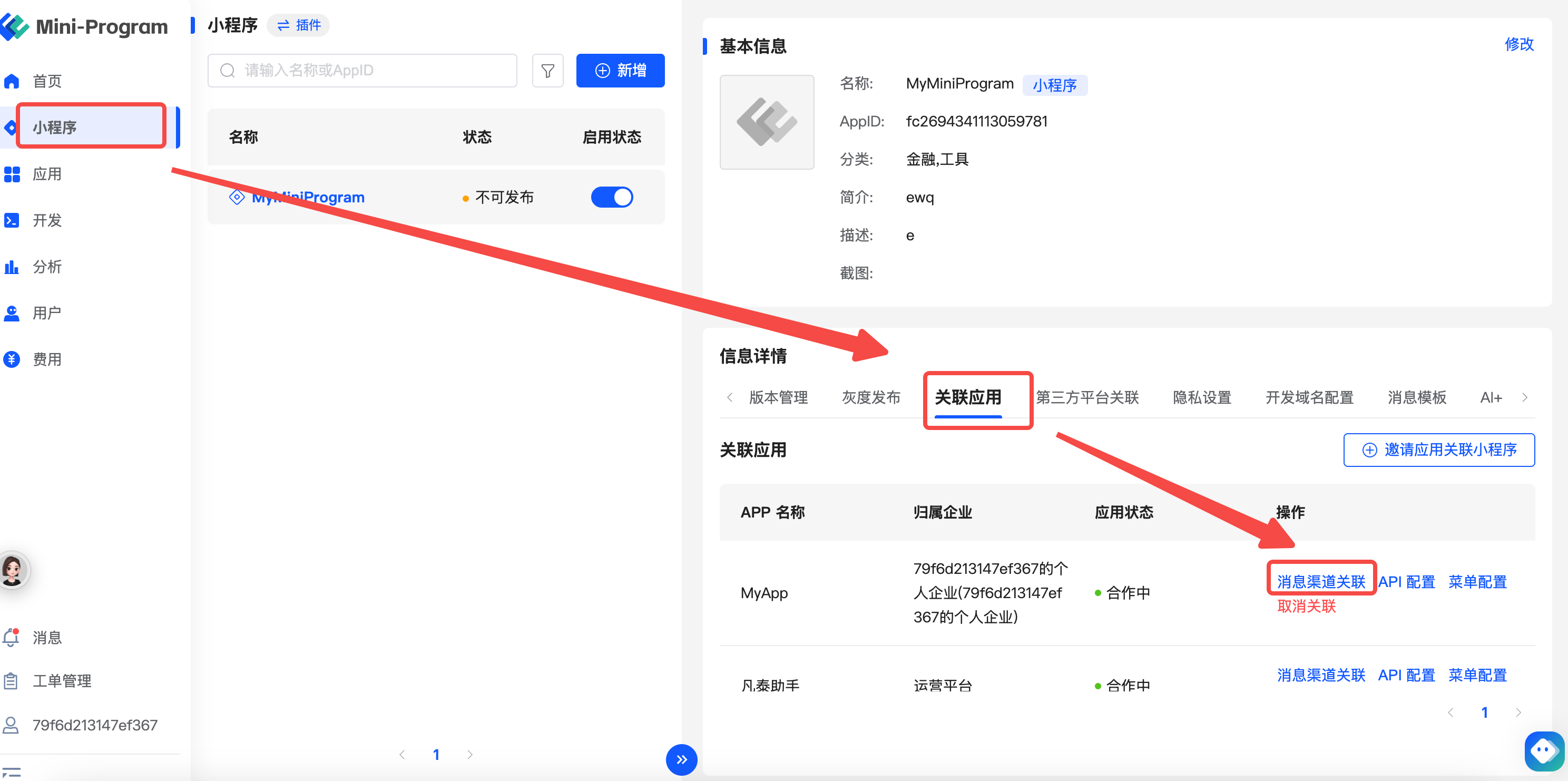
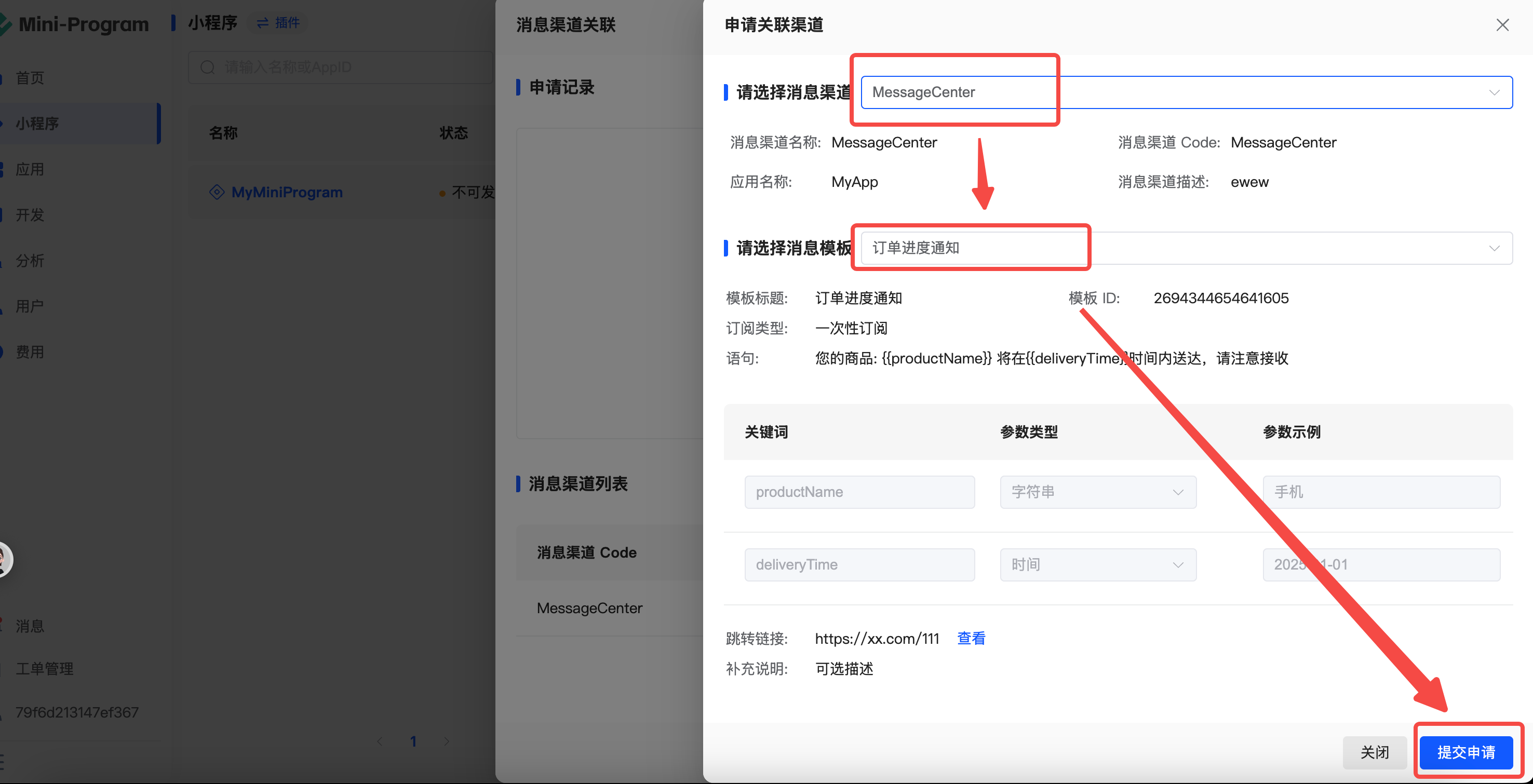
Description Message templates need to be associated with the application's message channels to enable message push. When a message template applies to associate with an application channel, the application side must review and confirm. This step ensures the reasonable matching of message templates with application channels, allowing the application side to decide whether to approve the association request based on their business needs. After successful association, the platform can push messages based on this template through the channel.
Entry
Developer Center - "Mini-Programs" - "Associated Applications" - "Message Channel Association"
Applying for Channel Association
# 2. User Message Subscription Process
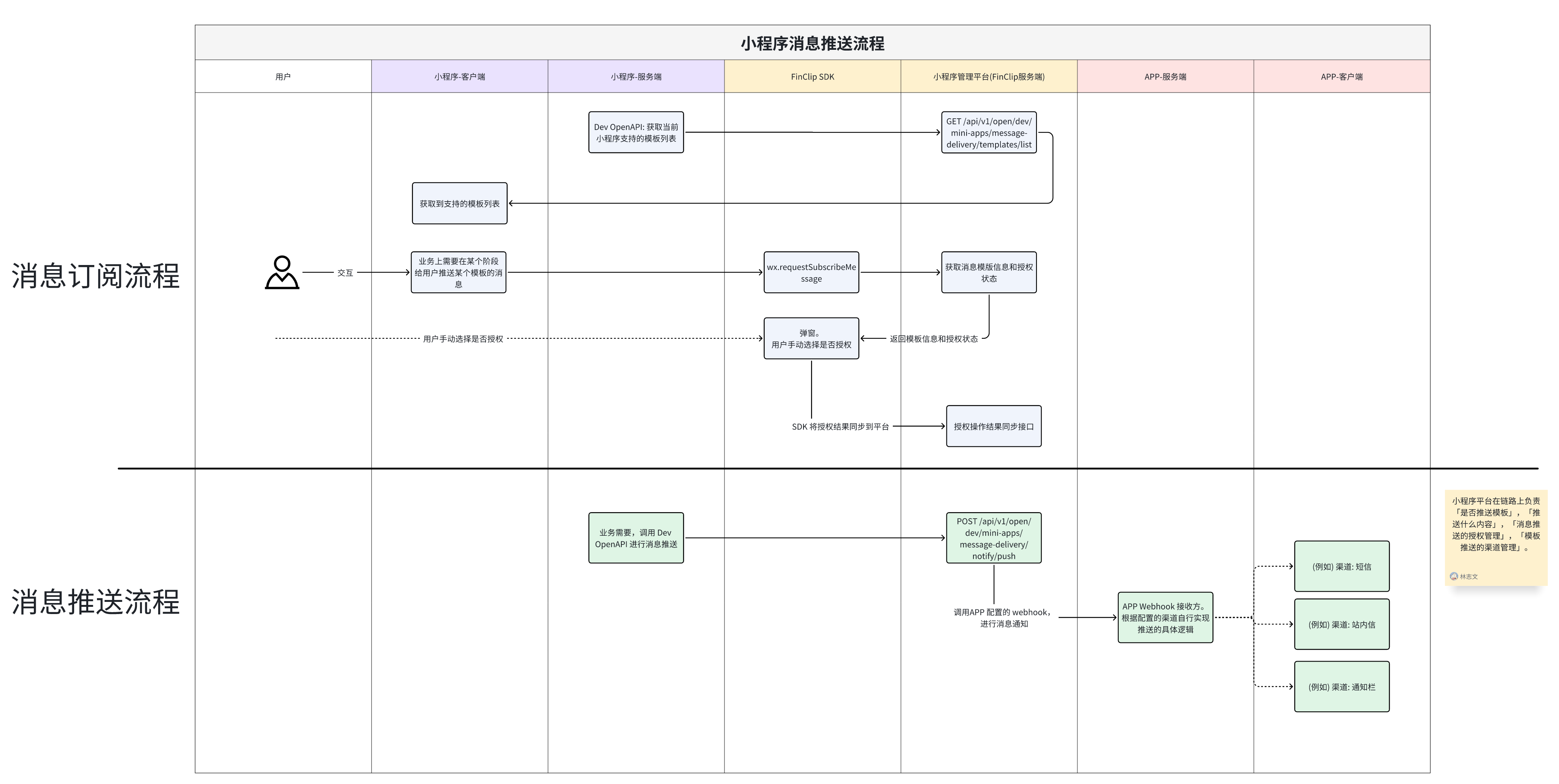
# 2.1 Mini-Program Server Calls OpenAPI to Get Available Template List
For more details, see: Developer Center OpenAPI - Get Available Message Templates for Mini-Program (opens new window)
# 2.2 User Authorization Request
- Trigger Authorization Request: When users use Mini-Program related functions, the Mini-Program client can trigger an authorization request through the
ft.requestSubscribeMessage({ tmplIds: [...] })interface. - Display Authorization Interface: The Mini-Program displays the authorization request interface, explaining the purpose and content of the authorization to the user.
# 2.3 Authorization Handling
- User Action: Users can choose to agree or refuse the authorization request. The authorization choice will be recorded in the FinClip server through the FinClip SDK. If the user agrees to the authorization, the system will record the user's authorization information and allow sending messages to this user.
# 3. Message Push Process
# 3.1 Message Triggering
When specific business events occur (such as order status changes, activity reminders, etc.), the "Mini-Program Server" can actively choose to trigger message push. Call the following OpenAPI interface for message push:
Developer Center OpenAPI - Push Mini-Program Message Template (opens new window)
# 4. Others
# 4.1 What Does the Body of the Application's Message Push Webhook Look Like?
The example of the webhook push body is as follows:
{
    "miniAppId": "fc1111", // Mini-Program id
    "userId": "zhangsan", // userId, consistent with the userId passed during sdk initialization
    "templates": [
        {
            "messageDeliveryTemplateId": "2696141363995781", // Message template id
            "text": "your order has been shipped, express number is 123456", // Message content
            "link": "/order/orderDetail", // Message jump link
            "desc": "this is a description", // Message description
            "channelCodes": [
                "notificationCenter" // Message channel code
            ]
        }
    ]
}
# 4.2 How to Ensure the Trustworthiness of the Source of the Application's Message Push Webhook?
To allow your service (the receiver of the webhook event) to verify that the request comes from a trusted caller, a signature method is provided. For this, you need to:
- Manually fill in the Secret when configuring the Webhook.
- Verify in the Webhook receiver: The value calculated from Secret + request body parameters should equal header's
X-Fc-Webhook-Sign- If no Secret is filled in when configuring the Webhook, the
X-Fc-Webhook-Signheader will not be sent.
- If no Secret is filled in when configuring the Webhook, the
# Signature Method Description
The signature of X-Fc-Webhook-Sign uses HMAC hexadecimal digest of the request body and generates it using the SHA-256 hash function, using webhookToken as the HMAC key.
Important things to remember when verifying the webhook payload:
- FinClip uses HMAC hexadecimal digest to calculate the hash value.
- The hash signature always starts with
sha256=. - The hash signature is generated using your webhook's webhookToken and webhook request body content.
- If your language and server implementation specify character encoding, ensure that the payload is processed as UTF-8. Webhook payloads may contain Unicode characters.
# Signature Example
Java
You can define the following verifySignature method and call it when receiving a webhook request:
import javax.crypto.Mac;
import javax.crypto.spec.SecretKeySpec;
import java.nio.charset.StandardCharsets;
import java.security.InvalidKeyException;
import java.security.NoSuchAlgorithmException;

public class WebhookVerifier {
    /**
     * Verify webhook signature
     *
     * @param payload webhook request body
     * @param webhookToken generated webhookToken
     * @param signature X-Fc-Webhook-Sign in the webhook request header
     * @return Whether the signature is valid
     */
    public static boolean verifySignature(String payload, String webhookToken, String signature) {
        String expectedSignature = computeSign(payload, webhookToken);
        return signature.equals(expectedSignature);
    }

    /**
     * Compute signature
     *
     * @param payload webhook request body
     * @param webhookToken generated webhookToken
     * @return Signature
     */
    public static String computeSign(String payload, String webhookToken) {
        try {
            String algorithm = "HmacSHA256";
            Mac mac = Mac.getInstance(algorithm);
            SecretKeySpec keySpec = new SecretKeySpec(webhookToken.getBytes(StandardCharsets.UTF_8), algorithm);
            mac.init(keySpec);

            // Compute signature
            byte[] signatureBytes = mac.doFinal(payload.getBytes(StandardCharsets.UTF_8));

            // Convert to hexadecimal string
            String hexDigest = bytesToHex(signatureBytes);

            return "sha256=" + hexDigest;
        } catch (Exception e) {
            throw new RuntimeException("err", e);
        }
    }

    private static String bytesToHex(byte[] bytes) {
        StringBuilder hexString = new StringBuilder();
        for (byte b : bytes) {
            String hex = Integer.toHexString(0xff & b);
            if (hex.length() == 1) {
                hexString.append('0');
            }
            hexString.append(hex);
        }
        return hexString.toString();
    }
}
Golang
You can define the following VerifySignature function and call it when receiving a webhook request:
// Parameter description
// payload: webhook request body
// webHookToken: generated webhookToken
// signature: X-Fc-Webhook-Sign in the webhook request header
func VerifySignature(payload []byte, webHookToken string, signature string) bool {
	expectedSignature := computeWebHookSign(payload, webHookToken)
	return hmac.Equal([]byte(expectedSignature), []byte(signature))
}

func computeWebHookSign(payload []byte, webhookToken string) string {
	mac := hmac.New(sha256.New, []byte(webhookToken))
	mac.Write(payload)
	return "sha256=" + hex.EncodeToString(mac.Sum(nil))
}
Python
You can define the following verify_signature function and call it when receiving a webhook request:
import hashlib
import hmac
def verify_signature(payload_body, secret_token, signature_header):
    """Verify that the payload was sent from GitHub by validating SHA256.

    Raise and return 403 if not authorized.

    Args:
        payload_body: original request body to verify (request.body())
        secret_token: GitHub app webhook token (WEBHOOK_SECRET)
        signature_header: header received from GitHub (x-hub-signature-256)
    """
    if not signature_header:
        raise HTTPException(status_code=403, detail="x-hub-signature-256 header is missing!")
    hash_object = hmac.new(secret_token.encode('utf-8'), msg=payload_body, digestmod=hashlib.sha256)
    expected_signature = "sha256=" + hash_object.hexdigest()
    if not hmac.compare_digest(expected_signature, signature_header):
        raise HTTPException(status_code=403, detail="Request signatures didn't match!")
JavaScript
let encoder = new TextEncoder();

async function verifySignature(secret, header, payload) {
    let parts = header.split("=");
    let sigHex = parts[1];

    let algorithm = { name: "HMAC", hash: { name: 'SHA-256' } };

    let keyBytes = encoder.encode(secret);
    let extractable = false;
    let key = await crypto.subtle.importKey(
        "raw",
        keyBytes,
        algorithm,
        extractable,
        [ "sign", "verify" ],
    );

    let sigBytes = hexToBytes(sigHex);
    let dataBytes = encoder.encode(payload);
    let equal = await crypto.subtle.verify(
        algorithm.name,
        key,
        sigBytes,
        dataBytes,
    );

    return equal;
}

function hexToBytes(hex) {
    let len = hex.length / 2;
    let bytes = new Uint8Array(len);

    let index = 0;
    for (let i = 0; i < hex.length; i += 2) {
        let c = hex.slice(i, i + 2);
        let b = parseInt(c, 16);
        bytes[index] = b;
        index += 1;
    }

    return bytes;
}