
# How to Obtain Bundle ID
What is Bundle ID
Bundle ID is the unique identifier for third-party applications. It is referred to as Bundle ID in the iOS App Store and as Application ID in the Android App Market.
# 1. How to Obtain iOS Bundle Identifier?
# 1.1 For Developers
Use Xcode, switch to the Info tab, and view the Bundle identifier. Copy all text including both black and gray characters.
# 1.2 For Operators
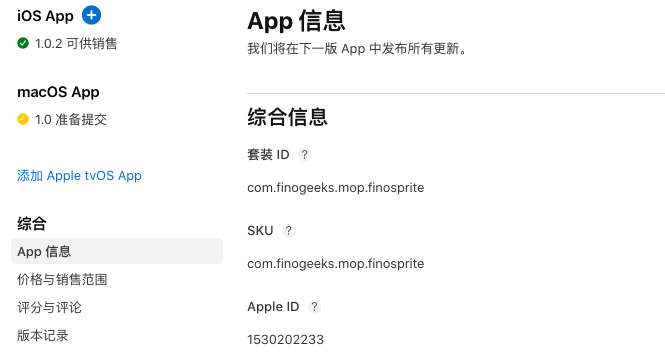
Log in to the iOS Developer Platform, navigate to App Information, and copy the "套装ID" (Bundle ID)
# 2. How to Obtain Android Package/Application ID?
Open the build.gradle configuration file in your Android application project. The content corresponding to the applicationId property under the android configuration is the application package name/application ID.
# 3. How to Obtain BundleID When Converting Mini-Program to App?
When converting a Mini-Program to an App, you first need to add an associated application in the FinClip Management Console. When naming the BundleID, you can start with com followed by your team and application name, such as com.companyname.appname.