
# Mini-Program Login FAQ
Note
For WeChat login, you can also use the associated WeChat Mini-Program login feature provided by FinClip to reduce development costs and quickly reuse WeChat login capabilities. Click here to learn more
In the WeChat Mini-Program environment, the login functionality typically uses OpenID or UnionID as a unique identifier to associate and integrate with the Mini-Program service's account system, completing the construction and design of the user account system.
For Mini-Programs migrating from the WeChat Mini-Program environment to FinClip, the following issues may arise:
- How to quickly reuse the login process? How to associate it with the Mini-Program service's account system?
- How to integrate user data from WeChat Mini-Programs with FinClip data? How to associate the account systems of both parties?
When encountering the above issues, you can try the following solutions:
# 1. Login Solutions
# Solution 1: Server-Side Modification
Applicable Scenario: The platform party builds its own ecosystem through FinClip, and the Mini-Programs running in the FinClip environment are all third-party Mini-Programs (i.e., the platform party cannot modify the Mini-Program code).
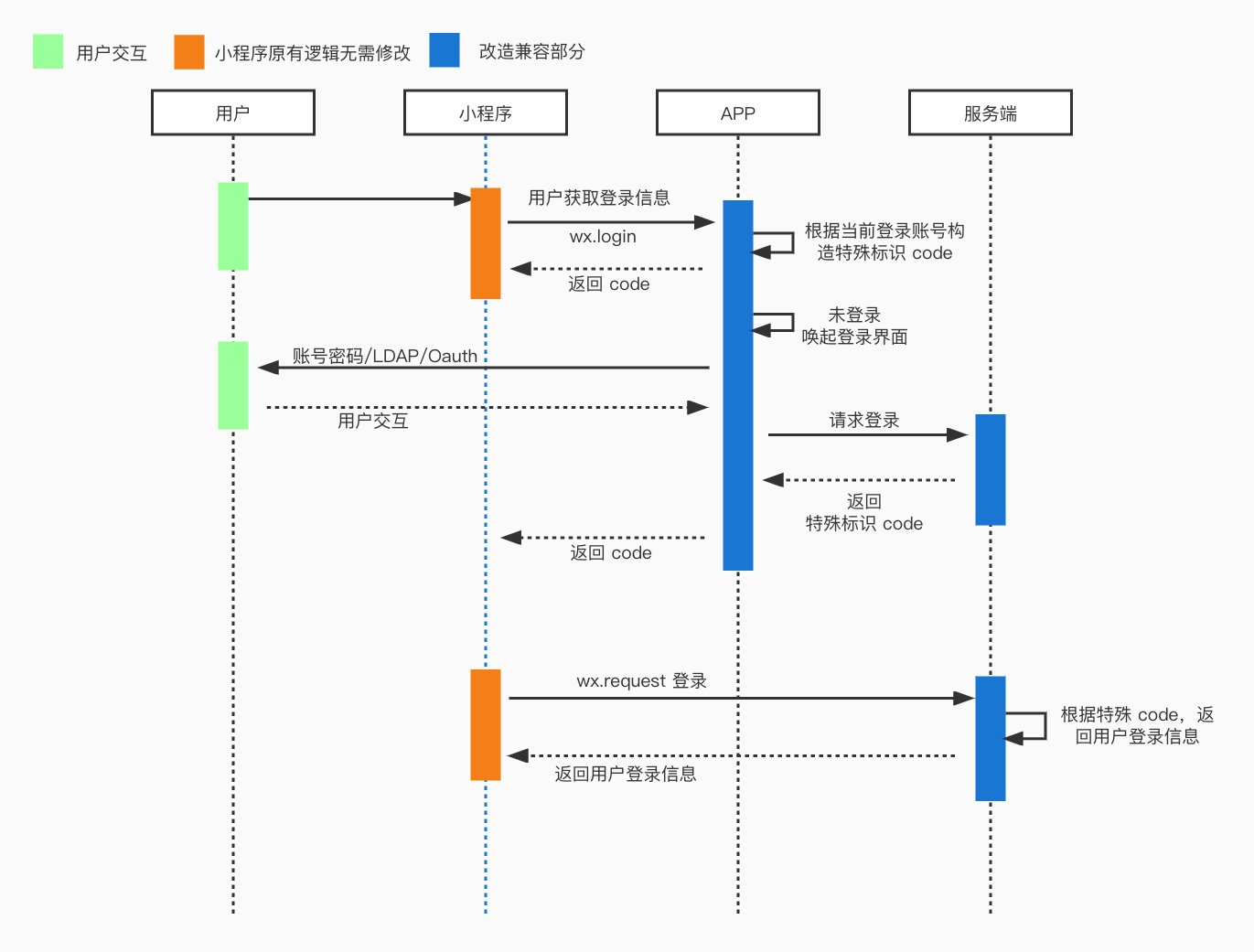
- Step 1: Inject the
wx.loginmethod into the App via a custom API, returning the code in the format used by WeChat Mini-Programs. - Step 2: The Mini-Program requires no changes. Following its implementation in the WeChat environment, it will send the code to the developer's server.
- Step 3: The developer's server adapts accordingly. By checking the code, it can determine that the login originates from the FinClip platform, parse the
UserIDfrom the code, and return the content corresponding to its own account system.
# Solution 2: Server-Side Modification (Triggering WeChat Authorization)
Applicable Scenario: The platform party uses FinClip to modularize its own functionalities, and all Mini-Programs are developed by the platform party itself (i.e., the platform party can modify the Mini-Program code).

- Step 1: Integrate the WeChat Open Platform SDK into the FinClip SDK.
- Step 2: Use a custom API to inject
wx.login. After triggering WeChat authorization, the code is returned. At this point, it might be necessary to append a unique identifier to the code. - Step 3: The Mini-Program requires no changes. Following its implementation in the WeChat environment, it will send the code to the developer's server.
- Step 4: The server, based on the unique identifier in the code, calls the corresponding authorization interface to obtain the
OpenID, checks the login status, and returns the result.
Limitation: Due to WeChat restrictions, OpenIDs under different entities and different open platforms are inconsistent. In this case, the Mini-Program needs to be associated with the same entity or the same open platform (where the unique identifier would be the UnionID).
# Solution 3: Mini-Program Modification
Applicable Scenario: Modify the Mini-Program logic. When it is detected that the environment is FinClip, directly obtain the required information from wx.login or a custom API (e.g., wx.loginFinlip) (i.e., the platform party can modify the Mini-Program code).
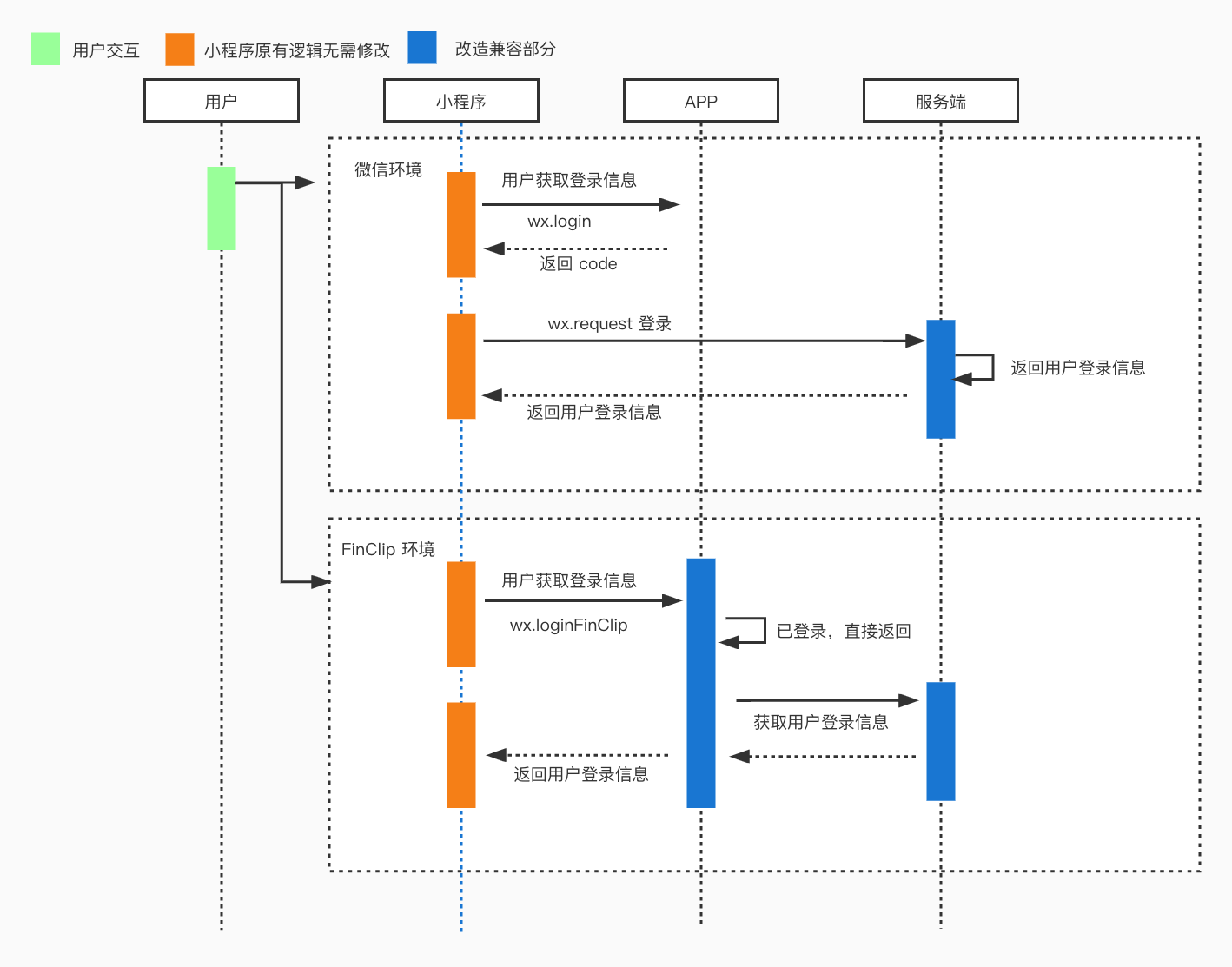
- The App uses a custom API to inject
wx.loginand returns the current App user's login status.
# 2. Custom API Implementation Code
Based on Solution 3, we provide corresponding implementation code for your reference.
# 2.1 App Integration with WeChat Login
If you need to implement WeChat account authorization login in your App, please refer to the WeChat Open Platform's Mobile App Development (opens new window) and the documentation WeChat Authorization Login Development Guide (opens new window). If not needed, you can start directly from Step 2.
# 2.2 App Implementation of Custom Injection APIs
First, the App needs to refer to the iOS SDK Custom Injection APIs and Android SDK Custom Injection APIs documents to inject the account authorization login capability into the SDK, allowing the Mini-Program to call it. The detailed explanation is as follows.
Android Side: To allow the Mini-Program to access data from the App, you need to register custom Mini-Program APIs. For specific instructions on custom Mini-Program APIs, please refer to FinClip Mini-Program Open Platform - Custom Mini-Program APIs and FinClip Mini-Program Open Platform - Registering APIs in the Mini-Program Process.
Custom login API
- Create a custom Api class, specifying the API name as "login".
public class LoginApi extends AbsApi { private final static String API_NAME_LOGIN = "login"; // API name called by the Mini-Program Base Library @Override public String[] apis() { return new String[]{API_NAME_LOGIN}; } }- Register the custom API.
This example shows a user authorization prompt Dialog, which requires an Activity object as the context parameter for the Dialog. Therefore, the custom API needs to be registered in the Mini-Program process.
if (FinAppClient.INSTANCE.isFinAppProcess(this)) { // Mini-Program process // The method for registering APIs in the Mini-Program process can obtain the Activity object where the Mini-Program is located, which can be used as the context parameter for creating dialogs) FinAppProcessClient.INSTANCE.setCallback(new FinAppProcessClient.Callback() { @Override public List<IApi> getRegisterExtensionApis(@NotNull Activity activity) { ArrayList<IApi> apis = new ArrayList<>(); apis.add(new LoginApi()); return apis; } @Nullable @Override public List<IApi> getRegisterExtensionWebApis(@NotNull Activity activity) { return null; } }); return; }- Implement the custom API's invoke() method.
First, display the authorization prompt Dialog (developers should decide whether to show this Dialog based on product requirements), then obtain the user login information from the main process (App process).
public class LoginApi extends AbsApi {

    @Override
    public void invoke(String event, JSONObject param, ICallback callback) {
        if (event.equals(API_NAME_LOGIN)) {
            showAuthDialog(callback);
        }
    }

    /**
     * Displays the authorization prompt dialog for obtaining user login information
     */
    private void showAuthDialog(final ICallback callback) {
        // Whether to display the authorization prompt dialog should be handled by the developer according to product requirements
        new AlertDialog.Builder(activity)
                .setTitle("Agree to authorize the retrieval of user login information?")
                .setNegativeButton("Deny", new DialogInterface.OnClickListener() {
                    @Override
                    public void onClick(DialogInterface dialog, int which) {
                        callback.onFail();
                    }
                })
                .setPositiveButton("Agree", new DialogInterface.OnClickListener() {
                    @Override
                    public void onClick(DialogInterface dialog, int which) {
                        loginMainProcess(callback);
                    }
                })
                .show();
    }

    /**
     * Obtains user login information from the main process
     */
    private void loginMainProcess(final ICallback callback) {
        // The Mini-Program process calls the main process, which obtains the user information and returns it to the Mini-Program process
        FinAppProcessClient.INSTANCE.getAppletProcessApiManager()
                .callInMainProcess(API_NAME_LOGIN, null, new FinCallback<String>() {
                    @Override
                    public void onSuccess(final String result) {
                        // The callback method needs to be called on the main thread
                        activity.runOnUiThread(new Runnable() {
                            @Override
                            public void run() {
                                try {
                                    callback.onSuccess(new JSONObject(result));
                                } catch (JSONException e) {
                                    e.printStackTrace();
                                    callback.onFail();
                                }
                            }
                        });
                    }

                    @Override
                    public void onError(int code, String error) {
                        callback.onFail();
                    }

                    @Override
                    public void onProgress(int status, String info) {
                    }
                });
    }

}
Subsequently, in the main process (typically in the Application, but developers can choose another suitable location), return the user login information to the Mini-Program process.
// Set the handler for "Mini-Program process calls main process" in the main process
// Developers can also choose to set the handler in other suitable code locations within the main process
FinAppClient.INSTANCE.getAppletApiManager()
    .setAppletProcessCallHandler(new IAppletApiManager.AppletProcessCallHandler() {
        @Override
        public void onAppletProcessCall(@NotNull String name,
                                        @Nullable String params,
                                        @Nullable FinCallback<String> callback) {
            if (callback != null) {
                if (name.equals(LoginApi.API_NAME_LOGIN)) {
                    // Obtain login information from the main process and return it to the Mini-Program process
                    // Here, dummy user login information is returned. Developers should obtain the actual user login information from the App.
                    JSONObject jsonObject = new JSONObject();
                    try {
                        jsonObject.put("userId", "123");
                    } catch (JSONException e) {
                        e.printStackTrace();
                    }
                    callback.onSuccess(jsonObject.toString());
                }
            }
        }
    });
At this point, the entire process of the Mini-Program obtaining user login information from the App via the custom API is complete.
Note: If the product requirements do not necessitate displaying a user authorization prompt Dialog, it is recommended to register the custom API in the main process (App process), thereby omitting the step of the Mini-Program process calling the main process (App process) to obtain data.
Custom getUserProfile API
- Create a custom API with the name "getUserProfile".
- The process for customizing the getUserProfile API is consistent with the login API process described above and will not be repeated here.
FinClip also provides an official Android APP Demo Project and Mini-Program (opens new window) as an example. If needed, you can download and experience it.
iOS Side:
- Call the SDK's API injection method in the native App.
getUserProfileis the method name corresponding to getting user information in WeChat Mini-Programs.
[[FATClient sharedClient]registerExtensionApi:@"getUserProfile" handle:^(id param, FATExtensionApiCallback callback) {
        //Return user information. If not logged in, you can prompt for login here and return user information after login is complete.
        NSDictionary *userInfo = @{@"nickName":@"张三",@"avatarUrl":@"",@"gender":@1,@"country":@"中国",@"province":@"广东省",@"city":@"深圳",@"language":@"zh_CN"};
        NSDictionary *resDic = @{@"userInfo":userInfo};
        //Callback the user information result to the Mini-Program
        if (resDic) {
            callback(FATExtensionCodeSuccess,resDic);
        }else{
            callback(FATExtensionCodeFailure,resDic);
        }
    }];
- Call the declared
getUserProfilein the Mini-Program to obtain user information.
wx.getUserProfile({
      success: (res) => {
        this.setData({
          userInfo: res.userInfo,
          hasUserInfo: true
        })
      }
    })
- FinClip also provides an official iOS APP Demo Project and Mini-Program (opens new window) as an example. If needed, you can download and experience it.
# 2.3 Mini-Program Implementation of API Calls
For a Mini-Program to support the login and getUserProfile APIs, the App needs to implement them via injected APIs. The implementation steps for injecting APIs can be found in Step 2.
Note that login and getUserProfile are default injected APIs for Mini-Programs. They can be called successfully without configuring FinChatConf in the Mini-Program's root directory.
If the App has not injected the relevant APIs, calling them will result in an error and trigger the fail callback.
- Invoke the login interface.
wx.login({
  param1: '', // Add parameters as needed, they will be passed through to the App for processing
  success: (res) => {
    console.log(res)
  },
  fail: (res) => {
    console.log(res.errMsg)
  }
})
- Invoke the get user information interface.
wx.getUserProfile({
  success: (res) => {
    console.log('getUserProfile success', res)
  },
  fail: (res) => {
    console.log('getUserProfile fail', res.errMsg)
  }
})
# 3. FAQ
According to the official WeChat announcement (opens new window), after December 27, 2021, user nickname and avatar information will no longer be provided to developers. You may need to handle the logic for obtaining user avatars and nicknames yourself.
Common handling logic is as follows:
- In Mini-Programs or Mini-Games, do not display the user's avatar and nickname; use other field content instead.
- After the user enters the Mini-Program or Mini-Game, randomly generate an avatar and nickname for the user.
- After the user enters the Mini-Program or Mini-Game, guide the user to configure their avatar, nickname, and other content information.