
Common Error Alerts
# Common Error Alerts
Error alert names on the code side, better for locating and identifying the root cause of issues.
| Error Reason | Page Error Code | Project Error Code | Title Display |
|---|---|---|---|
| INVALID_PARAMETER | 400 | 4000 | Invalid parameter |
| PLUGIN_NOT_INSTALLED | 400 | 4001 | Plugin not installed |
| PLUGIN_ID_NOT_GIVEN | 400 | 4002 | Missing plugin id |
| DATASOURCE_NOT_GIVEN | 400 | 4003 | Missing datasource |
| PAGE_ID_NOT_GIVEN | 400 | 4004 | Missing page id |
| DUPLICATE_KEY_USER_ERROR | 400 | 4005 | Name already used |
| PAGE_DOESNT_BELONG_TO_USER_WORKSPACE | 400 | 4006 | Page doesn''t belong to this workspace |
| UNSUPPORTED_OPERATION | 400 | 4007 | Unsupported operation |
| DEPRECATED_API | 400 | 4008 | Deprecated API |
| USER_DOESNT_BELONG_ANY_WORKSPACE | 400 | 4009 | User doesn''t belong to any workspace |
| USER_DOESNT_BELONG_TO_WORKSPACE | 400 | 4010 | User doesn''t belong to this workspace |
| NO_CONFIGURATION_FOUND_IN_DATASOURCE | 400 | 4011 | Datasource configuration is invalid |
| INVALID_ACTION_COLLECTION | 400 | 4038 | Collection configuration is invalid |
| INVALID_ACTION | 400 | 4012 | Action configuration is invalid |
| INVALID_DATASOURCE | 400 | 4013 | Datasource configuration is invalid |
| INVALID_DATASOURCE_CONFIGURATION | 400 | 4015 | Datasource configuration is invalid |
| INVALID_ACTION_NAME | 400 | 4014 | Invalid action name |
| NO_CONFIGURATION_FOUND_IN_ACTION | 400 | 4016 | No configurations found in this action |
| NAME_CLASH_NOT_ALLOWED_IN_REFACTOR | 400 | 4017 | Name already taken |
| PAGE_DOESNT_BELONG_TO_APPLICATION | 400 | 4018 | Page doesn''t belong to this application |
| INVALID_DYNAMIC_BINDING_REFERENCE | 400 | 4022 | Invalid dynamic binding reference |
| USER_ALREADY_EXISTS_IN_WORKSPACE | 400 | 4021 | User already exists in this workspace |
| UNAUTHORIZED_DOMAIN | 401 | 4019 | Invalid or unauthorized email domain |
| USER_NOT_SIGNED_IN | 401 | 4020 | User not signed in |
| INVALID_PASSWORD_RESET | 400 | 4020 | Invalid password reset request |
| INVALID_PASSWORD_LENGTH | 400 | 4037 | Invalid password length |
| JSON_PROCESSING_ERROR | 400 | 4022 | Json processing error |
| INVALID_CREDENTIALS | 200 | 4023 | Invalid credentials |
| UNAUTHORIZED_ACCESS | 403 | 4025 | Unauthorized access |
| DUPLICATE_KEY | 409 | 4024 | Duplicate key |
| USER_ALREADY_EXISTS_SIGNUP | 409 | 4025 | Account already exists with this email |
| ACTION_IS_NOT_AUTHORIZED | 403 | 4026 | Permission denied |
| NO_RESOURCE_FOUND | 404 | 4027 | No resource found |
| USER_NOT_FOUND | 404 | 4027 | No user found |
| ACL_NO_RESOURCE_FOUND | 404 | 4028 | No resource found or permission denied |
| GENERIC_BAD_REQUEST | 400 | 4028 | Invalid request |
| VALIDATION_FAILURE | 400 | 4028 | Validation failed |
| INVALID_CURL_COMMAND | 400 | 4029 | Invalid cURL command |
| INVALID_LOGIN_METHOD | 401 | 4030 | Invalid login method |
| INVALID_GIT_CONFIGURATION | 400 | 4031 | Invalid Git configuration |
| INVALID_GIT_SSH_CONFIGURATION | 400 | 4032 | SSH key not configured |
| INVALID_GIT_REPO | 400 | 4033 | Invalid Git repository |
| DEFAULT_RESOURCES_UNAVAILABLE | 400 | 4034 | Default resources not found |
| GIT_MERGE_FAILED_REMOTE_CHANGES | 406 | 4036 | Git merge failed for remote changes |
| GIT_MERGE_FAILED_LOCAL_CHANGES | 406 | 4037 | Git merge failed for local changes |
| REMOVE_LAST_WORKSPACE_ADMIN_ERROR | 400 | 4038 | Last admin cannot be removed |
| INVALID_CRUD_PAGE_REQUEST | 400 | 4039 | Invalid page generation request |
| UNSUPPORTED_OPERATION_FOR_REMOTE_BRANCH | 400 | 4040 | Unsupported Operation |
| ROLES_FROM_SAME_WORKSPACE | 400 | 4041 | Roles already exist |
| INTERNAL_SERVER_ERROR | 500 | 5000 | Internal server error |
| REPOSITORY_SAVE_FAILED | 500 | 5001 | Failed to save |
| PLUGIN_INSTALLATION_FAILED_DOWNLOAD_ERROR | 500 | 5002 | Plugin installation failed |
| PLUGIN_RUN_FAILED | 500 | 5003 | Plugin execution failed |
| PLUGIN_EXECUTION_TIMEOUT | 504 | 5040 | Timeout in plugin execution |
| PLUGIN_LOAD_FORM_JSON_FAIL | 500 | 5004 | Unable to load datasource form configuration |
| PLUGIN_LOAD_TEMPLATES_FAIL | 500 | 5005 | Unable to load datasource templates |
| IO_ERROR | 503 | 5003 | I/O error |
| MARKETPLACE_TIMEOUT | 504 | 5041 | Datasource cannot be deleted |
| WORKSPACE_ID_NOT_GIVEN | 400 | 4031 | Missing workspace id |
| INVALID_CURL_METHOD | 400 | 4032 | Invalid method in cURL command |
| OAUTH_NOT_AVAILABLE | 500 | 5006 | Unsupported login method |
| MARKETPLACE_NOT_CONFIGURED | 500 | 5007 | Marketplace not configured |
| PAYLOAD_TOO_LARGE | 413 | 4028 | Payload exceeds max allowed size |
| SIGNUP_DISABLED | 403 | 4033 | Signup disabled |
| FAIL_UPDATE_USER_IN_SESSION | 500 | 5008 | Unable to update user in session |
| APPLICATION_FORKING_NOT_ALLOWED | 403 | 4034 | Forking application not permitted |
| GOOGLE_RECAPTCHA_TIMEOUT | 504 | 5042 | Timeout in Google recaptcha verification |
| GOOGLE_RECAPTCHA_FAILED | 401 | 4035 | Google recaptcha verification failed |
| UNKNOWN_ACTION_RESULT_DATA_TYPE | 500 | 5009 | Unexpected data type |
| INVALID_CURL_HEADER | 400 | 4036 | Invalid header in cURL command |
| AUTHENTICATION_FAILURE | 500 | 5010 | Authentication |
| INSTANCE_REGISTRATION_FAILURE | 500 | 5011 | Registration failed for this instance |
| TOO_MANY_REQUESTS | 429 | 4039 | Too many requests |
| INVALID_JS_ACTION | 400 | 4040 | Invalid action in JS object |
| CYCLICAL_DEPENDENCY_ERROR | 400 | 4041 | Cyclical Dependency in Page Load Actions |
| CLOUD_SERVICES_ERROR | 500 | 5012 | Error in cloud services |
| GIT_APPLICATION_LIMIT_ERROR | 402 | 4043 | Maximum number of Git repo connection limit reached |
| GIT_ACTION_FAILED | 400 | 4044 | Git failed |
| GIT_FILE_SYSTEM_ERROR | 503 | 5013 | Git file system error |
| GIT_EXECUTION_TIMEOUT | 504 | 5014 | Timeout in Git command execution |
| INCOMPATIBLE_IMPORTED_JSON | 400 | 4045 | Incompatible Json file |
| GIT_MERGE_CONFLICTS | 400 | 4046 | Merge conflicts found |
| GIT_PULL_CONFLICTS | 400 | 4047 | Merge conflicts found during the pull operation |
| SSH_KEY_GENERATION_ERROR | 500 | 5015 | Failed to generate SSH keys |
| GIT_GENERIC_ERROR | 504 | 5016 | Git command execution error |
| GIT_UPSTREAM_CHANGES | 400 | 4048 | Git push failed for pending upstream changes |
| GENERIC_JSON_IMPORT_ERROR | 400 | 4049 | Unable to import application in workspace |
| FILE_PART_DATA_BUFFER_ERROR | 500 | 5017 | Failed to upload file |
| MIGRATION_ERROR | 500 | 5018 | Action already migrated |
| INVALID_GIT_SSH_URL | 400 | 4050 | Invalid SSH URL |
| REPOSITORY_NOT_FOUND | 404 | 4051 | Repository not found |
| UNKNOWN_PLUGIN_REFERENCE | 400 | 4052 | Unknown |
| ENV_FILE_NOT_FOUND | 500 | 5019 | Environment file not found |
| PUBLIC_APP_NO_PERMISSION_GROUP | 500 | 5020 | Required permission missing for public access |
| RTS_SERVER_ERROR | 500 | 5021 | RTS server error |
# REST API Errors
1. Missing URL
DEFAULT_REST_DATASOURCE is not correctly configured. Please fix the following and then re-run: \n[Missing URL.]
This message indicates that the URL field for the REST API in the API editor form has been left blank. This error can be fixed by editing the REST API form and providing a URL.
2. Missing Client Secret/Client ID/Access Token
DEFAULT_REST_DATASOURCE is not correctly configured. Please fix the following and then re-run: \n[Missing Client Secret, Missing Client ID, Missing Access Token URL]
This message indicates that the mentioned parameter fields - //Client Secret have been left blank. These fields are nested within sub-sections which become visible if the OAuth 2.0 option has been selected under Authentication Type.
3. Secret Key Required
Secret key is required when sending session details is switched on, and should be at least 32 characters in length.
This message indicates that the Send Appsmith signature header field has been marked as Yes but the Session Details Signature Key field has been left blank.
This error can be resolved by filling in the field or by disabling the Send Appsmith signature header field by selecting No.
# JS Errors
Errors may occur when using JS objects or writing JS functions. They could be caused by syntax errors in the code, mismatched data types, or attempting to access non-existent properties or functions.
# 1. Data Type Evaluation
This error occurs when the value in a widget property does not match the required data type for the property.
Error Message 1:
example
This value does not evaluate to type Array[Object]
Cause:
For example, you might encounter this error when using Lists because the data property requires an array of objects that may not match the data type of the API response.
Solution:
The solution is to bind the array in the response object or use JavaScript to transform the response object. Below is an example of the response from a fetch users API. Binding it directly to a table would result in an error.
{
 "next": "https://mock-api.appsmith.com/users?page=2&pageSize=10",
 "previous": null,
 "users": [
   {
     "id": 1,
     "name": "Barty Crouch",
     "status": "APPROVED",
     "avatar": "https://robohash.org/sednecessitatibuset.png?size=100x100&set=set1",
     "email": "barty.crouch@gmail.com",
   },
   {
     "id": 2,
     "name": "Jenelle Kibbys",
     "status": "APPROVED",
     "avatar": "https://robohash.org/quiaasperiorespariatur.bmp?size=100x100&set=set1",
     "email": "jkibby1@hp.com",
   }
 ]
}
To overcome this issue, you can use JavaScript to bind the users response array instead of the entire response object:
{{ fetch_users.data.users }}
Error Message 2:
example
This value does not evaluate to type Array[{label: string, value: string}]
Cause:
You might encounter a data mismatch error when adding options to single-select or multi-select dropdown lists. In this case, ensure that the options property is an array of objects containing label and value as strings.
Solution:
If the response does not contain label and value keys as shown below, you can map the response and transform it using JavaScript.
// invalid response of fetchColors API
[
 'Blue',
 'Green',
 'Red'
]
// Transform Response
{{
   fetchColors.data.map((color) =>{
       return {
           label: color,
           value: color
       }
   })
}}
Error Message 3:
example
Value does not match ISO 8601 standard date string
Cause:
Date pickers require a default date in standard ISO format. If the date you provide does not match this, you will see this error.
Solution:
To resolve this, you can use moment.js to convert the date string.
// Moment can be used to set the default date to the current date
{{moment()}}
// Moment can parse your date format
{{ moment("2021-07-26", "YYYY-MM-DD") }}
Error Message 4:
example
This value does not evaluate to type `boolean
Cause:
This error typically occurs in isVisible and isDisabled properties, indicating that the value in the property does not match the boolean type.
Solution:
You can resolve this issue using comparison operators.
{{ Dropdown1.selectedOptionValue === "RED" }}
Error Message 5:
example
This value does not evaluate to type string
Cause:
You might encounter an error when using widgets where the data property requires a string value that does not match the data type of the query response.
Solution:
The solution to this problem is to convert the data type of the API response to a string. This can be done using JavaScript methods. Additionally, ensure that the data passed to the widget is in the correct format. For example:
To get text,
{{Text1.text}}

To get image,
{{Image1.image}}
If the above method does not work, you can also check the EVALUATED VALUE section to ensure it returns a string value rather than an object or other data type.
Error Message 6:
example
This value must be number
Cause:
You might encounter an error where the data property requires a numeric value that does not match the data type of the API response.
Solution:
It is important to ensure that the data passed to the widget's data property matches the expected data type. One solution to this issue is to use JavaScript to convert the API response to the correct data type or to access the correct data type from the API response.
You can also check the EVALUATED VALUE section to ensure it returns a numeric value rather than an object or other data type.
# 2. Syntax Errors
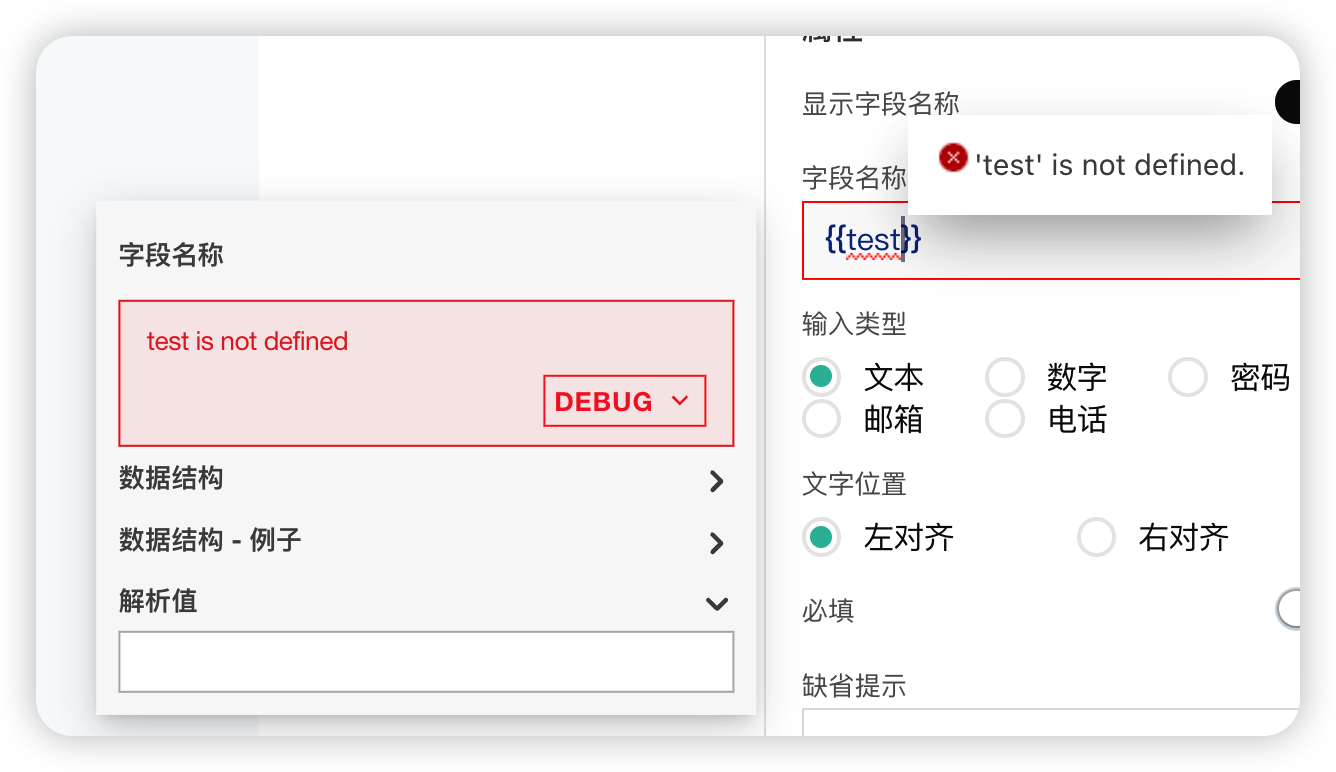
This error occurs when there is invalid JavaScript inside handlebars . In this case, the evaluated value of the field shows as undefined. Validate the number of braces in the code and consider rewriting the JS into multiline code. In the example below, test is not defined anywhere in the application.
# 3. Infinite Loop Errors
An infinite loop error occurs when a function or block of code repeats endlessly, causing the application or function to become unresponsive and even preventing users from accessing certain features of the application.
Cause:
The issue could be due to the page load function being stuck in a loop. This happens if you add code that uses the navigateTo function and executes on onPageLoad, which could make the page inaccessible or cause the application to get stuck in a loop and keep routing to the target page.
Solution:
To resolve this issue, you can use a debugger statement in Pageplug to stop the execution of the code and identify the source of the infinite loop. Here are the steps to do this:
Open the application in Pageplug and go to the page where the infinite loop occurs.
Locate the function or block of code causing the infinite loop.
Insert a debugger statement at the beginning of the function or block of code to pause its execution and allow you to inspect its state. See debugging statements and their usage for more details.
Use the browser’s debugger console to step through the code and determine the cause of the infinite loop.
Once the issue is identified, make the necessary changes to the code to fix it.
Save the changes and test the application again to ensure the infinite loop issue is resolved.