# Base Library Introduction
# 1. Base Library Introduction
# 1.1 What is the Base Library
The Base Library is the container responsible for loading the Mini-Program framework. Since the App and device capabilities (such as Bluetooth, NFC, etc.) are pre-packaged within the Mini-Program Base Library, developers can develop Mini-Programs using standard components and standard API interfaces.
Because Mini-Program capabilities require the SDK for support, the following applies:
- The Base Library, like the Host-App, has its own version number.
- The new capabilities added in each version of the Base Library need to run within a specific version.
- Certain capabilities of a higher version Base Library may not be compatible with a lower version SDK.
# 1.2 Composition of the Base Library
The Base Library is the foundation that provides the environment and APIs for the compiled Mini-Program code to run on the SDK. For example:
- The
.fxmlfiles in a Mini-Program can be compiled and rendered into actual DOM nodes within the environment provided by the Base Library. - Interfaces such as
PageandComponentused in the.jsfiles of a Mini-Program are also exposed globally by the Base Library. - The
ft.xxxAPIs used in Mini-Programs partly call native capabilities (Bluetooth, Wi-Fi, etc.), and the Base Library acts as the "bridge" between the Mini-Program and the native layer.
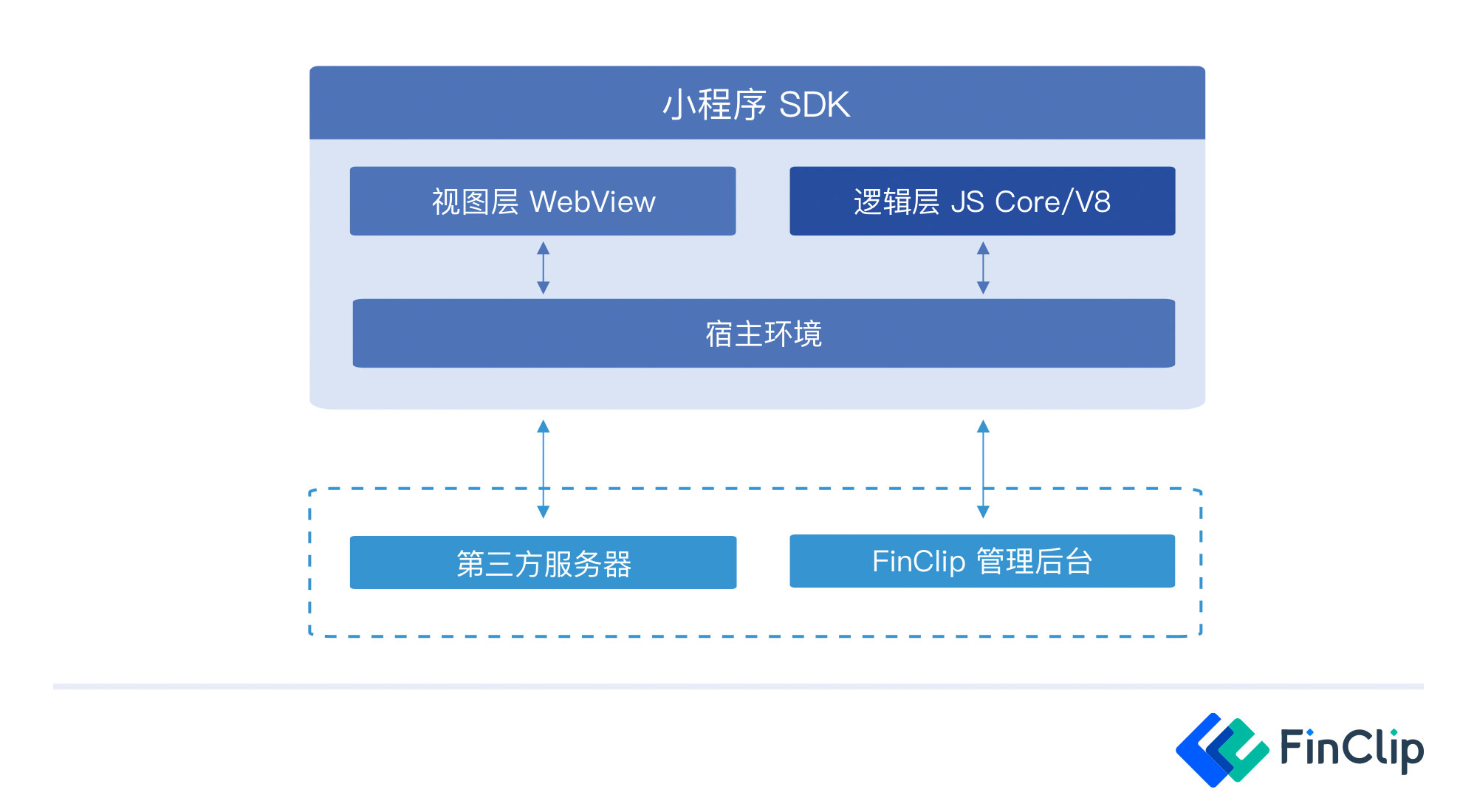
As shown in the figure below, the Base Library is primarily used to handle a series of framework logic such as data binding, the component system, event system, and communication system. It not only handles the rendering of the Virtual DOM but also includes built-in components and Logic Layer APIs. Additionally, the Base Library provides supplementary capabilities for Mini-Programs; the base code for custom components and plugins is also included in the Base Library.
# 2. Base Library Mechanism
# 2.1 Loading the Base Library
When developing web pages, we often reference third-party JavaScript libraries. Before using the APIs provided by these libraries, we need to include these third-party libraries in our business code in advance.
Similarly, when opening a Mini-Program within an App, we need to load the Base Library before starting the App, and then load the business code. Since the Rendering Layer and the Logic Layer of a Mini-Program are managed by two separate threads, when we generally refer to the Base Library, it typically includes the WebView Base Library (Rendering Layer) and the AppService Base Library (Logic Layer).
Before opening any Mini-Program implemented based on FinClip, the same Base Library needs to be injected. Therefore, we do not need to package the Base Library within the Mini-Program's code package. Instead, it is introduced by integrating the FinClip Mini-Program SDK into the App. Introducing the Base Library via the SDK has two additional benefits:
- It can reduce the size of the Mini-Program code package.
- Capabilities can be added to, or bugs fixed in, the Base Library independently, without modifying the Mini-Program's code.
# 2.2 Mini-Program Startup
When we open a Mini-Program, we see a loading page that includes the Mini-Program's icon and name.
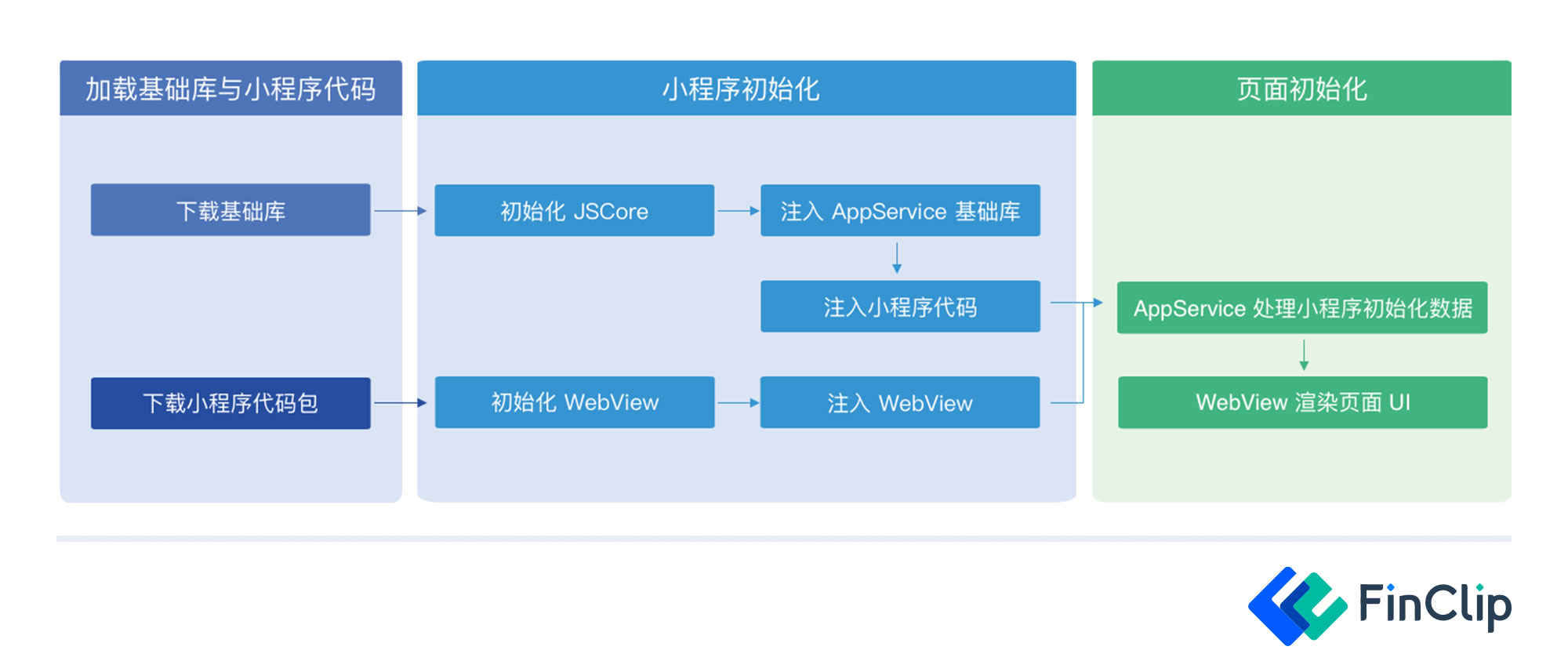
On this page, the download of the Mini-Program Base Library and the code package is completed first. After the Base Library and code package downloads are finished, the initialization of the JS Code and the WebView begins separately. Once the Base Library, Mini-Program code package, and WebView injection are complete, the relevant Mini-Program code initialization starts, and finally, the user can see the complete Mini-Program interface.